
The Beginner’s Guide to Web Accessibility
Welcome to the Beginner’s guide to accessibility!
You can use this guide to get familiar with accessibility fundamentals. It can also serve as a springboard for deeper investigation into areas of accessibility that are most relevant to you and your interests and needs.
If you’re new to accessibility, we recommend starting at the beginning and reading the sections in order. However, each section is written to stand on its own, so feel free to go straight to the sections that you’re most interested in.
Table of Contents
What is digital accessibility?
Digital accessibility refers to the practice of building digital content and applications that can be used by people with disabilities. This content can include websites, mobile apps, desktop apps, video games, electronic documents, emails, and more.
Digital accessibility involves many different disciplines and skills, including coding, design, user experience (UX), part coding.
Testing is particularly important. People with disabilities often use different types of Assistive Technology (AT) to navigate websites and applications, so a lot of accessibility work is simply about making sure your interface can be navigated by different kinds of assistive technology. We’ll take a deeper dive into AT in the next section, but common examples include screen readers, screen magnification programs, and keyboards.
Web accessibility means reaching more people
1.6 Billion+
The World Health Organization reports over 16% of the globe’s population has a disability. (Source)
98%
WebAIM reports that nearly all of the top one million web pages have critical accessibility issues. (Source)
$18 Trillion+
The global community of people with disabilities and their friends and family represents a vast market with immense spending power. (Source)
How people with disabilities use the web and mobile apps
The 5 major categories of disability are:
Visual
Example: blindness, low-vision, color blind.
Hearing
Example: deaf and hard of hearing.
Motor
Example: not having the use of certain limbs and paralysis.
Speech
Example: people who are not able to speak or who have a speech impediment.
Cognitive
Example: dyslexia, autism, ADHD.
In many (but not all) cases, people with disabilities use AT to navigate their computers, mobile devices, and their many applications. For example, people with visual disabilities may use a screen reader to navigate their computers and mobile devices. They may or may not use a braille keyboard. If they have low vision, they may use software and devices to increase the size of text and applications on the screen.
People with motor disabilities may not be able to use a mouse and instead navigate via keyboard or a device with keyboard-like inputs. They could use dictation software. People with cognitive disabilities may be able to use a mouse, keyboard, and monitor, but they may encounter barriers with certain user interfaces or design components.
That said, different disabilities pose different challenges to computer and mobile device usage, and there are practically infinite variations and combinations within these “categories.” The combinations and types of AT that people use often come in just as many variations.
Assistive technology
The best way to wrap your head around assistive technologies is to see how they’re used. Here are some great resources:
- How Persons With Disabilities Use the Web – Our Virtual Panel discussion International Persons with Disabilities Day is now available to watch on demand!
- An Introduction to Screen Readers – Steve Sawczyn demonstrates how he uses a screen reader to navigate the web via his PC and mobile device.
- One switch. One head. The world. Christopher Hills’s has produced a whole series of videos about how he uses technology as a person with Cerebral Palsy. Once you’ve finished this video check out Intersection: Where Technology and Disability Meet.
- Assistive Technology in Action – A great series of videos by the W3C about people with disabilities and the assistive technology they use.

Progress over perfection
You may be thinking, “How can I possibly create applications that work for every variety of disability and assistive technology?” Don’t worry! That’s not actually a realistic goal.
Most assistive technology is meant to translate alternative inputs into the kinds of input behaviors your application is designed to respond to; for example, turning eye movement into a mouse click or a specific keyboard shortcut into scrolling to the footer of a page.
The job of developers and designers is to create applications that present as few barriers as possible and that follow the coding conventions of the language the application is written in. (Occasionally, developers may be required to add some extra accessibility attributes to their code, but it’s often better to create applications that avoid such requirements.)
Overlays and widgets: Have you seen those floating icons on some sites that attempt to offer a separate experience for people with disabilities? They can’t guarantee compliance, cause negative user experiences, have very limited scope, and are often inaccurate. Read more in the Overlay Fact Sheet.
Accessibility compliance: Regulations and requirements
The most consistent motivation for digital accessibility projects is compliance with legal and regulatory requirements.
Please note: As a global company, we focus on a diverse array of digital accessibility standards, regulations, and requirements that will have varying degrees of applicability to your organization, depending on where and how you operate. The details below are meant to provide a basic overview of some of the most common and widely applicable examples. If your organization has specific compliance concerns, we recommend speaking directly to an accessibility expert or special counsel about what accessibility compliance means for your organization.
The European Accessibility Act (EAA)
The EAA is a directive of the European Union (EU) that aims to improve the accessibility of products and services for people with disabilities and the aging population in the EU.
The EAA is transposed into national law and regulations in all EU member states. Though one goal is to harmonize digital accessibility in Europe, each country has its own specific compliance requirements.
The EAA covers a wide range of products and services including:
- Personal devices like computers, smartphones, and e-readers (including operating systems and e-reader software)
- Public services such as ATMs and kiosks, ticketing machines, public transport services, banking services and e-commerce websites
To ensure that its accessibility goals are met, the EAA requires that member states base their accessibility standards on a harmonized European standard. Currently, EN 301 549 v3.1.2 is the standard of accessibility requirements for Information and Communications Technology (ICT) products and services in the European Union.
A standard in and of itself is not a law, and conformance to a standard is technically voluntary. A country makes conformance a legal requirement by incorporating it into its transposed national law. To understand how this all works together, think of it like this: By conforming to a standard (EN 301 549), you achieve compliance with a regulation (transposed national law), and by complying with the law, you are in alignment with the directive (EAA).
The Americans with Disabilities Act
The Americans with Disabilities Act (ADA) is a US civil rights law prohibiting discrimination against people with disabilities “in all aspects of public life, including jobs, schools, transportation, and all public and private places that are open to the general public.”
The Americans with Disabilities Act is made up of five different sections (or titles) for organizations in the United States to follow. While Title V contains a number of “miscellaneous” provisions, the preceding four titles have specific applications:
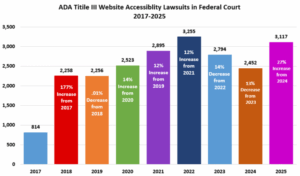
Courts have frequently interpreted Title I and Title III as applying to web-based content and services, and in 2024, Title II was updated to include specific requirements for digital accessibility.
In 2025, 3,117 Federal lawsuits were filed against inaccessible websites. According to Title III experts from the law firm Seyfarth Shaw:
WCAG
WCAG (Web Content Accessibility Guidelines), are technical guidelines from the World Wide Web Consortium (W3C) for creating accessible web-based content. WCAG serves as the basis of accessibility regulations across the globe. In 2023, the guidelines were updated and published as WCAG 2.2. Key things to know about WCAG 2.2 include:
- WCAG encompasses principles, guidelines, success criteria, and sufficient and advisory techniques.
- WCAG Success Criteria are broken down into different “levels of conformance”: A (basic conformance), AA (intermediate conformance), and AAA (advanced).
- The POUR acronym is shorthand for the principles that underlie WCAG: Perceivable, Operable, Understandable, Robust.
- The WCAG guidelines are ultimately about the user’s actual experience. If your user interface technically meets WCAG requirements but is inaccessible in practice, your UI is still inaccessible.
- The WCAG guidelines are designed to be technology-agnostic; they can apply to web-based technologies such as HTML, web apps, PDFs, audio, video, video players, and more. They can also apply to native mobile apps, software, kiosks, ATMs, emails, digital documents (text, presentations, spreadsheets) social media posts, and more.
EN 301 549
EN 301 549 is considered the technical benchmark for demonstrating conformity with the legal requirements of local transpositions of the EAA Directive.
It enables organizations to measure the accessibility of websites, electronic documents and non-web software such as native mobile apps, against documented success criteria for all people, including those with disabilities.
EN 301 549 is considered the technical benchmark for demonstrating conformity with the legal requirements of the EAA.
EN 301 549 incorporates WCAG 2.1 Level AA, but also goes beyond web content to cover:
- Native mobile applications
- Downloadable electronic documents
- Kiosks
- Software
- Electronic hardware
- and more…
EN 301 549 also follows the same POUR principles that underlie WCAG: Perceivable, Operable, Understandable, Robust.
Other regulations
- Section 508: Section 508 is a sub-section of the Rehabilitation Act of 1973 (US federal law) that prohibits discrimination on the basis of disability in federal programs or programs receiving federal aid or employment. In 1998, it was amended to require all federal electronic content to be accessible, and in 2018, it was refreshed to specifically reference WCAG 2.0 level A and AA.
- Accessibility for Ontarians with Disabilities Act (AODA): The Accessibility for Ontarians with Disabilities Act (AODA) is a law established by the government of Ontario in Canada to develop and enforce accessibility standards for government, businesses, nonprofits, private and public sector organizations.
- RGAA: The Référentiel Général d’Amélioration de l’Accessibilité (RGAA) is France’s official accessibility framework. RGAA predates the EAA, and is now being used to measure and demonstrate EAA conformance. It is a highly detailed standard with many requirements and some criteria that even go beyond EAA and WCAG 2.1 Level AA.
- DDA: Australia’s Disability Discrimination Act (DDA) has existed since 1992. The DDA makes it unlawful to discriminate against people with disabilities in critical areas such as employment, education, and housing. Recent updates from the Australian Human Rights Commission (AHRC) recommend that businesses align with WCAG 2.2 to improve web accessibility.
How do you know if you’re accessible?
Accessibility testing is the best way to assess your current status. Here are some basic tests you can conduct:
- Keyboard-only navigation: Try navigating through your website using the keyboard alone. Do not use your mouse. Do not use your trackpad.
Pro tip: A focus indicator is a box, highlight, or other visual indicator that appears on a page to show which element of the page is currently in focus. Learn more about accessible focus indicators on our blog.
- Automated accessibility testing: Download an accessibility testing browser plugin (we recommend the free Axe DevTools browser extension for Chrome, Firefox or Edge), and run the tool on your website. Does it return any accessibility issues? If so, your website is not accessible.
- Captions and transcripts: Do you have any kind of video content on your website? Is it captioned? If not, your content is not accessible.
Tests like these are beneficial, but they’re not comprehensive. The more people and teams you have working on different components and applications, the more likely it is that parts of your digital content are accessible and other parts are completely inaccessible.
The best way to fully and accurately assess whether your website and applications are accessible is to get a comprehensive accessibility audit conducted by accessibility experts.
