PDF (Portable Document Format) is one of the most widely used file formats worldwide. Whether used for academic research, corporate documentation, or digital publications, PDFs are universally recognized for their convenience and consistency.

Despite their widespread use, however, companies often overlook the critical importance of creating accessible PDF documents. It’s not uncommon to find websites claiming to be compliant while still having inaccessible PDF documents available for download on their site.

Digital documents are considered web content and must be accessible for any website to attain full WCAG compliance.

In this article, you’ll get a brief overview of what PDF accessibility is and why it’s so important. We’ll also provide you with an easy, eight-step checklist that you can use to help ensure your PDFs are fully accessible.

What is PDF accessibility?

At its core, PDF accessibility ensures that PDF documents are available to all users, including those with disabilities.

An accessible PDF provides features that help individuals with visual, motor, cognitive, and hearing impairments to perceive, navigate, and interact with the content without hindrance and in an equitable way.

These features include things such as semantic tags, alternative text for images, and logical reading order.

Accessibility standards like the Web Content Accessibility Guidelines (WCAG) and/or PDF/Universal Accessibility (PDF/UA) are often followed to make PDFs more inclusive and ensure the best user experience.

Why is PDF accessibility important?

Accessibility is ethically and morally essential, because everyone deserves equal access to information whether they have a disability or not. But there are also important business benefits. Here are just some of the ways PDF accessibility can benefit your company:

  • Reach: An estimated 16% of the world’s population has some form of disability. Accessible PDFs ensure that your content reaches a broader audience.
  • User experience: Accessible design results in better overall user experience. Features that aid those with disabilities can also benefit other users.
  • SEO and search: Accessible PDFs can be indexed better by search engines.
  • Reputation. People are more likely to view your organization favorably when you demonstrate a commitment to inclusivity.
  • Legal compliance: Many countries have laws and regulations—such as the Americans with Disabilities Act (ADA) in the US, the The European Accessibility Act (EAA), and more—which mandate accessibility standards. Non-compliance can lead to legal repercussions.

Your eight-step PDF accessibility checklist

Use this checklist as a guide to help ensure your PDFs are accessible.

  1.  My PDF has tags.
    • Tags should be semantic (headings, paragraphs, lists, tables, etc.).
    • The first heading should be an “H1” and only heading levels 1-6 should be used.
      • Heading levels should not be skipped (e.g. H2 followed by H4).
      • Heading levels can restart (e.g., H3 followed by H4, followed by H2).
  2.  Meaningful images in my PDF have appropriate alternate text.
    • Alternate text should be as clear and concise as possible.
    • Phrases such as “image of” or “graphic of” should be avoided since screen readers already announce properly tagged images as “graphic”.
    • Decorative images should be properly artifacted (i.e., marked appropriately so they don’t interfere with usability and accessibility).
  3.  My PDF has a logical reading order.
    • For most screen readers, the order in which your tags appear in the tags tree determines the logical reading order of the document. Properly ordering tags ensures a cohesive reading experience.
      • In the US, for example, content is typically read from top to bottom and from left to right.
    • The reflow order of your PDF should also be logical. This can be controlled by ensuring containers in your content pane are in the appropriate stacking order.
  4.  My PDF passes color contrast requirements.
    • WCAG 2.0 level AA requires a color contrast ratio of at least 4.5:1 for normal text and 3:1 for large text.
      • Large text is defined as 14 point bold, or 18 point.
    • Information should not be conveyed solely through color. Use text labels or symbols as well.
  5.  Tables in my PDF are tagged correctly.
    • Data tables must have table headers for columns and rows.
    • Column and row scope should be designated to associate header cells with data cells.
    • Complex tables should be avoided. If they exist, they should use cell ID’s for association.
    • Layout tables should not be tagged as data tables.
    • A table of contents should be tagged with appropriate structure and can include navigational links to the appropriate page.
  6.  Form fields and other interactive elements in my PDF are tagged correctly and are navigable by keyboard alone.
    • Ensure form fields have clear labels and descriptive tooltips.
    • Ensure the appropriate tab order has been set.
    • Ensure hyperlinks have meaningful link text. Avoid generic phrases like “click here.”
  7.  My PDF contains the necessary metadata.
    • Specify the document language to assist screen readers in pronunciation and navigation.
    • Include a meaningful title of the PDF and set the document title to show in the window options.
  8.  I have thoroughly tested my PDF with a combination of automated PDF checkers, manual testing, and assistive technology.
    • Automated PDF checkers can help identify issues such as missing alternate text, untagged content, and missing metadata such as a document title or language.
    • Manual testing of the PDF is always required to ensure accuracy, readability, and navigation.
    • Use assistive technology such as screen readers to listen to the document and identify inconsistencies.

Keep this checklist handy and refer to it anytime you create new PDFs. It’s a great way to start making your website and digital content fully accessible.

Want to learn more?

Deque offers a wide variety of services to fit your needs, including:

  • Online self-paced digital accessibility courses via Deque University. See our Document Accessibility curriculum.
  • Virtual Instructor-Led Training See our Document Accessibility .5 day to 2 full day modules.

Contact us today and see how Deque solutions take the guesswork out of digital accessibility!

Kyle Paciello

Kyle Paciello

Kyle Paciello is a Senior Documentation Accessibility Consultant at Deque. He’s been in the accessibility industry for over 14 years and specializes in helping clients make their digital documents accessible. He is an Accessible Document Specialist (ADS) certified by the IAAP and an Adobe Acrobat Certified PDF Expert with a deep knowledge of the requirements of an accessible document to meet compliance standards, including WCAG 2.1 and PDF/UA.

Today, we’re announcing the beta release of User Flow Analysis, a new feature of the axe DevTools Extension that lets you test entire customer journeys and create a single report with accessibility issues automatically deduplicated.

Try it now: New users can sign up for a 14-day free trial, expired trial users can reactivate, and customers can view the User Flow Analysis documentation.

Businesses today need to test user flows within their applications that represent a critical part of the customer journey, such as an e-commerce purchase process, new user sign up, and Single Page Application (SPA) flow, where specific parts of the page contain many different states.

In the past, testing these complex flows was challenging and time-consuming because many accessibility tools created separate reports for each unique page state.

Now with User Flow Analysis, you can easily and quickly test user flows, dynamic content, and website interactions. No setup is required—just perform the desired user interactions, and the axe DevTools Extension does the rest. The feature will watch your page for changes and kick off scans whenever unique states are detected. Once complete, axe DevTools Extension consolidates accessibility issues into a single, unified report, which lets you triage and prioritize accessibility issues for interaction-heavy widgets or multi-page flows through your application.

User Flow Analysis is designed to significantly reduce the time and effort required for accessibility testing. You can swiftly pinpoint and rectify issues, accelerating your development cycle without compromising accessibility standards.

Watch this quick demo video to see the User Flow Analysis feature in action.

Analyzing User Flows

As an axe DevTools Extension user with either a “Pro” plan or a free trial, you can automatically analyze each unique state you put your app into while “recording” a new User Flow Analysis.

Once the end of a user flow is reached, you can “stop” the analysis and generate a report with results from each one of the user flow’s states.

How to record a User Flow Analysis

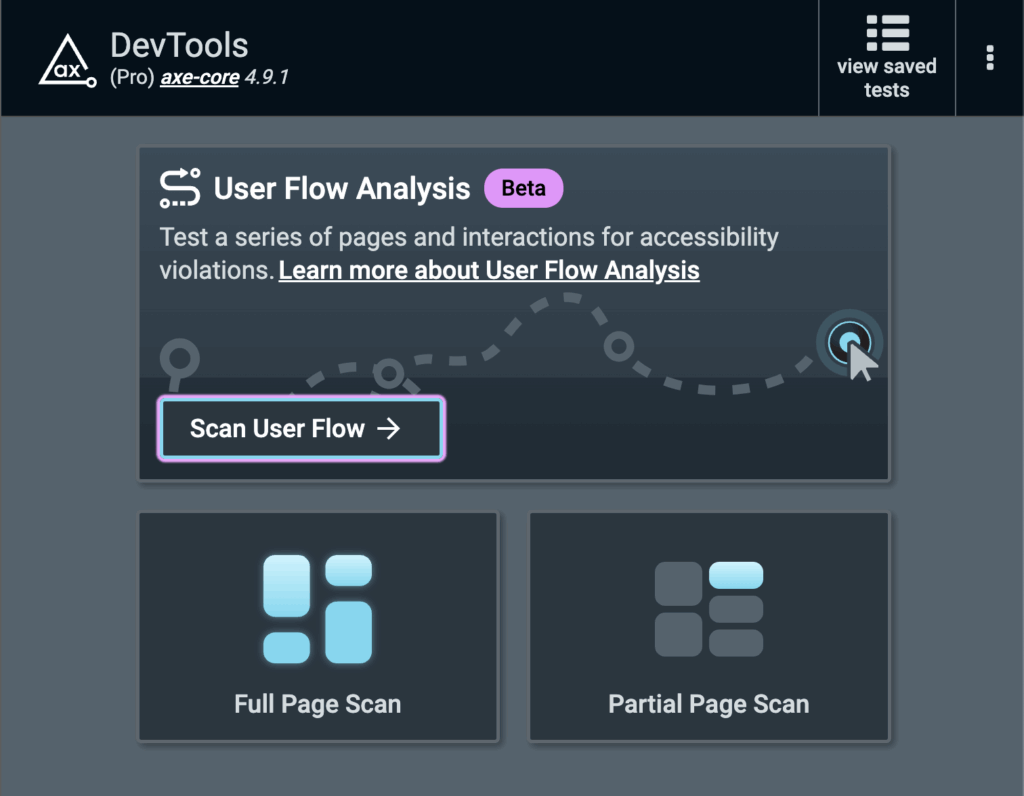
  1. From the axe DevTools Extension start screen, click “Scan User Flow” (up to 100 states can be scanned in the beta)
    Screenshot of the welcome splash screen in the axe DevTools Extension showing the new User Flow Analysis (Beta) feature, full page scan, and partial page scan.
  2. An initial, full page scan will automatically be kicked off
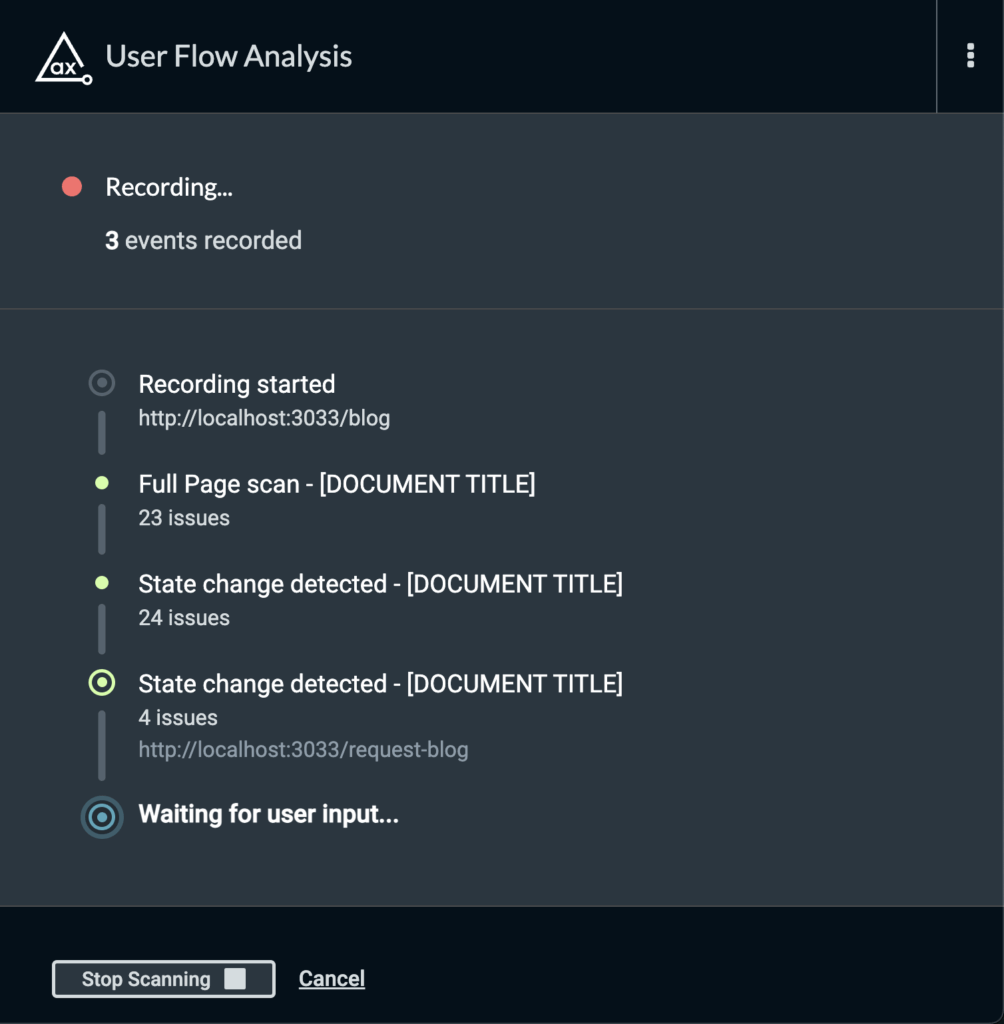
  3. Once the initial scan has completed, the User Flow Analysis will wait for your input. You can:
    • Change the state of the current page in any way (open modals, drop down menus, expand accordions, activate form controls, etc.)
    • Navigate to different pages
    • Submit forms

    Screenshot of the User Flow Analysis feature detecting page changes.

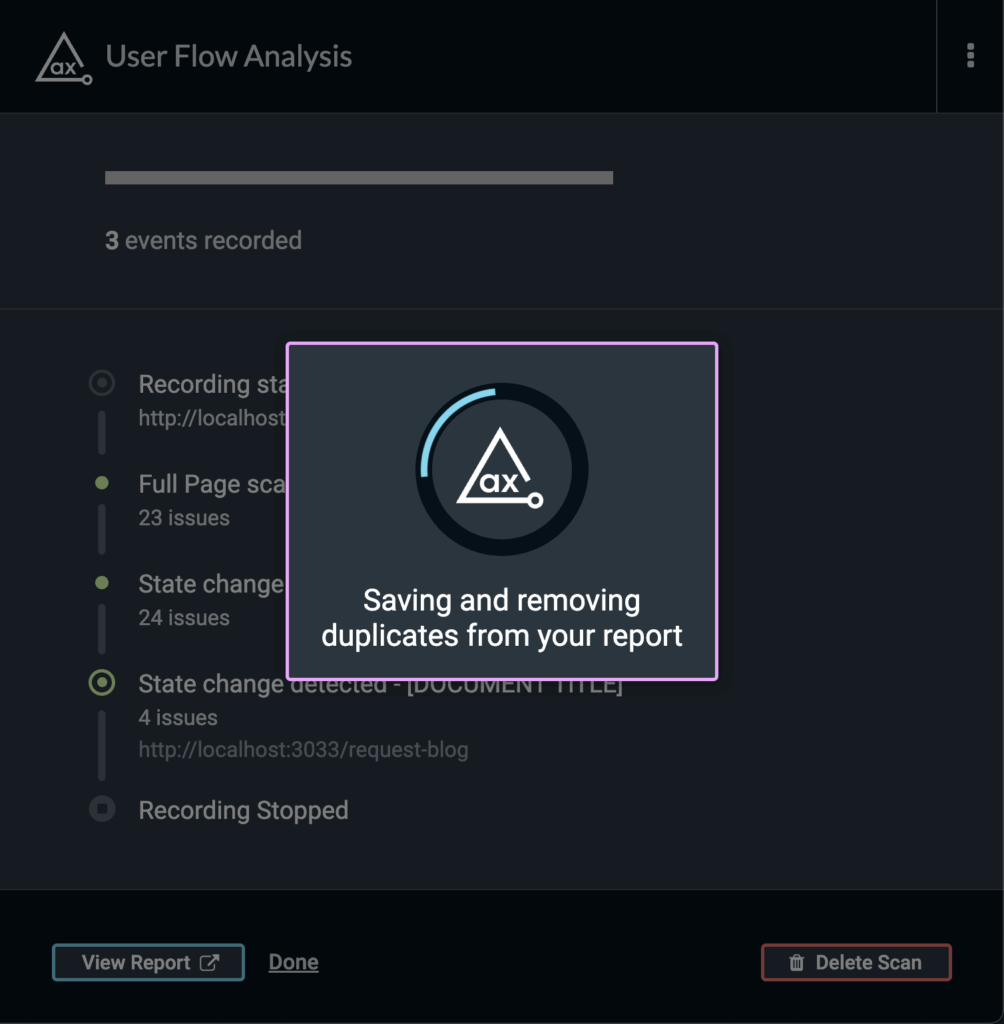
  4. Once your are done scanning your flow, click “Stop Scanning”
    • Your issues will then be deduplicated so you can focus only on the unique issues found during the user flow analysis

    Screenshot of the User Flow Analysis feature saving and removing duplicates from an accessibility report.

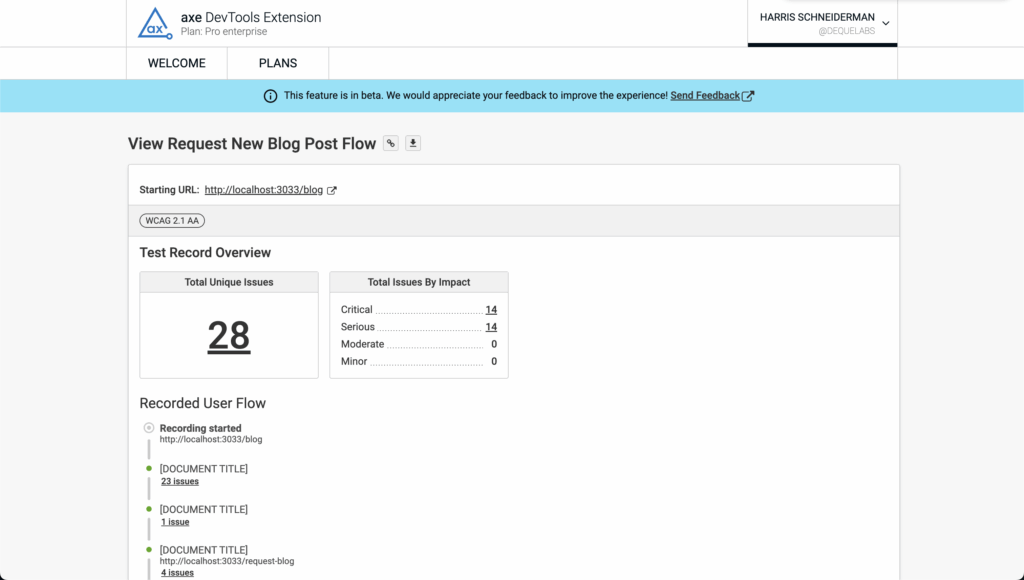
  5. Click “View Report” to review the unique issues found in each state of the recorded user flow
    Screenshot of the report showing unique issues found in each state of the recorded user flow.

Give us your feedback to impact the future of User Flow Analysis

We’re releasing this feature in beta so we can learn how to best incorporate this style of testing into existing axe DevTools Extension concepts, like Intelligent Guided Testing. So let us know what you think in our survey. Until we hear from our users and understand their needs, this feature will remain in beta. With all the research we’ve put into creating this feature, we already have enhancements planned to add to this powerful feature, so stay tuned for those!

Harris Schneiderman

Harris Schneiderman

Harris Schneiderman is a web developer with a strong passion for digital equality. He works at Deque Systems as the Senior Product Manager of axe DevTools building awesome web applications. He wrote Cauldron (Deque's pattern library), Dragon Drop, and is the lead developer on axe DevTools Pro. When he is not at work, he still finds time to contribute to numerous open source projects.

Is the use of Artificial Intelligence (AI) to solve accessibility barriers just a fairy tale? Will AI solve nothing? Will AI solve everything? Or will AI—refined by human intelligence and ethics—be the real path to systemic accessibility?

As an industry, we’ve been working to make digital accessibility a reality for over twenty years. Yet, we have not made enough progress. And if we keep trying to solve the digital accessibility problem the way we’ve been trying since 1999, we will never win.

But all is not lost!

Amid frightening dangers and amazing opportunities, there is a Goldilocks Zone for the ethical use of AI in digital accessibility.

Where we’ve been

Despite working on this goal of digital equality for over twenty years, most websites are not accessible to people who have visual, auditory, fine motor, speech, or cognitive disabilities. The WebAIM Million 2023 found that about 96.3% of home pages on the internet did not meet all the accessibility guidelines. This is obviously unacceptable, yet we aren’t likely to make significant progress unless we find new, more efficient ways to make digital accessibility a reality.

Where we are

The Generative AI (GenAI) movement is happening whether we like it or not. As an industry, we cannot afford to sit by and watch, waiting to see what happens. Just like accessibility should not be an afterthought in the design and development of software, we must make accessibility an integral part of GenAI. If we don’t, the speed at which digital barriers are created will be 10x faster than what we experience today—because that’s the velocity of software development we can expect.

Where we’re going

Generative AI (GenAI) is a subset of AI focused on creating new content. This new content can be text, speech, images, video, music, software code, and more. Gartner defines GenAI this way, “Generative AI can learn from existing artifacts to generate new, realistic artifacts (at scale) that reflect the characteristics of the training data but don’t repeat it.” GenAI is already creating useful and unique content, including making new art, discovering new drugs, and writing first drafts of software code.

This form of AI raises fascinating possibilities and questions about the boundaries of artificial and human-generated content. It also requires careful consideration of ethical implications and responsible use. Let’s look at GenAI a bit more closely!

Generative AI and accessibility

GenAI, specifically Large Language Models (LLMs), presents a unique opportunity to address accessibility challenges more dynamically and contextually than ever before. Here are just some of the ways GenAI can aid accessibility:

Generating accessible alt text

Historically, alternative text has been a one-size-fits-all solution, often falling short in delivering meaningful context. GenAI can revolutionize this by generating tailored alt text that considers the image’s context on the webpage. For instance, an LLM can be prompted to focus on an image’s subject, composition, and context to understand what should be required of alt text. While this is a controversial place to use AI, it has incredible potential.

Enhancing visual assistance

Another promising application is the Be My AI app by Be My Eyes, which is powered by GPT-4. This app provides users with detailed information about visual elements captured by their camera, enhancing independence for visually impaired individuals. By pointing their camera at an object, users can receive comprehensive descriptions, helping them navigate their environment with greater ease. We have evidence of people who are blind using Be My AI to assist with inaccessible digital interfaces.

Automated accessibility support

At Deque, we are leveraging GenAI to power axe Assistant, a pioneering accessibility chatbot trained on Deque University’s extensive accessibility knowledge. axe Assistant offers 24/7 support, providing immediate answers to accessibility queries. It can generate HTML for accessible components, such as form labels and alt text, and provide guidance on various accessibility practices.

How to prepare

Accessibility cannot be an AI spectator this year, nor ever again. We must embrace this new wave of computing.

When Amy Webb, the CEO of Future Today Institute, spoke at SXSW last year, she shared a valuable tool under Creative Commons called ADM (Act Decide Monitor) to help us prioritize our actions in this AI era.

We can apply Amy Webb’s ADM tool to AI in our accessibility industry to ensure that accessibility is an integral part of AI. It can help us discover ways that AI can help break down digital barriers faster than they are being built.

Act Decide Monitor
Risk without action! Near-term opportunity or risk Long-term opportunity or risk
  • Previously unseen immediate benefit to A11Y
  • Inflection point is imminent
  • New threat or risk is imminent
  • Could disrupt A11Y
  • Meaningful impact on A11Y
  • Near-term financial, operational, or regulatory risk or opportunity
  • Potential for financial, operational, or regulatory disruption
  • Knock-on effects could shape A11Y
  • Could pose novel A11Y risks

What AI can do for digital accessibility today

Narrow AI (where systems are designed to perform a single task) can “look” at rendered digital UI, as well as underlying code if it is available, and be taught how to accurately sift through mountains of data to identify accessibility issues, including:

  • “table cell” that visual acts as a column or row header but is not marked as table header
    • “table cell” could be built with non-semantic DIV and no ARIA
    • machine learning can accurately compare this inaccessible “table cell” DIV to other human-curated examples of inaccessible “table cells”
  • “button” that only works with a mouse, but does not work with a keyboard
    • “button” could be built with non-semantic DIV and no ARIA
    • machine learning can accurately compare this inaccessible “button” DIV to other human-curated examples of inaccessible “buttons”. Then AI can try to activate the “button” with keypress and accurately report a WCAG 2.x 2.1.1 Keyboard issue if the “button” cannot be activated.
  • “text” embedded in image that does not meet color contrast
    • machine learning can accurately identify text embedded in an image and select representative samples of the text color and the surrounding background color and report any failures of WCAG 2.x 1.4.3 Contrast (Minimum) when it is x% confident. If the accuracy confidence is lower than x%, the issue can be marked as needing human review.

These AI models can be programmed to ask for human review if there is not enough information to be x% confident, where x% can be adjusted to the level of accuracy you are comfortable with.

Testing at the speed of AI

This may seem like a fairy tale, and you may need more time to be ready to trust AI. But given the rate at which digital content (new web pages, new app screens) is being created, we are in a losing battle if we insist on only using manual accessibility testing done by human experts.

Even if we could keep up with the testing needs for new pages and screens, we also must consider how frequently developers and content contributors update content. The accuracy of a manual accessibility test of a page or screen by a qualified expert is only relevant until that page or screen is changed.

But all is not lost!

We can wisely use AI to augment our limited human resources. In fact, it is irresponsible not to use AI to assist in digital accessibility testing when the manual decision model for testing by a human is straightforward.

For example, you can write out the test process step-by-step and teach a person with a 6th-grade education to correctly identify what passes and what fails. And, a large amount of data is available to train and test this AI decision model. Meanwhile, we can focus our human brain power on auditing the accuracy of the results of AI accessibility testing on representative samples, and we can conduct manual accessibility testing where AI testing results are below your tolerance level for accuracy.

Dangers of AI (the Three Bears)

As we use AI in digital accessibility, we must also consider and mitigate the real and present dangers of this new technology. The recommended approach is multifaceted and relies on both technology and an ethical framework. Let’s begin by looking at three of the dangers of AI (aka, the three bears) and what we can do to confront them:

1. Unethical Use of AI:

To protect against the unethical use of AI, we must have AI governance in each of our organizations. This governance involves creating clear guidelines and policies that define acceptable uses of AI. We must have transparency in the AI we use, including understanding the mechanics behind AI decision-making, so that humans keep the ability to fact-check the accuracy of AI decisions. We must also make developers, content contributors, and all employees accountable for what AI data they use and the actions and decisions made with that data. We must promote a culture of responsibility.

For example, many vehicles today offer AI to help the driver do important things like stay in the proper lane and avoid a collision when changing lanes. Even though the driver is using AI to help them be safe, they are still responsible for keeping the car in the correct lane and not driving into other vehicles or objects.

2. Bias in AI:

Bias in AI is usually present due to historical biases in the AI training data. In other words, “biased data in” results in “biased data (and decisions) out.” Examples of bad bias in AI include job application screening models, bank loan approval models that illegally discriminate against protected classes, and facial recognition models trained only with data using light skin tones.

In reality, bias and discrimination can be hiding inside a human that you currently trust. The question is, will it be easier to identify bias in AI than in humans?  Could we actually use AI to model fair and ethical decisions that consistently support human rights?

We must vigilantly be on guard, looking for bias in our AI data and results. When we see bias, we must report it and not rest until it is corrected. We can start by carefully curating diverse and representative datasets, ensuring that the data is inclusive and does not repeat existing prejudices. Tools and techniques, such as fairness-aware algorithms and adversarial testing, can detect, measure, and zero out bias in AI models. Continuous monitoring and auditing are critical parts of this process, as biases can evolve over time. With a diverse workforce working in AI and collaboration between accessibility experts and data scientists, we can build AI systems that recognize and counteract harmful biases.

3. Over and under-reliance on AI:

Balancing how much we rely on AI is crucial to moving digital accessibility forward. We must avoid over-reliance that leads to unquestioning trust in AI decisions without critical evaluation. At the same time, under-reliance on AI is equivalent to blocking the opportunity to systematically solve digital accessibility issues faster than they’re created. To mitigate these dangers, we must step forward bravely and wisely into this era of AI and champion the concept of human-in-the-loop, where AI aids our human decision-making but does not replace it.

So, while AI has amazing potential, it is essential to proactively recognize and address these dangers. With ethical guidelines, monitoring, clear accountability, and continuous education, we can use AI for good. By providing insights into the AI decision-making processes, calculated confidence levels, and potential areas of uncertainty, we humans can stay in the driver’s seat, using AI to help us achieve our digital equality goal.

Human-centered AI

It’s not enough to discuss AI in theory. We must look at concrete examples of the ethical use of AI in accessibility today. The examples I’ve chosen are based on real-world use of AI at Deque, where we embrace what we call “Human-Centered AI”:

“Human-centered AI is an emerging discipline intent on creating AI systems that amplify and augment rather than displace human abilities.” —Noé Barrell, ML Engineer, Deque

Here, Noé describes our approach at Deque:

“Our approach to AI is human-centric because it provides the greatest accuracy in the results generated by the solution while delivering a very high ROI to users. We use AI in multiple ways such as object detection, OCR, and visual text and background rendering—including in different UI states. We combine it with heuristics while ultimately allowing humans to overrule our ML. This enables us to go beyond what is possible with pure heuristics, with zero false negatives, and give those responsible for delivering quality results the power to make decisions in complex situations.”

Axe DevTools Intelligent Guided Tests (IGTs) and AI

Axe DevTools Intelligent Guided Tests (IGT) uses Narrow AI.  But before axe DevTools uses AI, it uses the open-source axe-core automated rules to detect the basic WCAG issues that are possible to identify using traditional computing methods. Then, after reporting axe-core issues, axe DevTools uses Narrow AI to:

  • Reliably identify even more WCAG issues that used to require human vision and/or analysis but can now be done using AI including:
    • Complex text-color contrast issues, including text on top of an image or complex gradient.  In these complex cases, axe DevTools uses AI and the visual rendering of text and background to automatically calculate the range of color contrast values and accurately report any WCAG 2.x 1.4.3 Contrast (Minimum) issues.
    • Validate accessible name for most form fields. Axe DevTools uses Deque’s OCR model to generate the text that is visually associated with the form field with a very high level of accuracy and confidence. When confidence is not high, which is not often, axe DevTools does ask for human review.
    • Identify and accurately classify inaccessible UI objects. Deque’s object detection model can identify inaccessible forms, form fields, form field labels, data tables, data table headers, and interactive elements.
  • Ask you focused questions that need your brain and are worth your time, when AI isn’t sure if it is a WCAG issue or not:
    • At Deque, we always adhere to the axe-core manifesto of zero false positives. We’ve trained our AI models to be humble and ask for YOUR human review when it is not certain.

How does this help you?  You get the basic axe-core automated issue results you already know and trust. Plus, you get even more accurate automated checks made possible using machine learning and computer vision. Your accessibility testing can be done faster. Most importantly, you get to focus your brainpower on items that AI cannot learn (or has not learned yet).

Conclusion: The Goldilocks Zone

Inspired by the Goldilocks Zone metaphor from astronomy, we each have the responsibility to choose how we will use AI to make digital accessibility a reality. If we are too optimistic and think AI can do everything, and we do not do our due diligence to have reasonable human audit processes in the loop, we are destined to fail. If we are too pessimistic and assert that because AI cannot do everything perfectly, we cannot use it at all, we are also destined to fail—because we do not have enough human energy or experts to keep up with the volume of work to make and keep our digital spaces accessible.

The pragmatic path forward is recognizing that AI cannot do everything. Still, with ethical human guidance, AI can and will break down accessibility barriers that have resisted our human efforts for the past three decades.

In this rapidly evolving digital era, the intersection of AI and accessibility is crucial. AI presents us with remarkable potential and unavoidable challenges. We are truly on the brink of a transformative age where AI, driven by ethics and human intelligence, can radically reshape our digital landscape to be inclusive, fair, and accessible. As an industry, we must be brave and innovative.

Are you ready to leap forward and make digital equality a reality? AI + U = A11Y!

Glenda Sims

Glenda Sims

Glenda Sims is the Chief Information Accessibility Officer at Deque, where she shares her expertise and passion for the open web with government organizations, educational institutions, and companies ranging in size from small businesses to large enterprise organizations. Glenda is an advisor and co-founder of AIR-University (Accessibility Internet Rally) and AccessU. She serves as an accessibility consultant, judge, and trainer for Knowbility, an organization whose mission is to support the independence of people with disabilities by promoting the availability of barrier-free IT. In 2010 Glenda co-authored the book InterACT with Web Standards: A holistic approach to Web Design.

While web accessibility is a global issue, every region has unique challenges and opportunities.

According to the World Health Organization, approximately 16% of the world’s population lives with disabilities, and this number is expected to rise with an aging population. Recent numbers from the United Nations confirm that the Asia and the Pacific region (APAC) is home to 60 percent of the world’s population—some 4.3 billion people—and includes the world’s most populous countries, China and India.

Because of its size, web accessibility is a particularly pressing concern for APAC. Fortunately, significant progress is already being made. As organizations increasingly realize that there is a business case for increasing web accessibility alongside ethical reasons, we can hopefully look forward to the acceleration of this progress.

Let’s begin by looking at some laws and regulations already in place.

Accessibility laws and regulations in APAC

Many APAC countries have recognized the importance of web accessibility and have implemented laws and regulations to ensure compliance. For example, Australia has the Disability Discrimination Act, which mandates that websites and digital content be accessible to people with disabilities. In Japan, the newly revised Act on the Elimination of Discrimination against Persons with Disabilities requires public and private organizations to provide reasonable accommodation to individuals with disabilities, including making their websites accessible.

Web Accessibility Laws of South Africa

  1. Promotion of Equality and Prevention of Unfair Discrimination Act, 2000
  2. Government Communication and Information System (GCIS) – Website Accessibility
  3. Africa Law: Ensuring Digital Accessibility for Students with Disabilities
  4. 3Play Media – South African Accessibility Laws

Web Accessibility Laws of Saudi Arabia

  1. Personal Data Protection Law (PDPL)
  2. Legislative Decree No. 106

Web Accessibility Laws of New Zealand

  1. New Zealand Web Accessibility Standard
  2. Human Rights Act 1993

Web Accessibility Laws of India

  1. Rights to Persons with Disabilities Act, 2016
  2. Bureau Of Indian Standards IS-17802_1_2021 & IS-17802_2_2021

Web Accessibility Laws of Australia

  1. Disability Discrimination Act 1992
  2. Web Content Accessibility Guidelines (WCAG) 2.1

APAC is a diverse region with a wide array of cultures, languages, and accessibility needs. From elderly users with declining vision to young individuals with cognitive impairments, there is a need to cater to a broad spectrum of users.

This diversity is a key reason business organizations are increasingly focusing on web accessibility. Let’s examine the business use case.

How web accessibility implementation drives business benefits

Web accessibility goes beyond legal compliance. It also significantly impacts user experience and engagement. By creating inclusive digital experiences, businesses in APAC can build trust with their customers, enhance brand reputation, and drive customer loyalty.

Building trust and credibility
When users encounter an inaccessible website or app, they can feel frustrated and excluded. By prioritizing accessibility, businesses can demonstrate their commitment to inclusivity and make a positive impression on users. This can help build customer trust and credibility, increasing loyalty and repeat business.

Enhancing brand reputation
In today’s competitive landscape, brand reputation is more important than ever. Businesses prioritizing accessibility send a powerful message about their values and commitment to diversity. This can enhance the brand’s reputation and set it apart from competitors who overlook accessibility considerations.

Driving customer loyalty
By providing a seamless and accessible user experience, businesses can foster customer loyalty and build long-term relationships with their user base. Users who feel valued and respected are likelier to return to a website or app, recommend it to others, and become loyal customers.

Market expansion
Accessible products are designed to be usable by a broader range of individuals, including those with disabilities. By ensuring software is accessible, organizations can tap into new market segments, connecting with individuals with disabilities who require accessible technology solutions. This expands the organization’s potential customer base and fosters a more inclusive and diverse user community.

There are additional business benefits beyond the customer-facing items we’ve discussed above.

Competitive advantage
As accessibility becomes more prominent in procurement processes, organizations prioritizing accessibility gain a competitive edge. Demonstrating that their products meet or exceed accessibility standards can set them apart from competitors who may not have invested in accessibility measures. This can be particularly advantageous in industries where inclusivity and compliance are highly valued, such as government contracting or sectors with strong corporate social responsibility (CSR) initiatives.

Alignment with RFP requirements
Many organizations, particularly in government, education, and healthcare sectors, include accessibility requirements in their Requests for Proposals (RFPs). These requirements mandate that software solutions must meet specific accessibility standards to be considered for procurement. By complying with these standards, organizations increase their eligibility for contract bidding and can access a broader market of potential vendors.

Mobile web accessibility in APAC

Mobile web accessibility is particularly crucial in APAC, given soaring mobile adoption rates in recent years.

“In 2022, the smartphone adoption rate across the Asia-Pacific region reached 76 percent, marking an increase from 64 percent in 2019. By 2030, smartphone adoption in APAC was projected to reach over 90 percent.”
source: Statista

At Deque, we recognize that “the explosive growth of mobile apps has led to a proliferation of new ways to create them in complex native and cross-platform environments, which adds multiple accessibility testing hurdles into the mobile landscape.” Among the central challenges is that while the Web Content Accessibility Guidelines (WCAG) are the world’s gold standard, those guidelines were established for the HTML web and not for native mobile. Fortunately, with tools such as Deque’s axe DevTools Mobile, businesses can efficiently reproduce, research, and remediate accessibility issues.

The future of web accessibility in APAC

We’re heartened to see momentum around web accessibility in APAC continuing to accelerate. The increased focus on business opportunities is driving this momentum.

When the Economic and Social Commission for Asia and the Pacific (ESCAP) issued their most recent Disability at a Glance report, for example, their chosen focus topic was “Disability Inclusion in Business.”

Among the significant developments the report highlights is the adoption of the Jakarta Declaration on the Asian and Pacific Decade of Persons with Disabilities, 2023–2032 by the United Nations Economic and Social Council:

“The Jakarta Declaration on the Asian and the Pacific Decade of Persons with Disabilities, 2023–2032, adopted by the United Nations Economic and Social Commission for Asia and the Pacific (ESCAP) in October 2022, is the latest commitment of Governments in the region. The Jakarta Declaration recognizes the potential of disability-inclusive business and calls on the engagement of the private sector as a key change agent.”

Conclusion

We’ll conclude with two influential observations from the Disability at a Glance 2023 Catalysts of Change: Disability Inclusion in Business in Asia and the Pacific report. The first surfaces the financial opportunities businesses risk missing out on by failing to include persons with disabilities:

“A study of 10 low- and middle-income developing countries in Asia and Africa conducted by the International Labour Organization (ILO), found that the exclusion of persons with disabilities from the labour force can lead to an economic loss ranging between 3 and 7 percent of the gross domestic product (GDP).”

The second item spotlights something the report refers to as a “silver economy”:

“In Asia and the Pacific, rapid population ageing is resulting in increased disability prevalence as functions decline. Among persons aged 60 years and above, 46 percent experience some form of disability. The “silver economy” alone is estimated to be worth $4.56 trillion in Asia.”

Web accessibility matters in APAC more than ever before. By prioritizing accessibility, businesses in the region can reach a diverse audience, comply with legal requirements, and enhance the overall user experience. In doing so, organizations can ensure they’re on the right side of history morally and ethically while simultaneously ensuring robust business health as well.

The opportunity is real. The time is now.

Abin Choudhury

Abin Choudhury

Abin is the Vice President Sales, APAC at Deque Systems. He has completed his CFO program from IIM, Calcutta, and his MBA (Marketing) from MIT, Pune. Abin has over 18+ years of experience in Consultative Sales, Marketing, Business Development, and IT Operations, being a startup founder with solid entrepreneurial expertise to foster revenue growth, scale teams, and nurture organizational culture. Abin believes in a journey of continuous learning, intellectual curiosity, strong customer empathy, consultative selling, and ongoing professional relationships. He defines turnaround strategies to drive significant revenue growth, building a strong sales team with corporate vision and operational integrity. His expertise lies in leading sales development efforts, servant leadership, active strategies, and improvement initiatives to achieve defined goals and setting up the go-to-market plan. Through his experience, he is adept at overseeing various operational and fiscal responsibilities to ensure optimal business performance and significant revenue enhancements. In addition, he enjoys traveling (Driving by road for hours), writing blogs, exploring spiritual concepts, thinking of new ideas, learning about various entrepreneurs’ success stories, and constantly thinking about the subsequent ideas to solve more real-world problems.

Tags:  accessibility laws APAC

I have been watching Google I/O online since 2015. It’s their flagship tech conference for anyone in the tech industry, including accessibility professionals. This year, I realized a childhood dream by attending I/O 2024 in person. The opportunity to attend as an ambassador for Deque—a company committed to digital accessibility—made it all the more special.

Google has been a trailblazer in accessibility since the launch of TalkBack in 2009. With this year’s conference coinciding with Global Accessibility Awareness Day (GAAD), my expectations were high.

I was not disappointed. From improvements in TalkBack with Gemini Nano to Project Gameface and updates to Google Maps and Lookout, Google’s dedication to accessibility was evident throughout the main event.

There was one topic in particular that I was especially interested in: code generation.

Accessible code generation with Gemini

As an AI evangelist and early adopter of large language models (LLMs) such as ChatGPT, GitHub Copilot, and Gemini, it is clear to me that we have a unique opportunity to make accessibility accessible to developers. Code generation with powerful models like Gemini Pro 1.5 can significantly transform our ability to develop accessible applications from the get-go.

At I/O, Google announced the integration of Gemini into Android Studio, which will be available later this year. By leveraging Gemini’s multimodality, one can now simply upload an image of an app screen mockup and ask Gemini to automatically generate the code for that application.

It immediately got me thinking: Can Gemini generate accessible code for this screen?

At the Android demo booth, I tested this out. I prompted Gemini to ensure it generates accessible code, and I was quite surprised by how good the results were. I also had the privilege of discussing this topic with several Googlers who are passionate about accessibility. I learned about their experiences with Android accessibility and how simple errors, like missing content descriptions (contentDescription), can often be traced back to sample code.

My favorite announcements from Google I/O

The Gemini integration was just one of several significant announcements. Here are some of my other favorites:

Gemini Nano integration with TalkBack

Google announced an exciting integration of Gemini Nano with TalkBack for Android, a key development for blind or low-vision TalkBack users who may encounter as many as 90 unlabeled images daily. With Gemini Nano’s multimodal capabilities and ability to run completely locally on your device, TalkBack can now provide more detailed and clearer descriptions of images. The enhanced TalkBack update will begin rolling out later this year.

Project Gameface for Android

This one was particularly exciting for me as an avid gamer. Project Gameface, an open-source project, allows gamers to control their mouse cursor using head movements and facial gestures. Google has partnered with social enterprises like Incluzza to explore broader applications of Project Gameface and build integrations with Android to enable new ways to interact with applications in education and work settings.

New features in Lookout

Google introduced Find Mode in Lookout, currently in beta, which allows users to use their phone’s camera to get more information about their surroundings. Find Mode helps locate specific objects and provides AI-generated descriptions, aiding users in navigating their environment more effectively.

Accessibility enhancements in Google Maps

Google Maps now offers more detailed walking instructions for blind and low-vision users, with audio prompts for navigation. Additionally, Maps includes accessibility information for over 50 million places, marked with an wheelchair icon detailing parking, seating, and accessible restrooms. New support for Auracast in Maps helps venues broadcast assistive audio to visitors with Auracast-enabled devices.

Several other announcements were made, such as a Text-free mode for Look to Speak, Project Astra, Circle to Search, and new ways to interact with NotebookLM that can enable users across the board to enjoy the AI innovations on the horizon.

The future of GenAI-enabled accessibility is bright

Companies like Google are not only leading the charge but also enabling the future of accessible technology. With advancements in generative AI, there is a tremendous opportunity for accessibility to be integrated by default. Google’s innovative models like Gemini 1.5 Pro can ensure that accessibility is a built-in feature of all new code.

Like we love to say at Deque, “Friends don’t let friends ship inaccessible code!” Together, we can ensure that the future of digital innovation is inclusive and accessible to all.

Divya Rustagi

Divya Rustagi

Divya is an Associate Solutions Engineer at Deque. She helps organizations shift left by integrating accessibility into their software development lifecycle using Deque's axe product suite. With a degree in Computational Data Science from Penn State and a background in web and mobile technologies, she is passionate about making technology inclusive and equitable. Driven by a strong interest in language models and state-of-the-art AI, she is dedicated to using technology to eliminate barriers and make it accessible for all.

Far out in the uncharted backwaters of the unfashionable end of the Western Spiral arm of the Galaxy lies an utterly insignificant little blue-green planet (that’s us). And this planet has a problem: most people who’ve tried to use the internet struggle to do so.

The folks at the W3C are trying to do something about this.

For Global Accessibility Awareness Day (GAAD) this year, the W3C is publishing its latest draft of WCAG 3.0, adding 174 new outcomes. And our message to you echoes one you may recall from The Hitchhiker’s Guide to the Galaxy (which I’ve just borrowed from above): Don’t panic.

Key differences

The most notable difference between the coming draft and its predecessor are those 174 new outcomes (WCAG 3.0’s new name for success criteria). These outcomes are expected to make up the main section for WCAG 3.0. For comparison, WCAG 2.1 has 78 success criteria, or 50 if you don’t count Level AAA.

That’s a lot of new outcomes, but before you start to feel too overwhelmed, here are a few important things to remember:

  1. These are very early draft versions.
  2. Many outcomes will likely be dropped.
  3. The conformance level has yet to be decided.

Goals for the new draft

This draft is effectively the W3C putting all its cards on the table and asking: “What did we miss?” There are outcomes that the W3C knows are important for people with disabilities but for which they don’t have enough research. There are also likely other needs that people with disabilities have that aren’t known to the W3C. So this draft asks for that research and for people to report those gaps.

At this stage, the outcomes are ideas of what a particular topic may include—without detailed definitions, lists of exceptions, and examples. Whether any given outcome ultimately makes it into the definitive version of WCAG 3.0 depends on many factors.

From WCAG 2, we know that outcomes that 1) are difficult to test consistently, 2) have too many edge cases, or 3) lack proper research tend to get weeded out in the writing process. Or, they get moved up to a higher level of conformance (Level AAA in WCAG 2, Gold in WCAG 3.0), which organizations are encouraged but not required to meet.

What’s in the new outcomes?

While a good number of these outcomes will be familiar to anyone working in digital accessibility, there are quite a few new ideas in the report to be aware of. Highlights include:

Non-verbal cues: Media alternatives explain nonverbal cues, such as tone of voice, facial expressions, body gestures, or music with emotional meaning.

The purpose of this outcome is to aid people with difficulty understanding non-verbal cues to understand the purpose of images, video, and other media. This benefits people, such as some on the autism spectrum, who have difficulty understanding social cues.

Single idea: Each segment of text [such as sentence, paragraph, bullet] presents one concept.

When a longer text covering multiple topics is broken up into smaller paragraphs, with each covering a different topic, comprehension of the text is improved. This is useful for everyone, but especially for people with short-term memory challenges. Properly segmented texts makes it easier to go back and reread the topic of interest without getting lost in other topics.

Disability information privacy: Disability information is not disclosed to or used by third parties and algorithms (including AI).

A person’s disability needs, preferences, and use of assistive technologies are extremely personal. It is up there with other medical information. This information can, and often is used to deny people education, housing, insurance, employment, and more. Many sites these days do use widgets, which prevent access of information to people unless they are willing to disclose their disability needs to the widget provider. This outcome aims to keep people safe from such practices.

When can we use this

There are a lot of great ideas included in the latest WCAG 3.0 draft. But there is an awful lot still to be worked out. W3C calls this the “exploratory” stage of WCAG 3.0 outcomes. As the work progresses, outcomes will be moved from exploratory, to developing, refining, and lastly, to mature.

We don’t advise using these new outcomes as requirements for a product just yet. However, if you’re ready for a new challenge they are worth considering as additional best practices. WCAG 2.0, 2.1, and 2.2 should remain the foundation of any web accessibility program for the foreseeable future.

The W3C currently does not have a timeline for when WCAG 3.0 will be released as a “recommendation” (the point at which the document is done). The current roadmap goes up to 2026, but even in the most optimistic scenario, WCAG 3.0 likely won’t be finished before 2028. Considering the progress so far—and comparing it to how much time it took for WCAG 2.0 to finish from the point where it had its first list of success criteria (7 years)—we may not see WCAG 3.0 before 2030.

Giving feedback

These working drafts are published by the W3C in order to show progress and gather public feedback. In the editor’s note, the following three questions are explicitly called out:

  1. What outcomes are needed to make web content accessible, and which are missing from this list?
  2. What research supports or refutes these outcomes?
  3. Are outcomes listed here out of the scope of accessibility guidance, and why?

If you are interested in providing feedback, you can do so by opening a GitHub issue or by sending an email to public-agwg-comments@w3.org (comment archive).

Wilco Fiers

Wilco Fiers

Wilco is the principal product owner of axe-core and axe DevTools at Deque Systems. He is based in the Netherlands and has worked in accessibility for over 18 years. During this time, Wilco has worked in auditing, consulting, standards authoring, and accessibility tool development. Notable work includes being project manager of WCAG 3, founding chair of ACT Rules Community, lead developer of axe Linter and WCAG-EM report tool, and industry advisor to the EU's Web Accessibility Directive Expert Group.

The European Accessibility Act (EAA) is a crucial piece of legislation becoming national law in all 27 EU member states, taking effect on June 28th, 2025. This act will significantly impact industries operating in or selling within the EU, requiring them to ensure accessibility in their products and services, including e-commerce and banking. The EAA aims to coordinate accessibility standards across member states, simplify cross-border trade, and increase accessibility to a wider range of services.

What is the EAA?

The European Accessibility Act (EAA) is a directive (2019/882) of the European Union aimed at improving the accessibility of products and services for people with disabilities and the elderly across the EU. The EAA reflects the commitment to accessibility made by the EU and all Member States as part of ratifying the United Nations Convention on the Rights of Persons with Disabilities.

The EAA was officially adopted in April 2019 to remove barriers created by the disconnected rules and standards across EU member states, facilitating easier cross-border trade and ensuring accessible products and services are more affordable and widely available. It provides a framework with minimum requirements that each member state must uphold.

The directive’s implementation is specific to each country and, as a result, each country’s accessibility regulation varies to some degree. 

What’s covered under the EAA?

The influence of the European Accessibility Act affects a broad assortment of products and services. Its provisions are foundational to creating a more inclusive and balanced marketplace.

The EAA covers a wide range of products and services, including personal devices like computers and smartphones, public services such as ATMs and kiosks, ticketing machines, public transport services, banking services and e-commerce websites. The directive also applies to enterprises outside of the EU providing services or selling products to consumers within the EU, such as a US-owned retail website aimed at consumers in the EU or within a specific country of the EU, or smartphone or eReader devices sold in the EU by a US-based company. 

When does the EAA go into effect?

The EAA requires EU member states to adopt and publish all necessary laws, regulations, and administrative provisions to comply with the directive by June 28, 2025. 

By June 28, 2025, the requirements of the EAA must be fully implemented and newly marketed products and services within the scope of the EAA are to be launched as conformant.

Note: not all EU member countries have complied with this directive (e.g. Ireland published their regulation in January 2024 and Belgium has only partially transposed the EAA). The EU has sanctioned all countries that are not compliant with the directive.

How do I ensure EAA compliance?

Navigating the EAA can seem daunting, however, understanding the following ways to ensure EAA compliance will empower organizations to foster an accessible environment, ultimately making the EU a more inclusive and equitable society.

Regular compliance checks

National authorities will be responsible for carrying out regular compliance checks, which will include reviewing complaints and following up on any reported non-compliance. Businesses will be required to take corrective action if their products or services are found to be non-compliant, which could involve making changes to their products or services or implementing new training programs.

Accessibility compliance and evidence for service providers

Service providers will need to explain in the terms and conditions, or a similar official document, how a service meets the digital accessibility requirements. Where applicable, the information must contain:

  • A broad overview of what the service is, in a manner that everyone can understand, regardless of their accessibility needs
  • Detailed guidelines and explanations on using the service
  • An explanation of how the service aligns with the digital accessibility standards listed in Annex I of the European Accessibility Act

Service providers will also need to share evidence that the way the service is delivered and monitored complies with the above and all other applicable requirements of the EAA. This information must be made available to the public in an accessible format.

What happens if my product or service is not accessible?

Regulatory implications for non-compliance with the EAA include potential fines and other penalties, although the specific nature and amount of these fines are left to the discretion of individual member states. The directive does mandate that penalties must be “effective, proportionate, and dissuasive” and consumers can report infringements to a court or the enforcing body in their country.

While the penalties for non-compliance with the EAA are not specified in detail, the act emphasizes establishing a regulatory framework that encourages companies to prioritize accessibility. This framework promotes accessible products and services as the norm to avoid legal and financial consequences.

Different EU member states have different rules for accessibility fines and penalties. Some member states have defined monetary fines for companies and individuals, and others have even set guidelines for imprisonment for certain corporate positions. However, some member states have not yet defined any fines or penalties.

Take action on EAA today

The European Accessibility Act (EAA) is a ground-breaking piece of legislation across the European Union geared towards enhancing the accessibility of services and products for elderly individuals and people with disabilities to ensure a more inclusive market.

If you’re an EU-based organization or do business within the EU, Deque can help ensure you meet EAA requirements:

Derrin Evers

Derrin Evers

Derrin Evers is a Senior Solution Consultant at Deque Europe. Derrin’s background and experience spans from design to development, small agencies to large enterprises, and public sector to private business from North America to Europe. With the professional goal to promote positive change within software development through digital accessibility, Derrin helps Deque customers discover, plan, and realize their potential through strategic and technical support across the software development lifecycle.

We’re making some key advancements today to further extend our leadership position in automated accessibility testing.

Firstly, we’re making a minor naming change to axe DevTools HTML in favor of axe DevTools for Web. Second and much more importantly, we’re including an incredible new feature with axe DevTools for Web – we call it axe Developer Hub.

Let’s look at these changes in more detail:

You’re only as accessible as your last release

Accessibility is a moving target. Your digital products can be accessible today and inaccessible tomorrow. Software development teams are always one bad code change away from a poor user experience for people with disabilities. Accessibility program managers will often be haunted by the mantra “You’re only as accessible as your last release.”

What can we do to stay on top and deliver digital inclusion? Accessibility automation can help but you have to figure out how to get that into your automated test suite.

Meet axe Developer Hub

Axe Developer Hub makes it easy to catch accessibility bugs before your customers do. Here’s how:

  1. Change a few lines of code in your end-to-end testing configuration
  2. Run your end-to-end tests as you would normally
  3. Review your accessibility-focused results in axe Developer Hub
  4. Fix the accessibility issues that automation finds
  5. Using Git? Measure changes in accessibility at a per commit and branch level
  6. Using GitHub? Get your accessibility results directly in your PR using a GitHub Action, and optionally block a PR based on low-quality

You’ll notice that nowhere in the above steps do you need to edit your end-to-end tests themselves–it’s just a configuration change. Once your configuration is done, axe Developer Hub is smart enough to add accessibility tests to each end-to-end test.

If you’re into metrics, axe Developer Hub gives you an unprecedented view into changes in your accessibility risk profile. From an automatic tests perspective, you’ll finally be able to see if a code change made your product better or worse for your customers with disabilities. Imagine being able to easily view your product releases and the automatically discovered accessibility issues associated with each. Pretty cool.

Focus equals action

Getting metrics is half the story. Metrics without action is like a car without wheels–it can’t take you anywhere. Axe Developer Hub does an amazing job of keeping developers focused and increasing their productivity.

First, axe Developer Hub results are “deduplicated.” In other words, instead of reporting ten issues for the same failure on the same HTML, we report 1 and let you know about duplicates.

Screenshot of axe Developer Hub report. The report shows an issue which has 2 duplicates. There is a yellow warning at the bottom of the issue report which makes it clear that duplicates are recorded.

Next, we differentiate between new and old issues. Let’s say you’re working on code that has accessibility debt and you have numerous accessibility issues in code you don’t own or are not working on. Unless you’re tasked with clearing this debt, you only care about new issues that were caused by changes you made. Axe Developer Hub makes it easy to see the new issues and drill down into the details.

Screenshot of an axe Developer Hub report. Issues are shown in a table with impact shown as rows (critical, serious, moderate, minor) and issue classification shown as columns (total issues, new issues, fixed issues, previous issues, change in issues). The new issues column is highlighted with a pink border.

A solution for the whole team

We hope you agree that axe Developer Hub is the “easy button” for automated accessibility testing. We’re excited about axe Developer Hub and its benefits to your whole team. Here’s how we expect they’ll respond:

  • Developers will love it because they can focus on new issues related to their code rather than wading through technical debt and duplicate issues
  • Automated testing engineers will love it because it’s so easy to maintain your accessibility tests
  • Your compliance team will love it because they will be able to get amazing metrics associated with each release

The result? Your expensive resources are more productive. That’s an ROI win.

Let’s talk about axe Developer Hub plans

We offer 2 plans for axe Developer Hub: free and paid.

The free plan includes 1 API key. This is a good option for open-source projects or solo developers looking for high-quality accessibility feedback. Sign up for the free plan.

The paid plan comes with an axe DevTools for Web subscription. With this, you get unlimited API keys for each licensed subscriber. This is a great option for businesses. Developers working on multiple projects and making use of different CI/CD tools will be well served.

Contact us to get a free trial of our paid plan. This 30-day trial gives you access to all axe Developer Hub features. Once your trial is complete, you will be downgraded to the free plan.

axe DevTools for Web

Axe Developer Hub is available as part of Deque’s automation toolkit we call “axe DevTools for Web.” We’ve updated the name of this product bundle from “axe DevTools HTML” so it’s friendlier and easier to understand.

Deque now offers 2 amazing automation toolkits:

When companies buy axe DevTools for Web, they have access to all our web automation tools, including:

These tools make it easy to add accessibility testing while you and your teams are coding in the IDE, testing interactively in the browser, and reviewing code in pull requests.

The future is bright – axe advanced rules

So much accessibility automation is built on top of Deque’s market-leading axe-core (1 billion downloads and counting). While proud of our achievements, we’re the first people to ask, “Why can’t we do more with automation?” We’re living in a world of computer vision, machine learning, and AI. What can we do with this new tech? Advanced rules are our answer to these questions.

We’re working on several advanced rules right now and they will be available to run, as a paid add-on, in a future release of the axe DevTools for Web toolkit.

Thanks for the support

We love our community of accessibility professionals who work hard to promote digital inclusion. We believe axe DevTools for Web is the ultimate toolbox for automated accessibility testing. Axe Developer Hub is another leap in the mission to make it easy to catch and fix the low hanging fruit of digital accessibility through automation. Advanced rules show a glimpse of the future of extended coverage. With both, we plan to knock that high hanging fruit down a couple of notches!

Try axe Developer Hub for free or contact sales to learn how axe DevTools for Web could fit into your company’s software development lifecycle.

Ben Allen

Ben Allen

Ben Allen is Deque's Product Manager for axe DevTools Linter, axe DevTools APIs & CLI, and axe Developer Hub. Ben has 20 years experience in building software and has been an accessibility program manager for 7.5 years, most recently at GitHub. While at PNC, Ben's team were the inaugural winners of the axe-con "Accessibility at Scale Award" in 2021. Ben loves to learn and claims to be a lifetime student of python, and more recently, ukulele. Sea Shanty anyone?

For almost 25 years now, digital accessibility has been synonymous with the Web Content Accessibility Guidelines (WCAG). This standard, developed by the World Wide Web Consortium (W3C), set the bar for accessibility around the world. But, it’s not without its limitations. Most notably, WCAG is primarily written for web content. Its guidelines were not explicitly written for mobile apps, kiosks, GPS navigation devices, etc. And while people have tried to fit this WCAG-shaped peg into those various shaped holes, it is not always the best fit, and often more is needed. This is where EN 301 549 comes to the rescue.

What is EN 301 549?

EN 301 549 is a harmonized standard for the accessibility of Information Communication Technology (ICT) products and services. It is similar in scope to Section 508 standard. While written for the European market, it’s increasingly seeing adoption outside of Europe. EN 301 549 includes all requirements of WCAG 2.1 for web. This ensures that any web service that meets EN 301 549 also meets WCAG 2.1. But EN 301 549 has requirements that go far beyond web, including for:

  • mobile and desktop apps
  • non-web documents
  • ICT with two-way voice communication
  • ICT with video capabilities
  • authoring tools (web or otherwise)
  • electronic devices (ATMs, smart appliances, gaming consoles, etc.)
  • and much more

EN 301 549 even has some requirements for websites that go beyond WCAG. Section 11.7 User Preferences, for example, requires that browser settings such as motion reduction and larger default fonts have to be respected by a website. Another example is that of authoring tools such as content management systems and video editing software. These need to enable and guide the creation of accessible content–something that the W3C kept out of WCAG. All together, EN 301 549 is a far more extensive set of requirements for ensuring minimal accessibility of all ICT products and services.

Who uses EN 301 549?

Following EN 301 549 has been required for EU governments by the Web Accessibility Directive (WAD) since 2019. With the European Accessibility Act (EAA) deadline set for June 2025, EN 301 549 will be the standard for any but the smallest organizations doing business anywhere within the 27 European Union member states. Even if you’re not based in Europe, if you have customers in the EU, you’re likely required to apply this standard in the development of your products and services.

EN 301 549 is also gaining significant traction outside of Europe. This standard has the Brussels effect working hard for it. In 2016, the Australian government adopted it for its ICT procurement policy, where it was republished as AS EN 301 549. Similarly, Canada has republished the standard as CAN/ASC – EN 301 549 and is exploring incorporating it into the Accessible Canada Act. The list doesn’t stop there. Japan, India, and Kenya have also published their own standards based on EN 301 549.

At this point, it’s more a question of who hasn’t started using EN 301 549 yet.

Using EN 301 549

Unlike WCAG, there are no understanding documents for EN 301 549. To try and address this, on April 10th the IAAP organized a workshop on the interpretation and testing of non-WCAG requirements of EN 301 549. I was one of the workshop facilitators during this event. This workshop is expected to start a larger project in which understanding and testing guides for EN 301 549 can be created. In the meantime, Deque has developed its own test methodology for EN 301 549 available on Deque University (subscription required). Deque also performs audits specifically for EN 301 549. Our axe ruleset and documentation also include information on how these rules relate to EN 301 549. There are currently no fully automated solutions for testing the non-WCAG parts of EN 301 549 because requirements have proven difficult to automate. But now that we live in the age of AI, who knows what might happen?

Conclusion

Over the last 9 years, EN 301 549 steadily gained importance. It is often dismissed as “WCAG with a different number slapped on it,” but it is far more than that. Disappointingly, the W3C has resisted calls to make its guidelines applicable to non-web content. This isn’t likely to change with WCAG 3.0 either. But Europe heard those calls and delivered an answer that’s being picked up everywhere from Canada to Japan. At Deque, we’ve been testing our products and services against EN 301 549 for some time now. With the European Accessibility Act (EAA) coming into force next year, many more organizations will need to do the same. If you’d like to know how your solutions measure up to EN 301 549, get in touch and request an audit.

Additional Resources

Wilco Fiers

Wilco Fiers

Wilco is the principal product owner of axe-core and axe DevTools at Deque Systems. He is based in the Netherlands and has worked in accessibility for over 18 years. During this time, Wilco has worked in auditing, consulting, standards authoring, and accessibility tool development. Notable work includes being project manager of WCAG 3, founding chair of ACT Rules Community, lead developer of axe Linter and WCAG-EM report tool, and industry advisor to the EU's Web Accessibility Directive Expert Group.

I’m thrilled to see that the US Justice Department just announced an advanced copy of a final rule to improve web and mobile app accessibility for people with disabilities. The Americans with Disability Act (ADA) already made it clear that US websites must be accessible, but the ADA had not specified exactly how to measure compliance. This new rule clarifies that the technical standard for digital accessibility for ADA Title II is WCAG 2.1 A and AA.  Title II of the ADA is focused on US state and local government websites and mobile apps.

This new US rule aligns perfectly with Deque’s longstanding commitment to digital equality. Deque’s experts have collaborated closely with policymakers, technology leaders, and the W3C to help develop WCAG 2.1 to be a pragmatic standard that objectively defines how to measure the minimal requirements for accessible digital experiences.

With this new law, I’m sure you have questions, and we have answers.

  • Does this new US law directly apply to me? Title II of the ADA and this new law are crisply focused on US state and local government.
  • Does this new US law indirectly apply to me? Yes, if you are a .com, .gov, .edu, or .org that is open to the US public (except for religious entities and private clubs).
    • While this new law is focused on Title II of the ADA, the full ADA is a very broad civil rights law that prohibits discrimination against people with disabilities in employment, architectural design, transportation, examinations and courses, and other services offering public accommodation. The US Department of Justice has made it crystal clear that the ADA applies to all US organizations (with exceptions for religious entities and private clubs). Want to see some real-world examples:
    • Are there any content exceptions? Yes, content exceptions include archived web content, pre existing conventional documents, some third-party content, and preexisting social media posts.
    • How much time do I have to meet WCAG 2.1 A/AA? US state and local governments have two or three years to meet this requirement, depending on their population.
US State and Local Gov Size Compliance Date
0 – 49,999 people April 26, 2027
(3 years after rule was published)*
Special district governments April 26, 2027
(3 years after rule was published)*
50,000 or more people April 24, 2026
(2 years after rule was published)*

* This rule was published in the US Federal Register on April 24, 2024.

Why is Deque uniquely positioned to support you as you navigate these new requirements?

  • Our experts helped write WCAG 2.1 A/AA.
  • We bring real-world, hands-on experience testing for WCAG 2.1 A/AA since June 2018 (when WCAG 2.1 was finalized).
    • Actually, Deque began testing for WCAG 2.1 A/AA before it was even finalized because we volunteered as a proof-of-concept to implement WCAG 2.1 A/AA to make sure it was attainable.
  • Deque University has everything you need to understand how to design, develop, and test for WCAG 2.1 A/AA.
  • Last but not least Deque has been a pioneer in automated digital accessibility testing for over two decades. Deque is best known for its flagship offering known as axe, a suite of tools that fit frictionlessly into the development, content, and governance workflows, built on a common platform to provide consistency and accuracy where it matters. The axe suite consisting of monitoring, AI-powered interactive testing, and automated testing tools fits easily into today’s digital workflows making accessibility efficient and scalable across the software development lifecycle.

Our expertise in digital accessibility standards, combined with our suite of tools and services designed to ensure compliance with the WCAG 2.1 guidelines, means we are already primed to help you meet, and if you choose, exceed these new standards.

We see this rule not only as a validation of the path we’ve been on but also as a call to action for all US .gov organizations to prioritize accessibility and inclusion for all.

Glenda Sims

Glenda Sims

Glenda Sims is the Chief Information Accessibility Officer at Deque, where she shares her expertise and passion for the open web with government organizations, educational institutions, and companies ranging in size from small businesses to large enterprise organizations. Glenda is an advisor and co-founder of AIR-University (Accessibility Internet Rally) and AccessU. She serves as an accessibility consultant, judge, and trainer for Knowbility, an organization whose mission is to support the independence of people with disabilities by promoting the availability of barrier-free IT. In 2010 Glenda co-authored the book InterACT with Web Standards: A holistic approach to Web Design.