I’ve been working to advance digital accessibility for over twenty years. In that time, I’ve seen both successes and setbacks. But like everyone committed to this mission, I have never wavered in my faith that digital accessibility is the future.

Well, that future is here.

The European Accessibility Act (EAA) is law as of this weekend, and we’ve entered an entirely new era of accessibility. This transformation couldn’t have come at a more profound time. Even as we see sweeping global impact at the regulatory level, we’re also witnessing groundbreaking advancements in technology that are changing the world faster than we could have imagined.

This confluence makes for one of the most critical moments in the history of digital accessibility. The mission has always been ethically sound. But now, with the EAA redefining the global legal landscape—and with AI and automation rewriting the rules of what’s technologically possible—we have a historic opportunity to fully establish digital accessibility, alongside privacy and security, as an essential business practice.

To meet this moment and achieve this transformation, we must democratize digital accessibility and make it easy for organizations to achieve compliance. That means eliminating friction—removing the obstacles that slow down development and impact velocity. Digital accessibility is core to our digital society and must be an integral part of software and content development. However, we must also recognize that this isn’t just a technology problem. Underlying policies and processes must be addressed as well.

There is precedent for how to proceed. GDPR showed us that playing regulatory catch-up can be expensive and disruptive. It’s far better to get ahead. And to be blunt, there is real risk in underestimating the scope and complexity of EAA compliance.
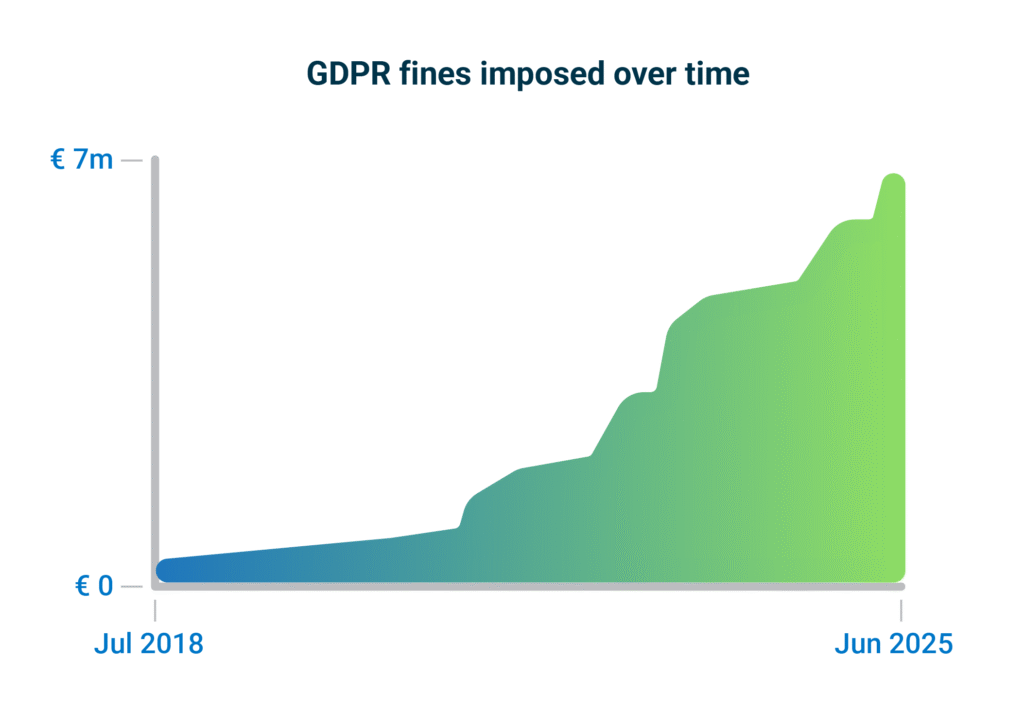
Graph depicting GDPR fines imposed over time. Ramping up from 0 in Jul 2018 to nearly 7M in Jun 2025.
Source: enforcementtracker

Fortunately, the benefits of digital accessibility are undeniable. Millions of people with disabilities all over the world can be your loyal customers if you simply ensure that your products and services are accessible to them. And as our global population ages, accessibility needs are going to increase exponentially. Plan for this now if you want to be ahead of the curve. And let’s not just focus on the carrot—there’s the stick to consider as well. The fines for failing to comply are very real. Reputational backlash can be brutal. Losing customers erodes your bottom line. There is even jail time in some countries for non-compliance.

For all these reasons and more, I believe digital accessibility is a board-level issue now. It needs to be.

To my fellow CEOs: you have my support—and my understanding. I know that organizational transformation isn’t easy. But you have crucial tailwinds behind you. And you have partners like Deque to help guide you as you grow your digital accessibility practice and work to achieve long-term compliance.

I was recently asked what advice I would give to a CEO just beginning to assess their exposure under the EAA. My answer was this: Don’t get bogged down in the fine print of what’s in scope and what’s not. That’s a losing battle. Instead, focus on practical realities and fundamental questions.

Where are your risks? What tools do you need? How can you ensure that your digital accessibility processes are efficient, effective, and sustainable?

This is where partnership matters. You need experts who can help you integrate accessibility into every stage of content creation and development. That way, you’re not just fixing issues—you’re preventing them from happening in the first place. You need a holistic approach that delivers expertise, automation, and training (the EAT model) in a single solution. And you need advanced AI and automation capabilities to scale successfully.

Choose your digital accessibility partner wisely. The stakes are high, and the rewards are undeniable.

We have worked with hundreds of companies over the years to build their digital accessibility programs. While each company’s needs were different, there were common threads running through every success story: strong governance, accountability, and transparency. Now, there is something else we can add: AI and automation. Given the speed and scale of digital content creation today, there is simply no sustainable path to long-term compliance without advanced automation.

If the EAA is what makes digital accessibility essential, AI is what makes it executable.

Responsible AI-powered digital accessibility tools can streamline accessibility compliance. We can automate repetitive testing tasks, provide expert remediation suggestions, and instantly make accessibility knowledge available when and where it’s needed most. This allows your teams to focus on the most complex accessibility challenges and enables a more proactive, scalable approach to compliance.

Going forward, the EAA is the law in all 27 EU countries. It impacts any organization selling into the EU, even if your business is based elsewhere. And the EAA is already inspiring similar efforts elsewhere around the world. The truth is that accessibility is a human right, and every business must embrace it. It’s not a matter of if—or even when. The only question is how.

And you do have a choice.

You can be reactive, inviting risk of all kinds—financial, legal, reputational—and losing time and money to costly and inefficient after-the-fact fixes. Or, you can be proactive, using innovative tools and products to get and stay compliant for the long-term, building a culture of inclusion, and embedding digital accessibility best practices from the start.

The choice is clear. The time is now.

Preety Kumar

Preety Kumar

Preety is the CEO of Deque Systems and co-founded Deque in 1999 with the vision of unifying Web access, both from the user and the technology perspective. Under Preety's leadership, Deque has grown to be a market leader in the field of information accessibility, serving corporate and government clients with the highest standards in information technology such as Veteran Affairs, Department of Education, Humana, Intuit, HSBC, Target, and others. She collaborated with the W3C Web Accessibility Initiative and is a nominated member of the Accessibility Forum's Strategic Management Council: a GSA sponsored group with representatives from the IT industry, academia, Government Agencies, and disabled user groups that fosters information accessibility through mutual cooperation.

Forbes has just published its 2025 Accessibility 100 list, highlighting “the biggest innovators and impact-makers in the field of accessibility.” Deque is proud to be featured among so many champions of accessibility, from giants like Apple, Google, and Microsoft to emerging leaders across industries. We celebrate everyone who shares our commitment to building a more inclusive world.

We’re especially excited to see accessibility recognized as being both “a bustling innovation hub” and “an untapped business opportunity.” As the accompanying article, “Accessibility In 2025: Forces, Finance, And The Future,” makes clear, accessibility is no longer optional—it’s a strategic business imperative with significant financial and social impact.

The Accessibility 100 list is the product of a rigorous methodology, drawing on insights from more than 400 conversations with industry experts, as well as guidance from an expert advisory board. In addition to spotlighting leaders in fields ranging from communication and education to employment and government, the Accessibility 100 list underscores the pivotal role of software companies in advancing accessibility:

“Code is at the heart of accessibility innovation. An app, interface or AI model can be all that stands between people with disabilities and their ability to engage with—or even survive—the larger world.”

For over 20 years, Deque has been on a mission to achieve global digital equality, providing industry-leading tools, training, and services that help organizations meet WCAG, ADA, Section?508, and more. From open source roots like axe-core to flagship products like axe DevTools, we empower teams to build accessibility directly into their code and culture.

The Accessibility 100 list arrives at a remarkable moment for digital accessibility. The European Accessibility Act (EAA) takes effect this weekend, ushering in a new era of accessibility. At the same time, artificial intelligence is making it possible to scale digital accessibility in ways never before possible. As Forbes notes in their coverage of Deque, these technological advances make it possible to “ensure that accessibility features work out of the box.”

Being featured as an innovator on the Forbes Accessibility 100 list is something we’re proud of, but what’s most exciting of all is the progress that innovation is making possible.

~

To learn more about our innovative digital accessibility tools, contact us today!

Deque Systems

Deque Systems

Deque is the global leader in digital accessibility, helping the world’s top enterprises build inclusive products, services, and experiences and achieve lasting compliance. Recognized by leading industry analysts for its AI-powered tools, comprehensive services, and developer-trusted solutions, Deque delivers the industry’s most complete accessibility offering. The Axe platform, anchored by Axe-core, has more than 3 billion downloads and 875,000 installed extensions, making it the global standard for accessibility testing. As a pioneer of people-first accessibility, Deque applies a human-in-the-loop approach that blends expert insight with AI innovation to advance its mission of digital equality for all.

Tags:  news

If your organization just completed a digital accessibility audit—congratulations! That’s a meaningful first step toward building more inclusive digital experiences.

But for many teams, this is where the cycle starts to repeat itself: inaccessible code makes it to production, users are impacted, audits flag the issues, and developers end up rewriting code that could’ve been accessible from the start.

The outcome? Delays, rollbacks, higher costs, and frustrated teams.

There’s a better way. Start by making sense of your audit, then build a plan to fix and maintain accessibility across your digital properties. Most importantly, empower your developers to catch and fix issues early—before code ever reaches production.

Step one: Make sense of your audit

Audit reports can be overwhelming. You may be surprised by the results, but that’s normal. Accessibility takes planning, expertise, and ongoing effort.

First, review the issues by impact level. Most reports highlight dozens (or hundreds) of issues—but not all are equal:

  • Blocker: Prevents access to core functionality.
  • Critical: Makes key parts unusable for some users.
  • Serious: Causes major barriers, but some access remains.
  • Moderate: Reduces experience quality.
  • Minor: Annoying or distracting, but not a major barrier.

This will give you a sense for where you should prioritize your resources and hopefully break up your fixes into more manageable chunks.

Step two: Remediate and streamline fixes

Focus first on remediating blockers and critical issues, especially those that prevent users from completing key actions, such as logging in, submitting a form, or making a purchase.

Also, look for quick wins. Fixes that can be applied across templates or components, such as updating contrast in a global style guide, can deliver widespread improvements with minimal effort.

Axe products can help you flag these issues and offer advice on how to efficiently remediate so you can make sure you’re putting your resources in the right place.

Step three: Retest, verify, and maintain

After remediation, it’s essential to confirm that issues are resolved. Use automated tools and manual testing to validate fixes and track improvements.
It’s important to note that accessibility isn’t a one-time fix—it’s a continuous practice and Deque tools can help you throughout your journey so you can:

  • Test and retest issues quickly
  • Monitor progress across projects
  • Embed accessibility expertise directly into your workflows

At this point you may wonder… “Do I just need a VPAT?”

Some organizations turn to a Voluntary Product Accessibility Template (VPAT) to document the current accessibility of their product. While helpful, a VPAT is not a substitute for action. It summarizes conformance to standards such as EN 301 549, WCAG 2.2, or Section 508, but it won’t tell you how to fix issues or improve usability.

Step four: Prevent future issues—start testing early

The real shift happens when you stop relying only on audits—and start building accessibility into your workflows from day one.

Here’s how:

Train dev teams

  • Help them understand the “why” behind accessibility
  • Build empathy and quality standards into your development culture
  • Offer expert resources to learn and upskill your teams

Equip them with the right tools

  • Use tools that test for accessibility in the IDE, browser, and pull requests for fast feedback that won’t slow down work
  • Help devs catch and resolve common issues before they hit staging or production

Monitor continuously

  • Use monitoring tools to spot site-wide risks and regressions
  • Keep stakeholders informed and aligned on progress
  • Maintain momentum between releases

Stop Playing Catch-Up

Audits alone can’t guarantee accessible user experiences—and they often come after the damage is done. If you want to reduce rework, improve customer experience, and save time and money, the answer is clear: Be proactive about testing for accessibility early, empower your developer teams, and build accessibility in from the start.

Request a product demo today!

Glenda Sims

Glenda Sims

Glenda Sims is the Chief Information Accessibility Officer at Deque, where she shares her expertise and passion for the open web with government organizations, educational institutions, and companies ranging in size from small businesses to large enterprise organizations. Glenda is an advisor and co-founder of AIR-University (Accessibility Internet Rally) and AccessU. She serves as an accessibility consultant, judge, and trainer for Knowbility, an organization whose mission is to support the independence of people with disabilities by promoting the availability of barrier-free IT. In 2010 Glenda co-authored the book InterACT with Web Standards: A holistic approach to Web Design.

Developing a strategic plan for digital accessibility is one of the most impactful efforts your organization can undertake to create more effective and inclusive customer experiences.

Far beyond a legal requirement alone, digital accessibility is a competitive advantage—expanding your reach, improving usability for everyone, and reinforcing your commitment to your customers.

With legislation like the European Accessibility Act (EAA) setting a new global bar, momentum around accessible design and development is accelerating. Now is the ideal time to build and grow a sustainable digital accessibility program that meets legal requirements, aligns with business priorities, and delivers exceptional user experiences.

The process of digital accessibility transformation

Creating a successful digital accessibility program is a transformative process, but it’s important to remember that it’s exactly that—a process. And getting from point A to point B can often seem daunting. It’s one thing to know you need a plan; it’s another thing altogether to actually have one.

That’s why we created the Digital Accessibility Action Plan tool.

The Digital Accessibility Action Plan tool

The Digital Accessibility Action Plan tool presents a series of prompts designed to capture the current state of your digital accessibility efforts. Your responses will enable the tool to generate a customized, actionable plan based on your organization’s unique needs.

The prompts are organized into topic areas covering design, development, testing, and training. Your report will offer specific, practical next steps to support your journey toward digital accessibility maturity.

The process is quick and straightforward: simply answer a series of questions with answers that best reflect the current state of your accessibility program. In minutes, you’ll receive a clear, actionable roadmap you can use to integrate accessibility into your workflows, improve efficiency, and reduce the time and resources required for testing and defect remediation.

Best of all, your plan builds upon your existing strengths, highlighting opportunities and recommending practical steps to embed digital accessibility across your entire organization. A genuinely actionable plan doesn’t just point out shortcomings; it highlights opportunities.

Building digital accessibility momentum

The essence of a good plan is strategic cohesion. No silos. No inconsistencies. No gaps. You want all the moving parts working in harmony, with each step leading naturally to the next and creating momentum that compounds across your organization.

Let’s examine a specific example where a single, intentional step can lead to highly beneficial outcomes.

A practical example: Accessibility annotations in design

One area the tool focuses on is design. For example, you will be asked how your organization incorporates accessibility requirements into design annotations.

Suppose your design team already provides annotations to guide developers on things like button sizes, colors, and spacing, but isn’t including accessibility-specific information. Your response would reflect this, and your customized plan would recommend strategic steps to advance your design practice.

It might, for example, recommend adding three specific types of accessibility information to your future annotations. This one minor adjustment can create a positive ripple effect:

  • Developers encounter fewer accessibility questions mid-sprint and can build features faster.
  • QA teams gain a clear testing roadmap, reducing ambiguity around what to validate.
  • Product owners get built-in regulatory documentation, eliminating last-minute scrambling.

With just this one focused change, your organization increases efficiency, reduces risk, and accelerates delivery. And that’s just one example from one of the tool’s topic areas.

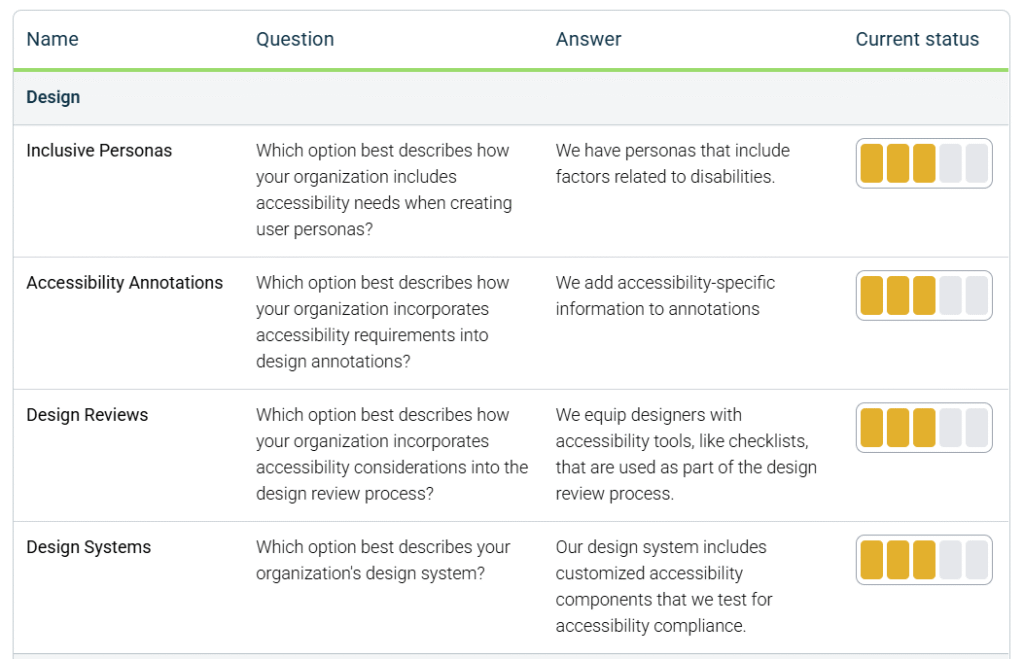
An example of the summary recommendations, highlighting questions, corresponding answers and a status score on a scale from 1 to 5.

Building on your strengths

Accessibility annotations are just one of more than a dozen opportunity areas we’ve identified. Every organization has untapped strengths and areas where you’re already excelling that can be optimized for even greater impact.

Some teams discover that their design system is their secret weapon. Others find their testing workflow holds the key to acceleration. The Digital Accessibility Action Plan tool will surface these high-value opportunities and provide strategic next steps, empowering you to act on them right away.

Your customized plan will be based on your current practices. Whether you’re starting from scratch or scaling mature efforts, your plan will meet you where you are.

Getting started, adding structure, scaling efforts

Putting practical strategies into place will reduce friction while enabling you to advance your accessibility practices—from starting to organizing to optimizing.

If your organization is early in its digital accessibility journey, you may be facing challenges such as:

  • Isolated fixes by individual teams
  • Inefficient or costly workflows
  • Lack of consistent policies or role-based training
  • Uncertainty around compliance obligations

These challenges are real but solvable with a more structured approach that is intentional and proactive. For example, you can:

  • Introduce accessibility checklists into design and development workflows.
  • Begin testing earlier in the development lifecycle.
  • Implement role-specific training based on tools and responsibilities.
  • Raise awareness around compliance risks, especially with regulations such as the EAA, AODA, and ADA.

As you become more proactive and digital accessibility is embedded into your systems and workflows, you’ll be able to optimize not just for compliance—but for scale, speed, and long-term impact.

Success

Successfully scaling digital accessibility means shifting from reactive fixes to a proactive, organization-wide approach. That transformation starts with a plan—and now, creating that plan is faster and easier than ever.

The Digital Accessibility Action Plan tool gives you a clear, actionable roadmap that builds on your strengths, sharpens your focus, and drives measurable results.

There’s no time like the present to begin embracing accessible design and development, especially with the EAA defining the next era of digital accessibility.

Ready to get started? Your digital accessibility plan is just a few questions away. Start now: https://accessibility.deque.com/action-plan

Matthew Luken

Matthew Luken

Matthew Luken is a Senior Vice President and Chief Architect at Deque, consulting with companies of all sizes, markets, and industries to grow their digital accessibility programs. Matthew also provides thought leadership to advance the profession and practice of digital accessibility and mature and maximize operations, processes, and outcomes. Prior to Deque, Matthew built and ran U.S. Bank’s digital accessibility program, providing accessibility design reviews, compliance testing services, defect remediation consulting, and more. The program leveraged over 1,500 implementations of Deque’s Axe Auditor and nearly 4,000 implementations of Axe DevTools and Deque University. Matthew also served as Head of UXDesign’s Accessibility Center of Practice, where he was responsible for supporting the digital accessibility team’s mission. As a digital accessibility, user experience, and service design expert, Matthew has worked with over 500 brands, covering every vertical and market. He also actively mentors digital designers and accessibility professionals.

Field notes from a real-world client story.

With this post, I’m embarking on a new series of articles focused on my client experiences in the field. I’m cheekily referring to the series as “Field Notes.”

As Senior Vice President and Chief Architect at Deque, I travel all over the globe, meeting with a wide array of organizations to discuss and implement digital accessibility transformation.

These articles give me an opportunity to share what I’m hearing about the actual challenges companies are facing and the practical steps they’re taking to elevate their digital accessibility programs to new heights.

While the stories I share will, of course, be anonymized, they’re nonetheless guaranteed to be chock full of real-world insights and ideas you can use to grow and optimize your accessibility program.

Let’s dig in!

The topic, the client, the challenge

Our topic today is preparation for the European Accessibility Act (EAA), and the client is a very large retailer with no accessibility program, and no planned budget. When they called us, it was urgent.

The company has a presence in multiple EU countries, operates both online and physical lines of business, and has more than 100,000 employees. Despite the scope of the challenge, however, the person tagged by leadership to organize the company’s EAA response has little to no experience with software or digital accessibility.

To the company’s credit, while they’re only just coming to understand their obligations under the EAA, they’re making an effort to tackle things head-on.

First steps: Mental preparation

You might think the first step in a situation like this would be tactical. But the reality is, you need to mentally prepare before you can strategically execute.

Digital transformation of any kind can be a massive and chaotic undertaking. Add in an impending deadline and the very real repercussions of failing to comply in time, and the stress levels go through the roof.

So, it’s essential that you give yourself some grace. You need to step outside of the maelstrom, assess things objectively, and remind yourself that this is difficult work. It’s going to take some time, and that’s okay.

It’s also critical to keep in mind that you did not create the current situation, nor are you being blamed for how things got to this point. The past is the past. What’s important is that you try to manage things on a forward-moving trajectory. Control what you can control, and be ready to pivot and adapt as new information or situations arise.

Finally, remember that the accessibility community is just that—a community. It’s full of talented, passionate, and experienced people who are more than happy to share their expertise and help when and how they can. Powerful tools, experienced practitioners, and valuable educational resources are readily available, and accessing them can help you accelerate your own efforts.

Next steps: Create the plan, sell the plan!

My next strategic recommendation to the client was to begin by taking immediate short-term action while concurrently building out a larger and more comprehensive long-term plan. After that, focus on getting leadership support for the plan. The goal is no surprises for anyone, even those only tangentially engaged with the effort.

Now, let’s look at some of the specific steps we discussed.

Gain legal alignment and support

It’s important to work directly with the team that covers legal, regulatory, and compliance matters. They are critical partners in this effort. Together, you need to understand how the EAA applies to your company and what kind of effort will be needed to be conformant. You also need to determine your approach to meeting the requirements. This could be anything from full-tilt focused auditing and remediation to taking a more risk-based approach to spot-fixing or triaging high-traffic and high-visibility user journeys and web pages. Finally, you’ll need to establish how you’re going to communicate information so that everyone is aligned and working towards a common goal.

Explore non-traditional funding approaches

No one likes to talk about money, but in business, it takes funds to make things happen. However, budget cycles being what they are, you may have to get creative if your deadlines are urgent and fall mid-cycle (the dreaded “unplanned spend”).

This was exactly the situation our client was facing.

The first thing I always make clear when it comes to budgets is that leadership has to fund digital accessibility. My recommendation is to request two to three strong internal resources to help build a scalable budget that articulates initial, intermediate, and long-term needs for training, tooling, and staffing. Leadership’s job is to reallocate the existing budget to make this happen and to secure adequate funding for the next fiscal cycle. Pro tip: Leverage your CFO. There are plenty of creative ways to find unplanned-for funds during any given fiscal year.

Reference GDPR to align leadership on creating a task force

When the situation is urgent, and deadlines are imminent, your best bet is to activate a task force and grant it “emergency powers.” This will simultaneously set the necessary “this is not a drill” tone and help you secure critical cross-functional resources from development, training, security, testing/QA, design, procurement, corporate communications, change management specialists, project management, human resources, executive leadership, and more. Did your company have a task force for GDPR? Use that experience as a reference.

Build accessibility awareness and implement a training plan

Raising awareness is an essential part of elevating digital accessibility. You can achieve this through everything from a keynote address to hands-on lab activities to presentations from employees with lived experience. You can follow up awareness campaigns with role-based training that includes digital accessibility fundamentals, learning modules on regulations and conformance, and how-to information on accessibility standards and success criteria. Every role in your organization should have some level of accessibility training within their learning and development plan.

Enable teams with tools

As soon as teams are trained and educated, you can equip them with the tools they need to ensure that what they’re building is accessible—from linters and AI-supported tools during the design and code creation process all the way through to manual testing with assistive technology. It is critical to activate these tools at just the right time. Introduce them too early, and adoption may be a struggle. Provide them too late, and you risk people forgetting what they learned during training.

Create a communication plan

The cardinal rule is that it is better to over-communicate rather than under-communicate. Share details and status reports as often as is realistic. Begin by letting the whole organization know that you’re actively developing a plan to create inclusive digital experiences that align with the new EAA regulations. When you create the task force, announce it and share details. As it becomes clear how different teams will contribute and be impacted, make sure this information gets disseminated. Share progress reports on a regular basis. The clearer and more consistent your communication, the more unified the effort will be. Clear communication also alleviates staff stress—people are happier when they know what’s going on.

Develop task force onboarding processes and materials

Make sure you have an onboarding process for new task force members. Over time, members will come and go. A documented onboarding process will help you ensure consistency as the effort evolves. Make sure this process includes materials on digital accessibility, the EAA regulation, strategic plans, operating models, and RACI charts. My favorite process is to stand up a simple SharePoint site with all the relevant materials, including a short video introducing people to the project.

Key considerations

As I mentioned earlier, you should have concurrent tasks at play. While implementing the other steps we’ve outlined above, you’ll also want to start creating a risk assessment for your legal or compliance team.

Risk analysis planning

In the case of our client, I recommended starting with a digital property inventory, then layering in usage and customer traffic data to help them understand which pages or user journeys were most critical to their organization.

After that, you can start adding in other key pieces of information, such as organizational alignment, product owner names, and whether accessibility efforts have begun on a given property or not. With EAA compliance as the focus, you might include which countries a digital property serves and which accessibility regulations apply.Pro tip: The list does not need to be perfect. Once you’ve identified one or two “Tier one” properties, you can proceed to another vital concurrent task: conformance testing.

Risk-based conformance testing

Timing your testing is an art. The sweet spot is to start testing so that the defects you identify can be routed to teams for remediation. You don’t want the data to age too long. Immediately after teams complete their training and are equipped with the appropriate tools, you can start sending them defects.

When it comes to testing and remediation, we recommend a three-phase approach:

  1. Automated testing. Use automated testing first. It is fast and cheap to complete. Then, remediate the defects found. After that, retest to confirm that you’ve truly cleared the issues.
  2. Semi-automated testing. Deploy semi-automated testing next. Deque’s Intelligent Guided Tests (available in the axe DevTools Extension) are an example of this. As you did with automated testing, remediate the defects you identify and then retest to confirm repair.
  3. Manual testing with assistive technology. Complete manual testing last. With this approach, you should have strong code that is stable. Manual testing is the most expensive and time-consuming type of testing. It also requires subject matter expertise. By doing this effort last, you’ll ensure that you are making the best investment of these resources.

Looking ahead

Deque excels at helping companies understand where they are and jointly building plans to rapidly grow and scale accessibility organizations. Despite the urgency of their situation and the inexperience of the individual tasked with leading the effort, our client is now well-positioned to get and stay EAA compliant.

How prepared is your organization? Let’s chat about how Deque can help you rapidly respond to regulations like the EAA. Schedule a free strategic consultation today.

Matthew Luken

Matthew Luken

Matthew Luken is a Senior Vice President and Chief Architect at Deque, consulting with companies of all sizes, markets, and industries to grow their digital accessibility programs. Matthew also provides thought leadership to advance the profession and practice of digital accessibility and mature and maximize operations, processes, and outcomes. Prior to Deque, Matthew built and ran U.S. Bank’s digital accessibility program, providing accessibility design reviews, compliance testing services, defect remediation consulting, and more. The program leveraged over 1,500 implementations of Deque’s Axe Auditor and nearly 4,000 implementations of Axe DevTools and Deque University. Matthew also served as Head of UXDesign’s Accessibility Center of Practice, where he was responsible for supporting the digital accessibility team’s mission. As a digital accessibility, user experience, and service design expert, Matthew has worked with over 500 brands, covering every vertical and market. He also actively mentors digital designers and accessibility professionals.

The European Accessibility Act (EAA) may be an EU regulation, but its impact reaches far beyond Europe. If your offerings are used, sold, or supported in the EU, the EAA may directly impact your business, even if you’re based in India, Australia, Singapore, or elsewhere.

Many APAC organizations are already feeling pressure to meet the rising expectations of EU partners who want accessible solutions. For all organizations across the Asia-Pacific (APAC) region, the EAA serves as an early indicator of where global digital accessibility compliance is headed. To remain competitive and in alignment with international standards, proactive companies should prioritize EAA compliance now.

In this post, we’ll explore how and where the EAA applies, as well as what APAC-based businesses need to know about compliance and the changing expectations of customers, collaborators, and regulators. We’ll also closely examine the benefits and risks and provide you with three steps you can take right now to ensure your business is well-positioned for this new era of digital accessibility.

Where does the EAA apply?

The European Accessibility Act (EAA) is a landmark directive aimed at improving accessibility for people with disabilities across EU member states. It establishes a unified set of accessibility standards that must be met by June 28, 2025.

Critically, the EAA doesn’t just apply to companies based in the EU—it applies to any product or service sold into the EU market, regardless of where the business is based. That means organizations in APAC—whether they’re software vendors, hardware manufacturers, or service providers—may be directly impacted if their offerings reach EU consumers.

The directive covers a broad range of digital and physical touchpoints, including:

  • E-commerce websites and mobile apps
  • ATMs and payment terminals
  • Banking services
  • Transport ticketing systems
  • E-readers and communication devices

By establishing clear accessibility standards for a wide range of products and services, the EAA strengthens the role of digital accessibility in how businesses operate and compete, both within the EU and for organizations conducting business there.

Why the EAA matters to APAC organizations

When it comes to the EAA’s potential impact on the APAC region, there are three primary issues to consider.

Selling into the EU requires EAA compliance

If your business is based in APAC, but you’re selling digital products and services into the EU—directly or through partners—then you likely have legal obligations under the EAA. This includes software vendors, IT providers, and hardware manufacturers. On the service side, the EAA covers everything from streaming and e-commerce to banking and passenger transport. As to products, the EAA covers media players, self-service terminals, e-books, e-readers, reader software, and more.

Compliance is becoming a prerequisite for doing business

EU-based clients and partners are increasingly requiring proof of accessibility as part of their procurement processes. Vendors must meet global accessibility standards to win or retain contracts, particularly in regulated sectors such as finance, transportation, and retail.

The EAA is a foundation for future accessibility regulations

Just as GDPR set a global benchmark for data privacy, the EAA is rapidly emerging as a reference point for digital accessibility regulations worldwide. Several APAC countries, including Australia, Japan, and Singapore, are already actively considering or developing legislation inspired by the EAA’s framework.

For APAC organizations, early alignment with EAA standards not only ensures smoother market access to the EU but also positions them ahead of regional regulatory shifts.

Compliance vs. non-compliance: Benefits and risks

The EAA represents a straightforward choice for organizations: Comply with digital accessibility requirements now and experience a range of benefits, or put off compliance and invite substantial business risk. Your approach can impact your business outcomes in significant ways:

Market access vs. market loss
Meeting EAA accessibility standards means your products can be sold and used by millions of consumers across the European Union, vastly expanding your market reach. Non-compliance, on the other hand, could lead to fines and even being barred from operating in one of the world’s largest markets.

Reputational opportunity vs. reputational risk
Being accessible positions your brand as a leader in inclusion, innovation, and social responsibility. It also signals your focus on customer experience. Failure to comply with digital accessibility expectations can damage your brand and leave you seeming out of step with global values.

Customer loyalty vs. customer churn
Inclusive digital experiences drive overall satisfaction as well as customer acquisition and retention. Neglecting digital accessibility can result in poor user experiences, customer dissatisfaction, and missed business opportunities.

Three steps APAC organizations can take right now to align with the EAA

For APAC organizations looking to align with the EAA and stay competitive in global markets, here are three practical steps to get started:

  1. Commit to conforming with EN 301 549
    The EAA references the EN 301 549 accessibility standard, which closely aligns with WCAG 2.1 AA. Proactively adopting this standard across your digital products aligns your organization with international benchmarks and puts you on the right path for both EAA compliance and broader digital inclusion.
  2. Shift digital accessibility left in your development process
    Shift left” refers to addressing digital accessibility early in your design, development, and QA workflows rather than waiting until later stages when fixes become time-consuming and expensive. By embedding digital accessibility from the start, you save time and money while ensuring your products and services meet EAA requirements. Early integration also fosters better user experiences by identifying and addressing barriers before they impact usability for your customers.
  3. Invest in role-specific accessibility training
    Implement role-based digital accessibility training for your designers, developers, testers, and content creators. Everyone has a role to play in digital accessibility, but those roles require different tools and skill sets. For example, designers can learn accessible design principles, developers can master coding for accessibility, and testers can focus on evaluating compliance with standards like the EAA. This targeted approach ensures that everyone understands their role in creating accessible products and integrating accessibility into your organization’s culture.

Choose Deque for digital accessibility

At Deque, we partner with organizations across the APAC region to navigate the evolving landscape of digital accessibility compliance, with a focus on aligning with the European Accessibility Act (EAA). Our tailored solutions combine deep expertise, automated testing, and role-specific training to help you meet EAA requirements in a manner that aligns with your unique business context.

Whether you’re just beginning your accessibility journey or expanding existing programs, we can help you:

  • Understand and manage your EAA compliance risks
  • Align your digital products and services with EU and global accessibility standards
  • Build inclusive experiences that open doors to the EU market and beyond

For APAC organizations selling products and services into the EU, aligning with the EAA is now essential to maintain market access and meet evolving accessibility expectations. Preparing your products and services today helps ensure your business can continue to operate smoothly in the EU digital marketplace.

Explore how Deque can support your EAA readiness and long-term accessibility strategy. Schedule a free consultation call with our experts today!

Sujasree Kurapati

Sujasree Kurapati

Sujasree wears multiple hats here at Deque. In addition to contributing her engineering expertise to several deque products, she runs day-to-day operations, drives innovation for global services, and is the axe for Designers’ product manager. She has been with Deque for more than 14 years, founding, building, and finally running Deque India over 11 of those. Here, she leveraged her core strengths of experimentation and innovation in building the organization in a country where digital accessibility was not well known. She has always been passionate about how technology can make a positive difference in people’s lives and, after her time at Microsoft, Deque’s work in digital accessibility captured her imagination. By the way, in addition to her Deque hat collection, Sujasree has two young children. Clearly, multi-tasking is her superpower.

We are living in a time of accelerated change powered by transformational technologies. Across virtually every landscape—legal, financial, political, ethical—the impact has been profound. And we are still only seeing the tip of the iceberg.

What’s striking is how quickly enterprises have adapted. Think about how far we’ve come with privacy and security. Just a decade ago, the GDPR didn’t exist, and enterprise security often still meant relying on perimeter-based defenses like firewalls. Today, privacy and security are built-in expectations, embedded into every product decision. Advanced solutions now harness artificial intelligence, machine learning, and automation to deliver comprehensive coverage at scale—even for the largest and most complex enterprises.

What’s also striking is that digital accessibility hasn’t yet reached that same baseline status. It’s every bit as fundamental to building inclusive products that serve more people, deliver against business objectives, provide better experiences, and meet today’s ethical and regulatory expectations. But unlike privacy and security, digital accessibility still isn’t universally baked into every decision. 

The question is: Why not?

Democratizing digital accessibility

The answer is that, until now, we haven’t made it easy enough. If we expect digital accessibility to be ubiquitous, we must democratize it so that anyone, anywhere, can build accessibly from the start.

Today, I feel more hopeful than ever that we’ve reached the turning point. I’ve been in digital accessibility for more than twenty years. For much of that time, this mission has felt like an uphill battle. But what I feel now is shared momentum. Digital accessibility is finding its way into the very heart of modern web and mobile development.

I’ve said before that I think of myself as a humanist, a technologist, and a pragmatist. When it comes to democratizing digital accessibility, my focus—as the CEO of a software company—is on the people doing the hard work every day. That includes the designers, developers, and testers building the products and, just as importantly, the accessibility leaders setting the vision, shaping the strategy, and securing the resources.

These are the individuals we must empower with solutions that make digital accessibility not just possible, but doable. If digital accessibility is going to be mandatory, then mandatory must be easy.

Embedding digital accessibility expertise where it’s needed most

Enacting this shift from optional to essential means embedding digital accessibility directly into the tools developers and content creators use every day. At Deque, we’ve just announced a new product called the axe MCP Server that’s designed to do exactly that. It will connect the digital accessibility expertise of the axe Platform with AI agents across the development lifecycle. This will enable developers to identify root causes and apply suggested code changes directly within their IDE.

Teams will be able to find and fix more issues—earlier and faster, with greater accuracy. They’ll build their expertise over time, but expertise will no longer be a prerequisite for impact.

This is what I mean by democratizing digital accessibility: easily doable, by all.

In a previous post, I wrote about digital accessibility and the EAT model: Expertise, Automation, and Training. This model is essential to the process of democratizing digital accessibility. Without expertise, you don’t have accuracy. Without automation, you can’t scale. And without training, you can’t achieve organizational self-sufficiency. 

Ensuring digital accessibility is the expectation, not the exception

To elevate digital accessibility to the level of privacy and security—where it’s no longer optional but essential—we must enable enterprises through a holistic approach, leveraging the EAT model to embed digital accessibility across the organization. And we must prioritize software solutions that are simultaneously transformational and practical, like the axe MCP Server.

AI-powered, expertise-informed technologies have already transformed how enterprises manage privacy and security—automating everything from threat detection to data classification and anonymization—making them an everyday part of conducting business in the global digital economy.

We are just steps away from achieving the same for digital accessibility.

We’ve seen what’s possible when enterprise priorities align with powerful tools and practical workflows. We can do the same for digital accessibility—ensuring it’s no longer the exception but the expectation.

The vision is there. The momentum is real. And now, we have the tools and the processes to make it easy—to create a world where digital accessibility is simply how we build.

Preety Kumar

Preety Kumar

Preety is the CEO of Deque Systems and co-founded Deque in 1999 with the vision of unifying Web access, both from the user and the technology perspective. Under Preety's leadership, Deque has grown to be a market leader in the field of information accessibility, serving corporate and government clients with the highest standards in information technology such as Veteran Affairs, Department of Education, Humana, Intuit, HSBC, Target, and others. She collaborated with the W3C Web Accessibility Initiative and is a nominated member of the Accessibility Forum's Strategic Management Council: a GSA sponsored group with representatives from the IT industry, academia, Government Agencies, and disabled user groups that fosters information accessibility through mutual cooperation.

When it comes to digital accessibility, finding issues earlier is always better. You save time and money, and most importantly, you ensure accessible experiences for your users every time.

Axe Developer Hub was built so you can effortlessly add automated accessibility testing to your end-to-end (E2E) tests with just a simple configuration, allowing you to catch and fix issues early and maximize productivity.

The first release of axe Developer Hub focused on streamlining E2E testing for teams using JavaScript and TypeScript frameworks and reading reports within a SaaS environment. Since then, we’ve been listening closely to your feedback, and now, we’re excited to introduce a new wave of features.

With the latest updates, you can:

  • Run E2E Selenium tests written in Java. Test across more environments with broader integration coverage.
  • Deploy on-prem. Keep test results in your own environment for enhanced data security and compliance.
  • Gain more control of your testing experience. Apply configuration settings and selectively add accessibility tests to some or all E2E tests.

Whether you’re a developer, QA engineer, or central accessible team leader, you know catching digital accessibility issues early is critical to your success. Let’s explore how the new features make this easier than ever.

Expanded testing language and framework support

If you use Selenium with Java, you can now plug axe Developer Hub right into your test framework with no ongoing maintenance required. With one simple configuration, you get accessibility tests in your E2E Selenium testing environment. You won’t have to constantly worry about updating accessibility API calls in your code or ensuring that accessibility is accounted for with each new test.

On-prem deployment for secure experiences

In addition to leveraging axe Developer Hub in SaaS environments, you can now deploy it in your on-premise systems. This enables you to easily add automated accessibility tests to your E2E testing workflows while keeping your data on servers you control. This means you now have more ways to experience the benefits of automated accessibility testing while maintaining your unique security and compliance requirements.

Greater control and flexibility

Axe Developer Hub now gives you the ability to standardize settings (such as what rules to include or exclude in tests) and select where you want to add automated accessibility tests for more controlled analysis. This gives you more freedom to match axe Developer Hub functionality with your needs and workflows so that you can maintain control, ensure standardization across products, and integrate accessibility testing seamlessly into your development process.

Real-world benefits of using axe Developer Hub

Here are two examples of how you can use axe Developer Hub to improve processes and get the results you need.

Data consistency

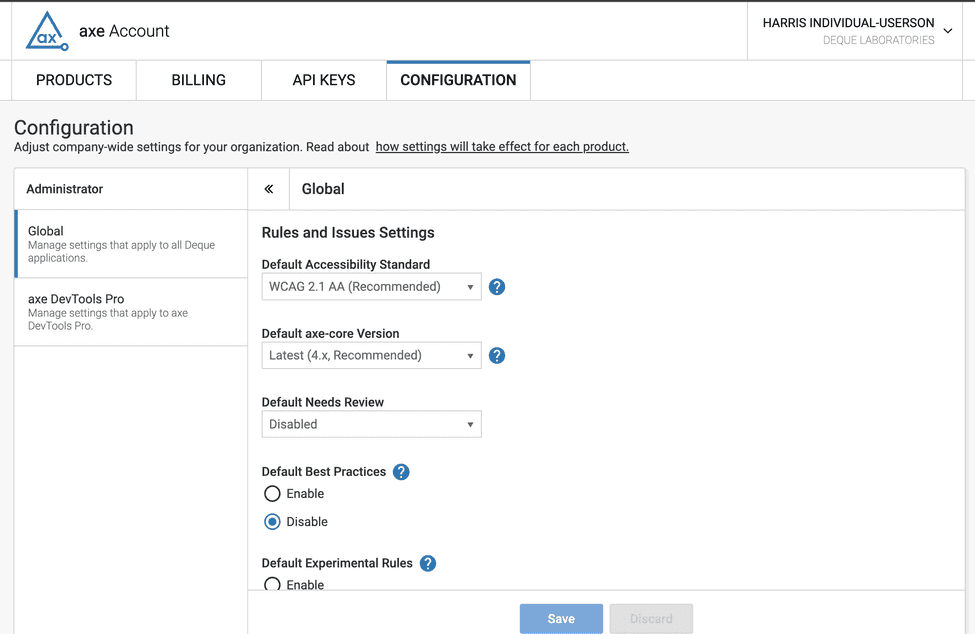
Let’s say you’re a central accessibility team leader, and you want to make sure that the automated tests run from both the axe DevTools Extension and axe Developer Hub are running the same version of axe-core and are both testing against WCAG 2.2 AA.

As shown in the image below, from axe.deque.com, you can navigate to “Configurations.” Within the page, there are “Global options.” These options allow you to set the rules run by different Deque tools. Data consistency, solved!

screenshot of Global options for Configurations within axe DevTools Pro

Controlled page analysis

In this next example, imagine you’re someone reviewing E2E test results. You only want to see results that matter to you and your team, because issues related to other teams are just noise. In this exercise, you’re part of Team A.

Here is a simple E2E test for an online shopping experience:

  1. Visit home page.
  2. Navigate to product catalog and add items to cart.
  3. Review shopping cart and select checkout.
  4. Fill out the checkout form.
  5. Review order confirmation.
  6. Review product recommendations.

This list looks pretty simple until you consider “who owns what.”

Page Owner
Home page Marketing
Product catalog Marketing
Shopping cart Team A
Checkout form Team A
Order confirmation Team A
Recommendations Marketing

If you were to add “watcher” (a component of axe Developer Hub) to this E2E test, then accessibility data would be gathered for all of these pages, and your team would have to wade through issues that aren’t relevant to them. With the ability to selectively add accessibility tests, you can pause and resume tests so that you get exactly what you want. More control, less noise!

Let’s wrap up this example by comparing the two approaches.

Page Owner Automatic analysis Controlled analysis
Home page Marketing Analyze Turn off automatic analysis and don’t analyze.
Product catalog Marketing Analyze No analysis
Shopping cart Team A Analyze Turn on automatic analysis and analyze.
Checkout form Team A Analyze Analyze
Order confirmation Team A Analyze Analyze
Recommendations Marketing Analyze Turn off automatic analysis and don’t analyze.

See axe Developer Hub in action

Ready to experience the benefits of our latest axe Developer Hub updates? Request a demo today to discover how simple it is to integrate automated E2E accessibility testing into your workflow.

~

Bonus news!

Axe Developer Hub isn’t the only feature getting an upgrade. So is our axe Linter. You can now lint code locally! In addition to checking your code for accessibility issues server-side, you can now run accessibility linting directly from your local environment, such as your laptop. This means faster scanning of large codebases while keeping everything securely in your system. Learn more.

Ben Allen

Ben Allen

Ben Allen is Deque's Product Manager for axe DevTools Linter, axe DevTools APIs & CLI, and axe Developer Hub. Ben has 20 years experience in building software and has been an accessibility program manager for 7.5 years, most recently at GitHub. While at PNC, Ben's team were the inaugural winners of the axe-con "Accessibility at Scale Award" in 2021. Ben loves to learn and claims to be a lifetime student of python, and more recently, ukulele. Sea Shanty anyone?

In Part 1 of this series, we explored how Next.js provides React developers a strong starting point for accessibility (A11Y), with built-in features such as semantic routing, head management, and linting. Here in Part 2, we’ll go beyond the framework to real-world development practices and demonstrate how tools like axe DevTools can help you validate real-world usability.

By “inclusive development practices,” we mean modern development techniques that ensure that applications are built accessible from the start—integrated into the design and code, rather than bolted on later or left for post-production fixes.

We’ll cover practical ways to implement accessibility at the code level, including proper use of semantic HTML, alt text, ARIA roles, and keyboard support. Below are some best practices and code examples to help you develop apps that are inclusive by design.

Create with semantic HTML

Swapping a generic <div> for a more meaningful element such as <header>, <nav>, <main>, or <section> is a simple way to improve accessibility without adding complexity. These tags help screen readers and other assistive technologies understand how your page is structured, making it easier for users to navigate.

Semantic markup increases accessibility and also makes your code cleaner and easier to maintain.

<nav>
  <ul>
    <li>
      <Link href="/">Home Page</Link>
    </li>
    <li>
      <Link href="/about">About Us</Link>
    </li>
  </ul>
</nav>

By choosing the right element for the job, you support better experiences for everyone without having to write extra code.

Ensure keyboard accessibility

Make sure every interactive element in your app functions properly for keyboard users, from navigating links to activating buttons. This means managing focus properly, maintaining a logical tab order, and using event handlers that support both mouse and keyboard input.

Native HTML elements such as <button> already support keyboard interactions out of the box. But if you’re building a custom interactive component (such as a <div> acting as a button), you need to manually support keyboard events like Enter, Space, or even arrow keys for navigation.

Here’s an example of how to make a custom component keyboard-accessible:

'use client'
import { useRef } from 'react';

export const MyComponent = () => {
  const divRef = useRef(null);

  const handleClick = () => {
    // Your click handler code here
  };

  const handleKeyDown = (event) => {
    if (event.key === 'Enter' || event.key === ' ') {
      event.preventDefault(); 
      divRef.current.click();
    } else if (event.key === 'ArrowLeft') {
      // Handle left arrow navigation
    } else if (event.key === 'ArrowRight') {
      // Handle right arrow navigation
    }
  };

  return (
    <div
      ref={divRef}
      role="button"
      tabIndex={0}
      onClick={handleClick}
      onKeyDown={handleKeyDown}
    >
      Learn More
    </div>
  );
};

This pattern ensures keyboard users get the same interactive experience as mouse users—especially when you’re building components from scratch.

Leverage ARIA roles and attributes

When semantic HTML doesn’t cover a specific use case, you can fill in the gaps with ARIA roles and attributes. Use them thoughtfully—they’re powerful tools but not substitutes for semantic markup. ARIA, when implemented poorly, can be a barrier rather than a path to accessibility.

<nav>
  <ul role="menu">
    <li role="menuitem">
      <Link href="/">Home Page</Link>
    </li>
    <li role="menuitem">
      <Link href="/about">About Us</Link>
    </li>
  </ul>
</nav>

By applying roles such as menu and menuitem, you give screen readers the context they need to interpret complex or custom navigation structures. Just remember: the best accessibility often starts with native HTML. Use ARIA when needed as a complement, not as a replacement.

Add alt text for media

You can make your content far more inclusive simply by adding descriptive text to your images and captions to your media. Every image should include an alt attribute that communicates its purpose. If the image is decorative, use alt=”” to let assistive technologies skip it.

<Image
  src="/wilson.jpg"
  width={450}
  height={450}
  alt="a wilson volleyball with a red handprint with a face on it"
/>

For videos or audio, you can include captions or subtitles to support users who are deaf or hard of hearing:

<video controls>
  <source src="/helloWorld.mp4" type="video/mp4" />
  <track kind="subtitles" src="/subtitles-en.vtt" label="English" />
</video>

By taking these simple steps, you’re actively making your content more accessible to everyone, regardless of how they experience the web.

Integrate localization

If your audience spans multiple languages or regions, Next.js makes localization easier with built-in support for automatic locale-based routing and language negotiation.

By integrating a localization library such as next-i18next or react-intl, you can deliver content that respects your users’ language preferences and make your app feel more human in the process.

Focus on performance and accessibility together

Performance and accessibility go hand in hand, and with features such as server-side rendering (SSR), automatic code splitting, and route-based prefetching, you can use Next.js to ensure your app loads faster and responds smoothly.

By optimizing performance, you’re creating an app that is easier to navigate for users of assistive technology and those with slower network connections. Building with both speed and inclusivity in mind helps create a better experience for everyone.

Test with accessibility tools

You can catch many common accessibility issues early by using automated testing tools. Libraries such as React Testing Library with Jest make it easy to validate accessible patterns in your components:

import { render, screen } from '@testing-library/react';
import MyComponent from './MyComponent';

test('needs to be accessible', () => {
  render(<MyComponent />);
  expect(screen.getByRole('button')).toBeVisible();
});

Building accessibility into your test suite means it’s part of your everyday workflow, making it easier to catch issues early and deliver more inclusive features with confidence.

Write tests with axe DevTools for browser JavaScript

If you’re using axe DevTools for Web, you can go even further by programmatically testing for accessibility violations within your browser-based JavaScript tests.

Once you’ve installed and initialized the axe DevTools browser package, you can scan any rendered component for accessibility issues. Here’s a basic example:

test('Component has no accessibility violations', (done) => {
  const { container } = render(<Badcomp />);
  axeDevTools.run(container, (err, results) => {
    expect(results.violations.length).toBe(0);
    done();
  });
});

This test uses the run() method from @axe-devtools/browser to scan the rendered DOM and verify that there are no violations. It’s a fast, reliable way to enforce accessibility standards across your component library or app.

Need a full example? Here’s a full test file to get started:

import React from 'react';
import Badcomp from '../components/badcomp';
import { render } from '@testing-library/react';
import axeDevTools from '@axe-devtools/browser';
import "babel-polyfill";

describe('Bad Component', () => {
  beforeEach((done) => {
    axeDevTools.init('wcag2', () => done());
  });

  test('Component has no accessibility violations, w/ attest reporter', (done) => {
    const { container } = render(<Badcomp />);
    axeDevTools.run(container, (err, results) => {
      expect(results.violations.length).toBe(0);
      done();
    });
  });
});

Once you’ve got the basics in place, you can expand your tests with custom rules, integrate reporting, or work directly with the results object for deeper insights.

Use the axe DevTools Extension

Even with Next.js, some accessibility issues will slip through, especially the trickier, context-specific ones that frameworks can miss. That’s where the axe DevTools Extension can help.

By adding it to your browser, you can scan your pages, spot issues visually, and zero in on exactly what needs fixing—all powered by axe-core, the engine trusted by industry leaders.

You can catch most common accessibility issues right out of the box. And when you’re ready, you can upgrade to axe DevTools Pro and get AI-powered features including Intelligent Guided Tests, which further boost your coverage. You’ll also benefit from features such as component-level testing, exportable reports, Jira integration, and more.

Make digital accessibility part of your workflow from day one

When you design with accessibility in mind from the outset, you make your product usable for everyone, including people with disabilities. You also avoid the cost and complexity of retrofitting later, when fixes are harder and less effective.

This early, proactive approach is part of a broader development strategy known as shifting left, which means moving digital accessibility testing earlier in your workflow, right alongside your other quality checks. In our next article, we’ll delve into what shifting left means for digital accessibility and how it can transform your development process.

This is why Next.js offers such a solid start for React developers to build upon. It encourages developers to add accessibility to their repertoire. Whether it’s linting semantic HTML, announcing route changes, or managing metadata properly, the framework gives you guardrails to build more inclusively from the start.

Yet frameworks don’t build apps—developers do. As a developer, you have the ability and the opportunity to shape the experiences of your end-users. Next.js provides a solid foundation, and tools like the axe DevTools Extension enable you to build on that foundation, ensuring that you’re getting accessibility right, while backed by decades of proven best practices.

At Deque, our mission is to help create a digital world that works for everyone. If you’ve made it this far, you’re already part of that mission. So keep building, keep testing, and keep pushing to make the web more inclusive for all.


Jeremy Rivera

Jeremy Rivera

Jeremy Rivera is a Developer Advocate for Deque Systems Inc. He is a full-stack MERN Developer and a University of South Florida alum. Jeremy transitioned to developer relations to bridge the gap between software and developers needing a diverse array of tools. He is a general technologist and evangelist of open-source and cloud-based tools, passionate about helping developers make the web a more inclusive environment.

Welcome to this month’s edition of Accessibility reads, where we cover the most important accessibility-related news happening across the globe!

In my short video below, I talk about some of the stories that really stood out to me, explore their significance, and explain why I recommend that you check them out.


Do you have a story you think we should read? Please share it on social and make sure to tag us! You can also leave a comment on this post.

Featured articles

The world celebrated Global Accessibility Awareness Day (GAAD) on May 15, and many organizations made significant accessibility announcements. Here is my recap:

  • Apple announced new and powerful accessibility features coming later this year, which are designed to make Apple products easier to use and more inclusive. New features include a seamless braille note taker, live caption for Apple Watch, Accessibility Nutrition Labels, and a helpful magnifier app.
  • Google announced New AI and accessibility updates across Android and Chrome. These updates include an expanded integration of Gemini AI with TalkBack (Android’s screen reader) and a new version of Expressive Captions that doesn’t just transcribe speech but also indicates how something is said.
  • Microsoft announced that they have added an Accessibility Assistant across Microsoft 365 apps. They also shared that Narrator (Windows’ screen reader) can now provide rich image descriptions on demand, and they’ve updated Bing Image Creator to produce more accurate and respectful images of people with disabilities.
  • Meta announced that their Ray-Ban Stories smart glasses are getting an upgrade that can describe what the wearer is seeing using Meta’s AI. Meta is also expanding its Call a Volunteer feature to all 18 countries where Meta’s AI is available. Finally, Live Captions in VR—which convert spoken conversations in virtual meetings or events into subtitles in real time on Quest headsets—is now available.
  • GitHub announced its pledge to help improve the accessibility of open source software at scale, and called on partners across the private sector, public sector, academia, and NGOs to take the pledge. They also announced an Open Source Accessibility Summit, which will be a space where members of the disability, accessibility, and open source communities can come together to explore shared goals and define next steps.
  • The GAAD Foundation announced an AI-powered accessibility checker called the AI Model Accessibility Checker (AIMAC). AIMAC is characterized as “an open-source, extensible evaluation framework” which tests AI models by sending prompts and analyzing the accessibility of the returned HTML code.
  • And, of course, Deque announced the new axe MCP server, where you can ask your IDE to make your component accessible and get reliable fix suggestions automatically. Deque also announced axe Assistant, which is a generative AI chatbot built for digital accessibility where users get real-time insights into any digital accessibility question they may have.

There is also some significant regulatory-related news to be aware of:

More stories

I’ve gathered some additional links to compelling stories that I think are well worth exploring:

Accessibility makes new cybersecurity requirements more robust
A package of standards is being developed to support a new EU regulation on cybersecurity. Experts from the Funka Foundation have been tasked with helping standardization organizations ensure that the standards take accessibility into account.

HC appoints panel on accessibility for seniors, differently abled at airports
The Bombay High Court on Tuesday ordered the setting up of an expert committee to examine complaints regarding inadequate facilities—including wheelchairs—for senior citizens and differently abled passengers at airports across India.

Prime Video launches a new accessibility feature that makes it easier to hear dialogue in your favorite movies and series
Amazon Prime’s Dialog Boost was heavily referenced at the IAAP-EU event in Brno recently. Dialogue Boost is an innovation that lets you self-select dialogue volume levels to suit your needs on any device with Prime Video.

Delhi’s High Court seeks response from Swiggy, Zepto, Meity on PwD accessibility plea
A petition has been filed by Mission Accessibility, an NGO advocating the rights of persons with disabilities, which says that the mobile applications in question are inaccessible for persons with disabilities, particularly those with visual impairments.

Mobile apps are failing users with disabilities
Many apps are falling short of being accessible to disabled users, according to a recent report from software developer ArcTouch and the online platform Fable.

Out of My Mind’ Star Phoebe-Rae Taylor on DMing Co-Star Jennifer Aniston and How the Film’s Accessible Set Was a ‘Breath of Fresh Air’
Phoebe-Rae Taylor shared her experience filming the Disney+ movie “Out of My Mind,” a coming-of-age story about a preteen with cerebral palsy.

Disability Smart Awards 2025 winners announced: Celebrating innovation in disability inclusion
Organizations and individuals working to remove barriers and improve the lives of disabled people were honored at the Business Disability Forum’s Disability Smart Awards 2025 in London.

The EU-funded Tomato Project brings an accessible museum experience home through play
Scoreboards, cards, and tabletop activities—as well as virtual reality apps—bring the museum to those who cannot visit in person due to financial and health reasons.

7 ways generative AI is making workplaces more inclusive
AI tools like Microsoft 365 Copilot are helping to break down barriers for today’s workforce.

You Read That Right: Netflix is Introducing a New Way to Experience Subtitles
Netflix is offering a new option: original language subtitles that show only the spoken dialogue.

How Samsung Embeds Accessibility and User-Centered Values Into Its Home Appliances
Guided by its vision of “AI for All,” Samsung Electronics continues to develop home appliances that are intuitive and convenient for a wide range of homes.

Woman with Invisible Disability Mocked by Passengers When Trying to Pre-Board Flight. Then She Got the Last Laugh
A Reddit user shared a recent flight experience where she was embarrassed in front of her fellow passengers. After presenting her ticket marked “pre-board,” the gate agent wrongly turned her away. Some first-class flyers jeered, thinking she was trying to cut in line.

UW researchers developing app to easily assess home for accessibility improvements
Researchers at the University of Wisconsin-Madison are hoping to make it easier to find ways to make your home more accessible, all from the palm of your hand.

Steam users will soon be able to search for games based on accessibility features
Valve is asking developers to input accessibility information to ensure robust support for the new search functionality.

“Tennessee: For All”
Tennessee’s latest tourism initiative celebrates inclusivity, accessibility, and the range of diverse experiences. Songwriters wrote alt-text for images so that blind and low-vision individuals can get a clear understanding of what is being shown in imagery.

Access and the law: Entertainment without barriers is a right, not a favour
In 2024, India produced over 130,000 hours of General Entertainment Content (GEC), of which 95% was first produced for television, 3% for film, and 2% for OTT (FICCI-EY, 2025). However, a significant volume of all content ultimately becomes available on OTT.

Private equity snaps up disability services, challenging state regulators
Private equity firms have acquired more than 1,000 disability and elder care providers in recent years.

How the Google Maps mission changed for Sasha Blair-Goldensohn (video)
One day, when commuting to work through Central Park, a dead tree branch fell on Googler Sasha Blair-Goldensohn, leaving him paralyzed from the waist down. At that point, his mission changed. Today, he works to make Google Maps accessible for people of all abilities.

Milan Design Week: Claudia Poh Champions Accessible Design With Werable’s First Bag
The Singapore designer, who founded the adaptive fashion label Werable, tells how and why she made the Wishbone Bag, unveiled at Milan Design Week.

Rosie O’Donnell’s Doc ‘Unleashing Hope: The Power of Service Dogs for Children With Autism’ Debuts on Hulu
Rosie O’Donnell’s documentary Unleashing Hope: The Power of Service Dogs for Children With Autism will launch on Hulu.

The Accessibility Gap: Why the biggest apps [in India] still exclude millions
Despite laws and advocacy, many digital platforms remain inaccessible to people in India with disabilities. Now, a growing coalition is demanding change.

‘Completely transformative’: Omaha Performing Arts pilots new technology for arts accessibility
A jacket is enhancing live music and performance experiences through real-time touch sensations. It’s called the SoundShirt, and Omaha Performing Arts is one of the first performance venues in the world to introduce it.

For this CVS Health developer, making tech more accessible is personal
Apple’s Accessibility Nutrition Labels will spotlight investments in inclusive design. But Cory Joseph says companies don’t need to be huge to embrace accessibility.

Delhi launches mission to make city more accessible for persons with disabilities
Delhi has rolled out a city-wide initiative to make public spaces and infrastructure more accessible for persons with disabilities. It aims to build on the early success of a pilot project in the sub-city and scale it across the national capital.

VRBO Announces Changes to Accessibility Features
Vrbo said this month that it is adding eight new accessibility attributes to its search. The company is also partnering with Becoming rentABLE, a separate platform that specializes in accessible rentals, to encourage hosts to make their properties more accessible.

NotebookLM’s Mobile App Makes Content Accessible, Interactive Anywhere
NotebookLM’s new mobile app transforms how users consume complex content by offering interactive audio overviews and enabling questions during playback.

Caption with Intention: A New Standard in Cinematic Accessibility
FCB Chicago, in close partnership with the Chicago Hearing Society (CHS) and core creative partner Rakish Entertainment, has introduced Caption with Intention—a groundbreaking new caption design system created to transform how Deaf and Hard of Hearing audiences experience film and television.

What is beep baseball? Boston team of blind athletes plays America’s favorite pastime
The Boston Renegades plays beep baseball, an adaptive version designed specifically for blind and visually impaired athletes.

11-year-old boy who can imitate 50 birds wows at school talent show (video)
11-year-old Samuel Henderson, an autistic tween, has a knack for perfectly imitating the sounds of over 50 types of birds, but will his talents impress his classmates at the annual talent show? Steve Hartman goes “On the Road” to Choctaw, Oklahoma, for the story.

Inside Apple: Sonic Accessibility
In this episode, the Apple team breaks down the philosophy and craft behind their most impactful accessibility features.

This week’s recommended read

I have two recommendations this week for stories you absolutely must read:

First, the Disability Data Hub is an open data initiative of the World Bank Group to promote access to and use of disability-disaggregated development data. This site allows you to analyze disability-disaggregated data from 63 economies across different development topics and indicators.

Second, 3Play Media has released its 2025 State of ASR Report, testing and comparing the top speech-to-text technologies. This annual study finds that ASR Technology is showing signs of a plateau.

Bonus content!

Empathy through play: ‘Removing Barriers‘ is a thought-provoking board game created to help people understand the real-life challenges faced by disabled people. By using a game format, it invites players to step into the shoes of people facing barriers in transport, employment, housing, and leisure—making it a powerful educational tool for training and discussion. First introduced in 2017, the game has been updated with current tools promoting disability inclusion in 2025.

Conclusion

Thank you for joining me for Accessibility reads and all that you are doing to bring equality to the digital world. Please share these stories across your networks, and take a moment to let us know how we are doing with our monthly content curation.

Is your business ready to take your digital accessibility efforts to the next level? Schedule a free strategic consulting session today!

Matthew Luken

Matthew Luken

Matthew Luken is a Senior Vice President and Chief Architect at Deque, consulting with companies of all sizes, markets, and industries to grow their digital accessibility programs. Matthew also provides thought leadership to advance the profession and practice of digital accessibility and mature and maximize operations, processes, and outcomes. Prior to Deque, Matthew built and ran U.S. Bank’s digital accessibility program, providing accessibility design reviews, compliance testing services, defect remediation consulting, and more. The program leveraged over 1,500 implementations of Deque’s Axe Auditor and nearly 4,000 implementations of Axe DevTools and Deque University. Matthew also served as Head of UXDesign’s Accessibility Center of Practice, where he was responsible for supporting the digital accessibility team’s mission. As a digital accessibility, user experience, and service design expert, Matthew has worked with over 500 brands, covering every vertical and market. He also actively mentors digital designers and accessibility professionals.