Images need alternative text (alt text). This is often one of the first things designers and developers learn about accessibility. On the surface, it’s a simple concept to learn and is usually straightforward to implement. Automatically detecting whether an image has alt text or not is also pretty easy. Browser-based tools like Axe DevTools can find the alt text for most types of images.

What’s not as easy to determine is when to use alt text and how to write good alt text that will be effective. In order to write appropriate alt text, you need to understand who you’re writing the alt text for and the purpose of the image.

Who uses alt text, anyway?

Alt text, is primarily used by people who use screen readers to access websites, apps, and other software. People who use screen readers are usually either completely blind or are considered low vision that makes it difficult to read the text on a page. People with low vision may not be able to see an image well enough to understand what it is, and people who are fully blind won’t be able to see the image at all. If an image is conveying important information that isn’t available elsewhere on the page, a person who can’t see the image will not get that information if the image doesn’t have alt text specified by the HTML alt attribute.

People who have very slow internet connections also have a use case for alt text. They can turn off images so that pages load faster, without losing the information that the important images convey. When you turn off images in the settings in most major browsers, the alt text for the image will display instead.

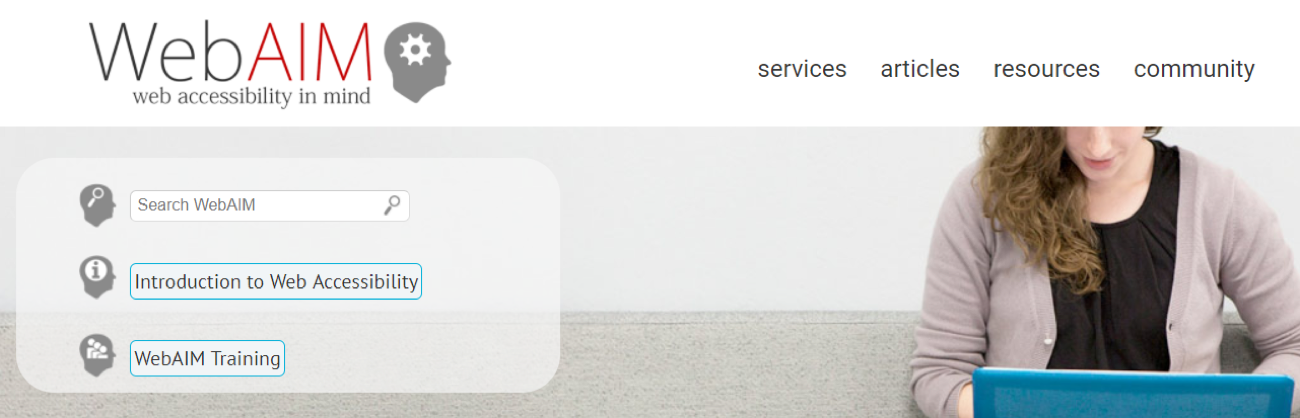
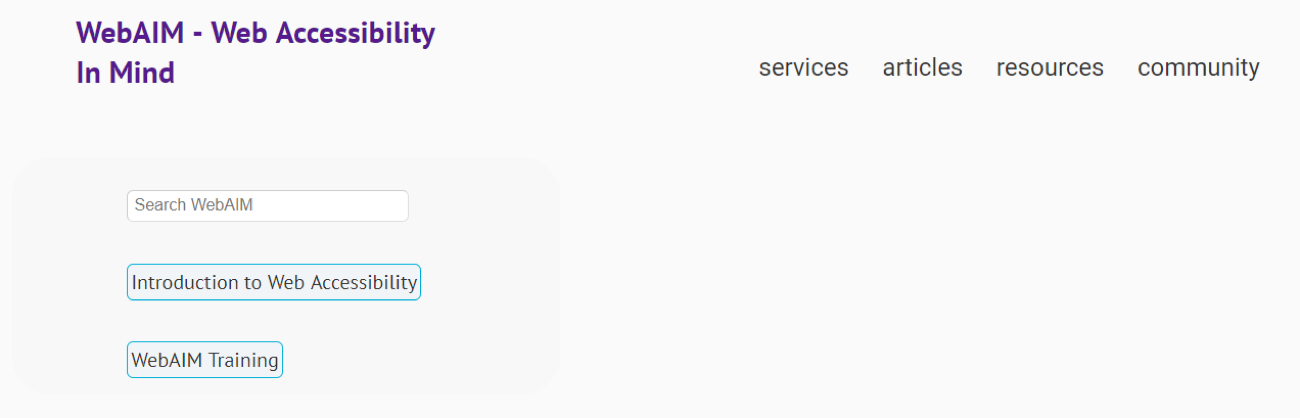
The WebAIM homepage, with a logo image, large background image, and a number of icons.

The WebAIM homepage again, but this time without images - note that only the important images have alt text.
The WebAIM homepage again, but this time without images – Note that only the important images have alt text.

People who have cognitive disabilities may also turn off images on a page in order to reduce the number of distractions. If a person has trouble processing large amounts of information or is easily distracted, turning off images can help.

Alternatively, a person may have a learning disability which prevents them from understanding text easily. In this case, it’s good to include images and other media to help them process the information on the page more easily.

In addition to improving accessibility, alt text is also used by search engines to determine the subject of an image and is considered as a ranking factor for SEO (search image optimization).

When do images need alt text?

Always! Every image should include alt text to ensure a positive experience for users who rely on screen readers. Even if an image is decorative and does not require descriptive alt text (more on this below), it’s still important to use an alt=”” tag. This prevents the screen reader from reading the image file name aloud (bad experience) to the user, which is a poor experience. In short, all images need some sort of alt text—even if it’s just an empty tag (“”).

Having answered with an “always!” above, I do want to clarify my comment about “decorative” images. In the accessibility world, we differentiate between images that are decorative and images that are informative.

Decorative images usually don’t need alt text (beyond the empty tag that I mentioned above). They may exist on the page for purely aesthetic reasons (in other words, to make the page look pretty). Or they may be repeating information that is already on the page as text. In that case, adding alt text to the image would be redundant.

Informative images, on the other hand, convey some kind of information. The rule I use to determine whether an image is informative or not is to imagine if it was removed from the design. If I would be missing information because the image was gone, then it means the image is informative and needs alt text.

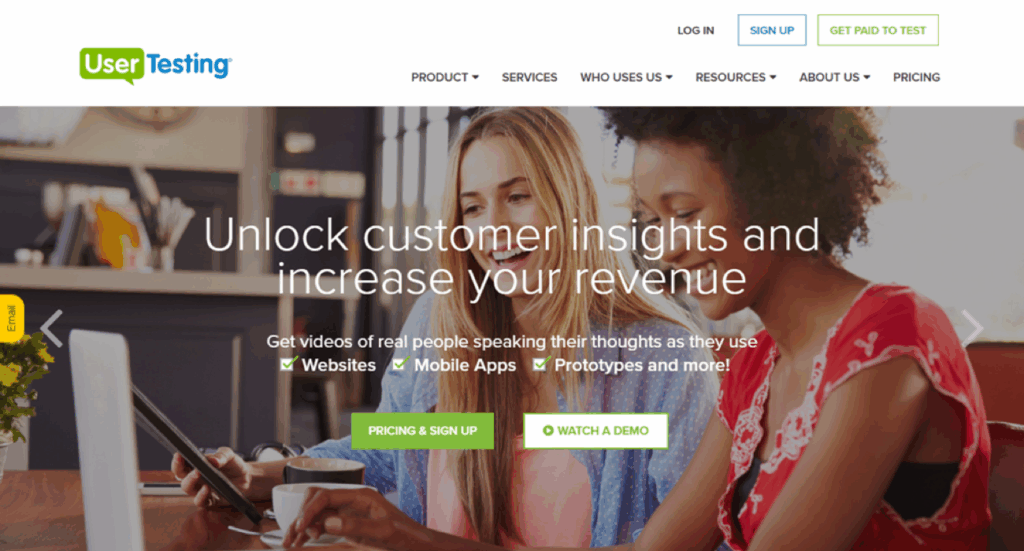
This webpage has two images: a large, colorful background image and a logo image. What happens if I remove them? This webpage has two images: A large, colorful background image and a logo image. What happens if they’re removed?

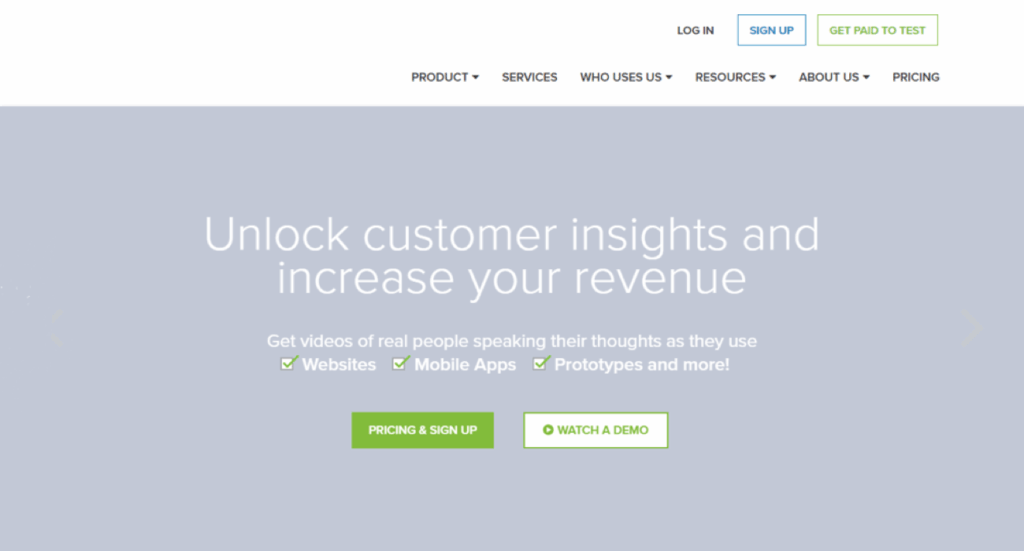
I’ve removed both images from the page. I can still understand everything without the large banner image, but with the logo missing, I’m not sure which site I’m on. Here both images have been removed from the page. I can still understand everything without the large banner image, but with the logo missing, I’m not sure which site I’m on.

The technique of removing the image can also help you understand the context for the image. In the case of the background image, its context is the text and buttons on top of it. The text and the buttons underneath explain everything you need to know about this banner. Providing an alt text description for the banner image wouldn’t add anything to the meaning.

It’s fairly common to see images in conjunction with text, particularly on news sites, social media, and e-commerce sites. Often, images are accompanied by a headline or other text that describes the image.

“Star Wars Darth Vader Teapot Set” and the price ($59.99) show in text underneath the image of a teapot, cup and saucer that are all Darth Vader-themed."
“Star Wars Darth Vader Teapot Set” and the price ($59.99) show in text underneath the image of a teapot, cup, and saucer that are all Darth Vader-themed.

In the case of this Darth Vader teapot set (from ThinkGeek RIP), the text underneath the image describes the image and is also rendered using HTML, which means screen readers will be able to find it. You could argue that the image should include alt text that is more descriptive than the text beneath it. For example, the alt text could describe the teapot in the photo as Darth Vader’s iconic helmet, and the teacup as having Darth Vader’s lighted chest panel on it. However, users won’t know all of the details about the tea set until they go to the product page for it, so you could also argue that the image doesn’t need any alt text because it’s purpose—as with the text beneath it—is to tempt the user to click the link for more information.

The moral of the story is that determining whether an image is decorative or not is often dependent on context.

Types of images that definitely need alt text

There are some types of images that are always informative, and therefore always need alt text. These include:

  • Images that are links or buttons
  • Images which contain important text
  • Logos

Even for these, it’s important to look at the image’s context – if there’s HTML-rendered text adjacent to the image that gives you the same information, then providing alt text can be redundant.

Images that are links or buttons

It’s fairly common to find images, especially on marketing or e-commerce sites, which are also links. For example, on a typical product listing on Amazon, most of the images on the page are pictures of products, which link to more detail about the product when you click on them. Sometimes these images are accompanied by text, but sometimes they are not, as in the following example:

Amazon’s “Interesting Finds” page contains a grid of images with no text that all link to products - fortunately, all of these images have decent alt text!
Amazon’s “Interesting Finds” page contains a grid of images with no text that all link to products. Fortunately, all of these images have decent alt text!

There are three keys to writing alt text for images (or buttons) that are also links:

  1. Clickable images should have alt text or be part of a clickable area that also includes HTML text that describes the image.
  2. Alt text or text associated with the image should make clear what will happen when you follow the link or activate the button.
  3. Images with no text around the image, it must have alt text!

Screen readers will always read out links and buttons. If a link is an image and has no alt text, all that a screen reader user will hear is the word “link.” Following links and clicking, buttons are two of the main ways people interact with websites. If a user can’t tell what the link or button is for, they likely won’t be able to use that part of the page.

Images of text

In general, it’s a good idea to use HTML to render text as much as possible, rather than embedding text in an image. HTML text doesn’t require any extra work on the part of the developer to make it accessible. However, when geared towards marketing, text is sometimes used in a way that can’t be replicated easily using HTML and CSS.

Take this old screenshot from Victoria’s Secret:

Victoria Secret banner ad for a pajama sale

This banner ad for a pajama sale uses two styles of text. One is a simple sans serif font in black, which would be easy to replicate using HTML and CSS. The other is a sans serif font which looks like it’s written using glitter. It would be very difficult to replicate the glitter using CSS.

The entire ad is a single image, however, and includes other images of pajamas sets, pairs of slippers, and a woman opening a gift. If designers and developers wanted to convert the basic black text to HTML while preserving the layout, they would have to use HTML and CSS to create a responsive layout which would accommodate multiple images and pieces of text. The solution that the Victoria’s Secret site used was to replicate all of the text in the image as alt text.

Given that these ads are often only up for a week or less, turnaround time is important. Some companies choose to just use alt text on the full image rather than meet the requirement to not use images of text. Technically, this is a failure of WCAG because while the alt text is helpful to screen reader users, low vision users do not have the ability to adjust font type, font color and background color.

Logos

It’s very rare that a product or company logo will be used in a way that doesn’t require alt text. Even when the logo has text in it, that text is usually part of the image and can’t be removed from it.

For example, the UserTesting logo is made up almost entirely of text. While the text could be replicated in HTML to remove the need for alt text, there’s no good or easy way of doing that without compromising the design of the logo. It is much simpler to add alt text to the image.

UserTesting logo
alt: UserTesting logo

Logos are also often used in the header or banner of a site and are often links which lead to the site’s homepage. These days, many users expect this functionality. At a minimum, the alt text for a company’s logo in the header should be the name of the company. For a slightly better experience, adding additional alt text which says where the link goes can be helpful. For the UserTesting logo, the alt text could read “User Testing – Home”.

Icons are images, too

There are many types of images that can be informative or not. It’s your job to determine whether an image is informative before you decide whether to write alt text. One type of image that often comes up in the design phase are icons. They deserve their own section here because, in my experience, designers often forget that icons and symbols are also images.

Icons follow the same principles as other types of images: they’re either informative or they aren’t. Here are a few questions to ask yourself about the icons you’re using:

  • Is there text directly next to the icon?
  • If there is text, does it describe exactly what the icon is for?
  • If the icon is a link or a button, where does it go?

It’s increasingly common to see icons which stand on their own, with no text around them at all. In that case, it’s very important to add alt text to the icons. Otherwise, they will be meaningless to anyone who can’t see them. It’s very rare for icons to be entirely decorative.

The Awwwards site uses multiple icons with no labels in the header alone. Unfortunately, none of them have alt text. The Awwwards site uses multiple icons with no labels in the header. Unfortunately, none of them have alt text.

Icons without text are not ideal. It’s preferable and less ambiguous to use a text label—rendered using HTML—right next to the icon:

  • Icons can be used for multiple purposes (think of the gear icon).
  • Including text with icons that are links or buttons means a bigger clickable/touchable area for the link or button.
  • If alt text is added to the icon because there is no text around it, screen reader users will likely have a better experience than everyone else.

If you’re using icons, try to find a place for a text label next to the icon. If that isn’t possible, make sure the icon is very clear and understandable, big enough to see (and click) easily, and has alt text. 

When should alt text be written, and who should write it?

If you created the image, you should write the alt text. If you didn’t create the image but you are the first to include it in a wireframe or mockup or prototype, you should write the alt text. If you’re a developer and you’re implementing UI with images based on something created by a content creator or a designer, you should not be responsible for writing the alt text – alt text should have been written by the time it gets to you. The developer’s responsibility is to make sure the alt text is implemented correctly.

When designers write alt text for images (especially icons and logos) as they’re finalizing a set of wireframes or mockups for a feature or a page, they can include alt text as part of the wireframe annotations. If someone is writing a blog post, they can write alt text or a caption (or sometimes both) for each included image as they’re creating the draft.

Alt text that’s written long after the fact (for example, during an “accessibility sprint,” or worse, after the site has launched), is usually less effective. The reasoning and context for including an image may have been lost in the process. As with all aspects of accessibility, it’s both faster and easier to write alt text up front, rather than to do it after the fact.

Finding the right balance for image descriptions 

While symbols, icons, and logos are straightforward to describe because of their simplicity, pictures with more detail require careful consideration to avoid overwhelming the reader. Focus on the key elements of the image, such as how many people are present, the location, and what activities are taking place. Thoughtful descriptions help people with disabilities better understand images they otherwise wouldn’t be able to see.

If you’re describing a house in alt text, simply writing “Photo of a house” is likely not enough. Instead, a more informative description like “Modern one-story home on quiet residential street with brown dog sitting in front” provides helpful context. However, going into excessive detail, such as “Contemporary large white one-story home with large expanses of glass, gray stone accents, manicured landscaping with four mature trees, and a medium-sized brown and white dog sitting on the front porch looking happy,” may be overwhelming and unnecessary.

In conclusion: writing alt text makes you a better designer (and creates better experiences for your users!)

One of the most valuable aspects of thinking about alt text is that it forces you to consider the meaning and purpose of any given image. And the practice of writing alt text can help you improve your designs and your content. 

In writing alt text for an icon, you might discover that the icon itself is too vague. This can then lead you to edit your designs to make the icon more understandable. If you’re writing a blog post and struggling to write a caption for an image you want to include, you might end up removing the image after all, because you realize that it didn’t illustrate your point as well as you thought it did.

By thinking more about the images you’re including in your design or content work—and the impact they have on all types of people—you’re able to make your work that much stronger. Images can be a very powerful form of information. The more thought you put into them, the more powerful they can become.

Patrick Sturdivant

Patrick Sturdivant

Patrick Sturdivant is Vice President and Principal Strategy Consultant at Deque Systems. Patrick has worked in information technology for over 30 years. An experienced software engineer who is blind, Patrick deeply understands the technical challenges our customers and the disabled community face when it comes to accessibility. Coupled with his testing, team building, training and DE&I strengths, Patrick is a consulting force to be reckoned with. For the last eleven years, Patrick has been dedicated to promoting digital inclusion for all through awareness and the benefits digital equality brings to all users by sharing his own personal story of leading a digital lifestyle using multiple screen readers on both desktop and tablet platforms. Patrick’s accomplishments include accessibility lab and disability employee resource group establishment experience, US Patent holder for several bank products designed for the blind and his ability to influence at all levels of an organization’s business and technical teams.

Tags:  accessible UX alt text UX

We’re at an inflection point for digital accessibility. With AI accelerating content creation and code generation, and global regulations and standards rapidly evolving, the pace at which teams must deliver quality, compliant, accessible experiences is intensifying—and so is the pressure.

Rising to this moment means having the right tools so organizations can scale digital accessibility, keep pace with modern requirements, and continue moving toward a more accessible digital world. To solve AI-created accessibility challenges, you need AI-powered accessibility solutions, and that’s exactly what Deque is providing.

Our two latest AI features are automated Intelligent Guided Tests and advanced rules. While we’ve had many enterprise customers already using these for months, you can now access these features directly in your browser extension, so it’s even easier for you to leverage in your workflows.

Drive more impact from your accessibility testing with AI-driven features

With our AI-enhanced capabilities, you’ll benefit from expanded automated coverage to help your teams find and fix more accessibility issues faster. You’ll also be able to expand who can participate in testing, making it easier for more people to uncover issues that previously required expert-only review. This means quicker issue detection, lower manual effort, and more bandwidth for strategic accessibility work.

Automated Intelligent Guided Tests

Automated Intelligent Guided Tests use AI to help your teams complete more complex accessibility tests faster and more consistently—without taking control away from human experts. Instead of manually working through guided questions and steps, AI assists by reviewing patterns, surfacing potential issues, and presenting clear findings for your team to review and approve with just the click of a button. You get the speed and consistency of automation while retaining full ownership of the final results.

Automated Intelligent Guided Tests also provide reasoning behind each finding, so your team can understand why an issue was flagged. This builds trust, confidence, and shared understanding across teams.

The first automated Intelligent Guided Test available is for interactive elements. We are actively automating more Intelligent Guided Tests (such as keyboard tests) so we can continue to help break down barriers to accessibility, make it easier to test earlier in the SDLC and scale across teams.

Advanced automated rules

These AI-powered rules tackle issues like heading structure, focus indicators, text contrast, and decorative images—areas that previously required manual testing or Intelligent Guided Tests. Now, your developers and QA teams can catch these problems early, consistently, and quickly. This means more people on your teams have the power to contribute to accessibility right away and move faster through workflows. You’ll also be freeing up your experts to focus on the most complex and strategic problems.

The impact: Faster, easier, more scalable accessibility testing

Teams once spent 30–45 minutes manually tabbing through every interactive element, discovering keyboard issues, documenting issues, and writing up remediation recommendations. With Intelligent Guided Tests, we were able to tremendously cut down that time to 2–3 minutes. Now, with automated IGTs powered by AI, those same tests happen in seconds—up to 4x faster than a standard IGT (and up to 60x faster than a manual test).

As you can see, these new AI features truly give you meaningful advantages in your accessibility strategy. Your team can automatically detect more accessibility issues with less manual work, while you stay in control of final decisions. Routine tasks are handled faster, freeing you up to focus on critical, high-impact accessibility challenges. And because more people (not just specialists) can contribute confidently, you build a more scalable, resilient accessibility program. It’s the ideal way to stay ahead in our AI-powered world.

If you’d like to check out these new features and learn more, contact our team to get a demo or start a free trial of the Axe DevTools Extension.

Request a demo today!

Harris Schneiderman

Harris Schneiderman

Harris Schneiderman is a web developer with a strong passion for digital equality. He works at Deque Systems as the Senior Product Manager of axe DevTools building awesome web applications. He wrote Cauldron (Deque's pattern library), Dragon Drop, and is the lead developer on axe DevTools Pro. When he is not at work, he still finds time to contribute to numerous open source projects.

Listen to this article

Recent proposals to “reform” the Americans with Disabilities Act (ADA) are being framed as a way to protect small businesses through notice-and-cure requirements. These proposed changes deserve careful, thoughtful examination.

At first glance, these proposals sound reasonable. Give businesses notice. Allow time to fix issues. Reduce unnecessary litigation. Those are not bad instincts. In fact, they reflect something important: most businesses are not trying to exclude anyone. Most accessibility failures are not malicious.

But reasonableness cuts both ways. And when we look more closely, we must ask harder questions: Who bears the burden during that waiting period, and at what cost? And perhaps most importantly, what is the real end goal, and is this the best way to get there?

In this post, we’ll look at the proposed changes, explore pros and cons on both sides of the argument, and highlight what needs to remain central to the conversation as this effort moves forward; namely, that digital accessibility is the goal, and that this goal is attainable—even for small businesses.

The ADA 30 Days to Comply Act

Congressman Mike Lawler is a co-sponsor of a bill called the ADA 30 Days to Comply Act, about which he has stated the following:


“The ADA was created to guarantee access and protect the rights of Americans with disabilities, not to fuel drive-by lawsuits that do nothing to actually fix the problem. Our bill creates a simple, fair process for navigating an ADA violation so that businesses get notified and have 30 days to make it right. That means quicker compliance, better access, and fewer bad-faith lawsuits that punish well-intentioned small businesses.”

This language presumes a contradiction that we need to unpack and address.

Accessibility and profitability are not mutually exclusive

Supporting disability rights and supporting businesses are not contradictory aims. In fact, long-term success depends on both.

I work with organizations every day that are overwhelmed by conflicting guidance, unclear legal expectations, legacy platforms, and limited budgets. Small businesses, in particular, are often navigating accessibility without in-house expertise or legal teams. Fear is real. Confusion is real. And yes, poorly framed lawsuits can feel punitive rather than constructive. Acknowledging that reality does not weaken the ADA. It strengthens our ability to implement it well.

Where we go wrong is when we assume the solution is to slow down enforcement rather than improve clarity, support, and accountability.

The real problem is not “drive-by lawsuits”

The narrative of rampant “drive-by” lawsuits suggests that businesses are being ambushed without warning. But in digital accessibility, that framing often obscures what’s actually happening.

Most accessibility issues are systemic, not accidental. They stem from:

  • Platforms chosen without accessibility criteria
  • Templates reused across dozens or even hundreds of pages
  • Third-party tools embedded without evaluation
  • A lack of ongoing testing and governance

When the same types of barriers appear repeatedly across updates and redesigns, the issue isn’t a lack of notice. It’s the absence of sustainable accessibility practices. When barriers are known, repeated, and left unaddressed, the resulting lawsuits should not be treated as a surprise.

It’s also worth stepping back and remembering what often gets lost in debates like this: access. Too often, conversations become overly focused on legal process rather than on whether people with disabilities can fully use websites and digital services. When we focus on how lawsuits occur rather than why barriers persist, we risk losing sight of what actually needs to change.

The most reliable way to reduce ADA lawsuits is not delay, but proactive prevention of accessibility barriers.

What a true win-win looks like

If we genuinely want to protect small businesses and uphold civil rights, we should focus on solutions that reduce friction without reducing rights.

That means:

  • Clear, stable technical standards so businesses know what “accessible” means
  • Safe harbors tied to good-faith, ongoing compliance, not one-time fixes
  • Education and tooling that make accessibility achievable, not intimidating
  • Procurement accountability, so small businesses aren’t forced into inaccessible platforms they can’t control

This approach doesn’t ask a person with a disability to wait longer for access. It helps businesses get ahead of problems before harm occurs.

The good news is that proactive accessibility is not reserved for large enterprises with legal teams and big budgets. With clear standards, affordable tools, and thoughtful platform choices, even small “mom and pop” businesses can build and maintain accessible digital experiences.

Accessibility done well is not about perfection. It’s about progress, maintenance, and accountability over time.

A better way to address “drive-by” accessibility lawsuits

If your business is on the receiving end of this type of lawsuit, you have two clear desires: 1) To resolve the lawsuit, and 2) To try and avoid any similar lawsuits in the future. To achieve these goals, you can work with qualified accessibility experts who can help you separate legitimate issues from noise, guide remediation in coordination with counsel, and ensure that your response is driven by fixing real barriers, not by fear or pressure. The goal is to resolve the issue responsibly and put durable accessibility practices in place so you’re not facing the same situation again.

If you do get hit by this type of lawsuit, don’t panic, but also, don’t ignore it. Engage legal counsel with experience in ADA and digital accessibility, and focus immediately on understanding the specific barriers being alleged. Bring in an experienced accessibility expert to validate the claims, identify high-impact issues, and help you build a concrete remediation plan with realistic timelines. Demonstrating good-faith action, documented progress, and a commitment to ongoing accessibility often matters more than achieving instant perfection.

A better way to approach legislation

Notice-and-cure requirements shift responsibility in a subtle but important way. They ask people with disabilities to first identify violations, formally notify the business, wait patiently, and hope remediation is meaningful—before the law will protect their right to participate fully. That may feel reasonable on paper, but in practice, it adds friction only for the person already facing the barrier.

The ADA exists because access was too often optional, delayed, or ignored. It is a civil rights law, not a customer service escalation process. When a person with a disability encounters a barrier (whether that’s a step at the door or an inaccessible website), the harm isn’t abstract. It’s immediate.

In digital spaces, especially, access is time-sensitive. If you can’t apply for a job today, access healthcare information today, complete coursework today, or engage with your government today, waiting 30 or 60 days is not a minor inconvenience. It is exclusion. And exclusion, even when temporary, is still a denial of equal access.

Moving accessibility and business forward—together

The ADA was enacted because voluntary compliance alone did not work. That history matters. Any reform effort must preserve the law’s core purpose: ensuring equal participation in society for people with disabilities.

We can, and should, support businesses with guidance, clarity, and reasonable pathways to compliance. But we should not do so by shifting the cost of delay onto the very people the law was designed to protect.

This does not have to be a win-lose debate. With the right balance, it can be a win-win: stronger civil rights protections and more confident, capable businesses.

That balance starts by remembering a simple truth: access delayed is access denied. The real path forward is committing to accessibility and taking proactive responsibility to sustain it by design.

Contact Deque today to explore how you can achieve proactive digital accessibility for your business.

Glenda Sims

Glenda Sims

Glenda Sims is the Chief Information Accessibility Officer at Deque, where she shares her expertise and passion for the open web with government organizations, educational institutions, and companies ranging in size from small businesses to large enterprise organizations. Glenda is an advisor and co-founder of AIR-University (Accessibility Internet Rally) and AccessU. She serves as an accessibility consultant, judge, and trainer for Knowbility, an organization whose mission is to support the independence of people with disabilities by promoting the availability of barrier-free IT. In 2010 Glenda co-authored the book InterACT with Web Standards: A holistic approach to Web Design.

Listen to this article

A roundup of recent regulatory and legal developments you can reference in discussions with your risk and legal teams.

As 2025 comes to a close, we wanted to be sure you’re aware of some recent EU and European Accessibility Act (EAA)-related news items that may be of use in your conversations with internal risk and legal teams.

These items include everything from urgent compliance gaps in the Netherlands and e-commerce regulatory cases in Sweden to a summons for interim relief in France and pending exposure of non-compliant products in the Czech Republic.

Being proactive is the only effective way to steer clear of legal risk, and stories like these can help you drive essential conversations and make the case for increased resourcing for digital accessibility in the new year.

The Netherlands

In our recent article about Digital accessibility in a post-EAA deadline world, we shared details and guidance with you regarding the October 15 deadline for non-conformance reporting established by the Dutch Authority for Consumers and Markets (ACM).

The ACM has since advised that, while many reports have been delivered, gaps remain, and companies that failed to report or submitted incomplete reports should expect to be prioritized for audits in early spring of 2026.

Hanneke van Rooijen, project leader and senior supervisory officer at the Netherlands Authority for Consumers and Markets (ACM), spoke on this at AbilityNet’s TechShare Pro conference:

“There is a very big gap between the status of the industry and the compliance with EAA. It will indeed be a process. We [the authority] understand that. So we take that into account in our approach.”

She went on to note that fines and penalties are “absolutely not the goal.” She said that the authority tries to be “mission and value driven in this work, which means that we try to contribute with our oversight to equal access and no exclusion for people using webshops and electronic communication services. In our approach, we will urge—and try to motivate businesses as much as possible—to make the necessary changes.”

Hanneke was also very clear about what to expect in the coming days and months:

“We have started testing the companies that didn’t reply at all to our letter and to the request for reporting non-compliance. After that, we will analyze the results. From there, we will select some businesses that didn’t reply and seem to be underperforming in the results of the audit testing. We will do further investigations into these companies and, if needed, take further enforcement measures.”

The key takeaway here is that if you have not reported yet, you are encouraged to work with the authority to do so. Otherwise, you’ll need to be prepared to respond to their audit findings, as the authority has stated they will commence interventions soon.

Should it be helpful to you, the English version of the NL-ACM’s website is now live.

Ireland

The Commission for Communications Regulation (ComReg) has started to process consumer complaints, including one against Ireland’s largest mobile telecommunications company, Three. It’s been reported that Three has been responsive and active in the wake of the formal processing of the complaint.

Sweden

The Swedish Post and Telecom Agency (PTS) has announced that it has now started its first regulatory cases specifically related to e-commerce with inspections to check that operators are compliant with the Accessibility Act. The review of e-commerce services will continue in 2026.

France

We previously reported in September that in France, disability organizations working with legal partners had issued a demand against four major grocery retailers for failing to make their digital services accessible.

The grocers did not meet the compliance deadline, so a summons for interim relief was entered before the Commercial Court in November. In an article on the proceedings, legal collective Intérêt à Agir wrote that, “having observed a certain indifference regarding respect for the law and the rights of people with disabilities, the associations decided to bring summary proceedings against the four companies in November 2025, so that the courts would put an end to a situation deemed discriminatory for people with visual impairments.”

When asked about the particular approach the plaintiffs are taking, Otto Sleeking, Partner at Taylor Wessing, replied, “It is interesting to note that the plaintiffs chose interim proceedings, which can be done if the focus is on compliance and not damages. This should result in a judgment on short notice.”

Deque will continue to monitor the progress of this case as it moves through the courts.

Czech Republic

The Czech Republic’s supervisory authority plans to publish lists of non-compliant products and services, particularly under the new General Product Safety Regulation (GPSR) and the European Accessibility Act (EAA), enabling market surveillance and enforcement.

Norway

Norway is not a member of the EU and therefore not governed by EAA. However, as they are following and implementing many EU laws and regulations, we thought it important to share this item for our customers that operate within this jurisdiction:

The situation began when the Norwegian Health Authority sent a notification of regulatory non-compliance to HelsaMi (a medical app used by nearly half a million residents in central Norway). They had identified many digital accessibility errors and issued an order of correction accordingly. HelsMI worked to reduce the defect list, but many errors remained even as the initial deadline passed. The authority then issued a decision imposing a compulsory fine and set a December 19 deadline to correct the remaining errors. After this, daily fines of 50,000 kroner (approximately USD$5,360) will start.

Next steps

What these examples make clear is that while the EAA’s impact is already being felt, its real-world implications are still evolving. In a situation this fluid, informed decision-making becomes critical, and our experts continue to monitor and report on the latest developments.

You can reach out to Deque today for strategic consulting on what to do with this information, what your organization should be addressing now and in the near future, and how to use these insights to reinvigorate internal conversations with colleagues and partners.

Matthew Luken

Matthew Luken

Matthew Luken is a Senior Vice President and Chief Architect at Deque, consulting with companies of all sizes, markets, and industries to grow their digital accessibility programs. Matthew also provides thought leadership to advance the profession and practice of digital accessibility and mature and maximize operations, processes, and outcomes. Prior to Deque, Matthew built and ran U.S. Bank’s digital accessibility program, providing accessibility design reviews, compliance testing services, defect remediation consulting, and more. The program leveraged over 1,500 implementations of Deque’s Axe Auditor and nearly 4,000 implementations of Axe DevTools and Deque University. Matthew also served as Head of UXDesign’s Accessibility Center of Practice, where he was responsible for supporting the digital accessibility team’s mission. As a digital accessibility, user experience, and service design expert, Matthew has worked with over 500 brands, covering every vertical and market. He also actively mentors digital designers and accessibility professionals.

Listen to this article

Here at Deque, there’s one thing that never changes—the mission. Digital equality has been our passion from the start, and it always will be. 

But that doesn’t mean we’re afraid of change—especially when it moves our mission forward.

Positive change is how we make progress on our mission, and the world of accessibility has given us some great examples this year, most notably, the European Accessibility Act.

If you’re watching closely, you’ll start to notice some pretty neat changes right here at Deque in the coming months. To see them, all you’ll need to do is visit our website, where the core elements of our rebrand will begin going live.

Yes, it’s a rebrand! Though really, it’s about meeting transformation with transformation.

Moodboard containing elements of the Deque rebrand, including logos, graphic elements, colors, and language.

This has been an incredible year for digital accessibility, but it’s also been an incredible year for Deque. We’ve advanced boldly into a rapidly evolving landscape driven by technological and regulatory transformation, as our founder and CEO, Preety Kumar, wrote recently in an article titled The EAA and the new era of digital accessibility:

“Even as we see sweeping global impact at the regulatory level, we’re also witnessing groundbreaking advancements in technology that are changing the world faster than we could have imagined. This confluence makes for one of the most critical moments in the history of digital accessibility.”

Deque has always been about meeting the moment. In a time of incredible opportunity, we knew we needed to ensure we had the best platform possible for bringing our innovations and values to the global fight for digital equality.

So watch this space, because we’re going to be rolling out all kinds of new things as part of our rebrand. New pages for our products and partners, and new paths for finding exactly the resources you need—not to mention new colors, a new font, and a new logo!

We couldn’t have achieved this without the insights and support of so many people, both inside and around Deque. Community is at the core of everything we do, and that principle guided our entire rebrand process. We talked directly to our co-workers, clients, partners, and the passionate accessibility advocates who make up our global community. Together, your perspectives were essential to getting this right.

We do this because a rebrand is a little different when you’re an accessibility company. This is an opportunity to showcase beautiful and accessible design in harmony. 

In addition to our commitment to accessibility, Deque is defined by being an innovative software company with a social good mission. Not just the one, not just the other. Capturing the essence of what that combination means was an essential part of this process, and it’s a foundation we go back to every day to ensure we’re showing up in the world as authentically as possible. 

We can’t wait for you to experience what we’ve got coming, so like I said, watch this space. 2025 showed us all that positive change on a global scale is possible. As 2026 promises even more, we’re excited to be right there with you, driving our shared mission forward!

Ryan Bateman

Ryan Bateman

Ryan is a Marketing leader at Deque. He's worked in the telecommunications and performance monitoring industries for over ten years and cares deeply about improving the web for everyone.

Listen to this article

When it comes to the most exciting digital accessibility event of the year, there’s no better time to start planning than right now, because we’re revealing the full agenda today.

If you thought last year’s event was amazing, wait until you see what we’ve got in store for you in 2026!

We’ve already announced Dr. Rana el Kaliouby and Haben Girma as our opening keynotes; if you weren’t able to read about these incredible visionaries and allies in our previous announcement, you can learn more about their accomplishments and impact below.

But right now, let’s discover who else will be bringing their insights and knowledge to the Axe-con community at our 2026 event!

We’ve got experts from Adobe to Zendesk, and all points in between, including Amazon Web Services, Atlassian, Coinbase, GitHub, Harvard Business School, HSBC, IKEA, Kaiser Permanente, Microsoft, Northwestern Mutual, Peloton, Walmart, Wix, Workday, and more.

Day one highlights

Here are just some of the special sessions you can attend:

Accessibility in the End of Deterministic Design (Again), with Anna Cook of Microsoft

We’re elated to have Anna return to Axe-con, and this will mark her third conference appearance. Anna is a Senior Inclusive Designer at Microsoft, where she specializes in building inclusive products. In this talk, Anna will discuss non-deterministic design, a way of building systems that remain accessible even when no two interfaces are exactly alike. If you’re interested in questions such as “How do we ensure accessibility when outcomes aren’t fixed?” “How do we test what we can’t predict?,” this is the session for you!

Building for a new next billion users, with Ire Aderinokun

Ire is an invited Google Expert in Web Technologies, and the co-founder of Helicarrier, a Y Combinator-backed blockchain company for Africa that built some of the continent’s earliest crypto-fintech products. In her presentation, she’ll discuss what digital inclusion means in 2026, and demonstrate how accessibility-first design can be the foundation for reaching your next billion users.

Integrating Axe for automated testing in a distributed engineering environment, with Thomson Reuters

This incredible session brings together three experts from Thomson Reuters to discuss how to scale automated accessibility testing and achieve the best outcomes. Peter Bossley leads the Standards and Practice team within the Thomson Reuters accessibility program. He will be joined by Corey Hinshaw, Lead Accessibility Specialist, and Pavan Mudigonda, Lead QA Engineer, Developer Experience. All three will be debuting at Axe-con 2026!

The Accessible Design Specialists Playbook, with Pawel Wodkowski of Atlassian

Pawel is an Accessibility Lead Designer at Atlassian with over 20 years of design experience. Pawel will share insights into how Atlassian has embedded Accessible Design Specialists and supported them with clear growth profiles, simple processes, and focused tools. He will also share strategies for recruiting and growing specialists, defining day-to-day expectations, and partnering with them in their day-to-day work.

Day two highlights

Here are some of the fantastic options for day two of Axe-con:

The Accessibility Impostors Game Show, with Jennifer Gorfine of Zendesk

Jennifer is a founding member of the Product Accessibility team at Zendesk, and was recognized as one of 14 Power Women in Code by the DCFemTech Awards. In this cleverly structured presentation inspired by the TV shows “Is It Cake?” and “Candy or Not Candy?,” this interactive session will help you learn how to tell accessibility impostors (interfaces that look accessible but aren’t) apart from the real deal.

Scaling Accessibility in a Complex Enterprise: Lessons from Audits, Adoption, and Shared Practices, with Ryan Schoch of Wolters Kluwer

Ryan is Director of CX/UX Advisory Services at Wolters Kluwer, a global leader in information, software solutions, and services. In his presentation, Ryan will share insights into his organization’s focus on strengthening interaction expectations and reusable UI foundations through accessibility reviews, design system improvements, and the centralization of practical authoring guidance.

Day two will also feature presentations from Mali Fernando of HSBC (recipients of the Accessibility Culture Award at the 2024 Axe Awards!) and Matt King from Meta.

Mali Fernando, Group Head of Digital Experience and Accessibility, HSBC

Mali is a multi-award-winning digital leader in banking. He was recognised in the King’s New Year’s Honours list of 2023, where he received an MBE for his contribution to banking and technology.

Matt King, Accessibility Specialist in UI Engineering, Meta

Matt King is a groundbreaking engineer and a champion for software accessibility. As the first blind engineer at Facebook (now Meta), he works to ensure that technology is designed for everyone, including people with disabilities.

Keynotes

Keynote banner featuring Rana El Kaliouby and Haben Girma

In case you didn’t see our previous Axe-con announcement about our keynote presenters, here are the details!

Day one opening keynote: Dr. Rana el Kaliouby

Rana is a true pioneer in artificial intelligence. She co-founded Affectiva, credited with creating and defining the new technology category of Emotion AI. Rana has since founded Blue Tulip Ventures, an early-stage venture firm that invests in startups building human-centric AI. She is also an executive fellow at the Harvard Business School and co-chair of the Fortune Brainstorm AI conferences. If that’s not enough, Rana is also the author of a best-selling memoir, “Girl Decoded: A Scientist’s Quest to Reclaim Our Humanity by Bringing Emotional Intelligence to Technology,” and has been recognized on Fortune’s 40 Under 40 list, Forbes’ Top 50 Women in Tech, and Boston Globe’s Top 50 Tech Power Players.

This will be Rana’s inaugural appearance at Axe-con, and we are elated to have her open our conference in 2026. If you’re interested in the intersections of humanity and technology and are eager to glean deeper insight into the future of AI, you’ll want this right at the top of your itinerary.

Speaking of itineraries, make sure to register for free today so you can start building out your agenda with your favorite sessions. February 24 will be here before you know it.

While Dr. Rana El Kaliouby will be debuting at Axe-con 2026, our day two opening keynote will be delivered by someone we’re all very excited to welcome back to the conference: Haben Girma!

Day two opening keynote: Haben Girma

We have been very fortunate to have so many incredible Axe-con presenters join us over the years, and the days and weeks following each conference are always a joy as we gather event feedback and hear from the community about which presenters you most loved and appreciated. It’s no exaggeration to say that Haben is one of our most requested returnees, and we’re thrilled to have her back.

Among her many achievements, Haben is also a celebrated memoirist. The New York Times, Oprah Magazine, and TODAY Show have all featured her book, Haben: The Deafblind Woman Who Conquered Harvard Law.

In addition to being the first Deafblind person to graduate from Harvard Law School, President Obama named her a White House Champion of Change. She has also received the Helen Keller Achievement Award and been included on the Forbes 30 Under 30 list. President Bill Clinton, Prime Minister Justin Trudeau, and Chancellor Angela Merkel have all honored her work as a human rights lawyer advancing disability justice.

Register for free today

Mark your calendars for February 24-25, 2026, check out the agenda, and complete your registration today!

All told, Axe-con 2026 will feature more than 45 sessions across development, design, organizational success in accessibility, and the wildcard track.

Truly, Axe-con has something for everyone. Please consider this your invitation to join your fellow developers, designers, business users, and accessibility professionals of all experience levels as we rally to advance digital accessibility programs everywhere.

And remember, your registration ensures that you’ll have access to the conference recordings, so even if you’re not able to attend all your favorite sessions live, you can still experience every inspiring and insightful moment.

“I’ve been working to advance digital accessibility for over twenty years. In that time, I’ve seen both successes and setbacks. But like everyone committed to this mission, I have never wavered in my faith that digital accessibility is the future. Well, that future is here.” —Preety Kumar, CEO and founder, Deque

Please join the global Axe-con community at Axe-con 2026 as we come together to create the future of digital accessibility in real time!

Deque Systems

Deque Systems

Deque is the global leader in digital accessibility, helping the world’s top enterprises build inclusive products, services, and experiences and achieve lasting compliance. Recognized by leading industry analysts for its AI-powered tools, comprehensive services, and developer-trusted solutions, Deque delivers the industry’s most complete accessibility offering. The Axe platform, anchored by Axe-core, has more than 3 billion downloads and 875,000 installed extensions, making it the global standard for accessibility testing. As a pioneer of people-first accessibility, Deque applies a human-in-the-loop approach that blends expert insight with AI innovation to advance its mission of digital equality for all.

Tags:  Axe-con 2026
Listen to this article

Deque founder and CEO Preety Kumar took the stage at Microsoft Ignite on November 18, joining Jenny Lay-Flurrie, Microsoft’s Chief Accessibility Officer, and Ed Summers, Head of Accessibility at GitHub, for a presentation titled “Building for Everyone: How Accessibility is Shaping the Future of AI.”

Jenny got things started with a delightful welcome, immediately charming the full room with a query about whether there had been long lines at lunch. She then embarked on a brief but comprehensive overview of what digital accessibility is and why it matters.

She covered Microsoft’s commitment to what she termed “accessibility at the speed of trust,” and outlined the three components of their approach: skilling, inclusive design, and listening systems.

Slide from a Microsoft Ignite presentation, about skilling, inclusive design, and listening systems.

If you’ve enjoyed a presentation from Jenny before, you know she’s got a tremendous knack for approachably balancing the tangible and the technical, and her self-styled “British sarcasm” certainly plays a key role in that—she got quite a laugh from the crowd when she asked if anyone had heard of AI!

Before closing her segment, she made a direct and powerful plea to the audience: “If you’re not yet invested in accessibility today, I ask you to change that … we need all of you. Lives change because of this work.”

All of us at Deque know this to our core, and it’s why we were thrilled to be a part of the Ignite experience. We were especially gratified by Jenny’s introduction of Preety, where she highlighted Deque as “one of our most amazing partners that we have worked with for decades.”

Part of the magic of Ignite is the scale of the event itself; it’s massive, and the actual experience serves to reinforce the scale of ambition that is everywhere present. Preety herself wasted no time clarifying Deque’s ambitions, stating right from the start that “our mission is to help every organization become and stay accessible.”

Preety Kumar at Microsoft Ignite: How Accessibility is Shaping the Future of AI

After giving the audience an introduction to our approach—which brings together technology, education, and services—she spoke directly to the question that seemingly looms over every discussion about AI: Will it help, or will it hurt?

When it comes to digital accessibility, Preety’s answer was clear: AI will help. It gives us the power to fix thousands of issues at a time at a pace never before possible, and, even more importantly, to proactively prevent issues in the first place.

In mentioning proactive digital accessibility, Preety echoed Jenny’s earlier assertion that “we must shift left,” and noted that when issues aren’t addressed until production, costs soar.

Slide from a Microsoft Ignite presentation, about how finding issues late leads to soaring costs

Preety continued to build on the themes that Jenny established, offering a twist on her “at the speed of” language to introduce the concept of “accessibility at the speed of AI.”

Slide from a Microsoft Ignite presentation about accessibility at the speed of AI

Agentic AI is central to this new era of digital accessibility, and Preety outlined Deque’s vision for an approach that combines the speed and scale of AI with human expertise to create a system where developers are in the driver’s seat, supervising code and making expert determinations about what to approve, improve, and reject. What this approach does is to create a continuous loop—code, find, fix, validate—that happens “at the speed of AI.”

Preety has been known to rely on her fair share of driving metaphors in her presentations. At Ignite, she memorably extended her “driver’s seat” analogy to include false positives, likening them to an air bag exploding when the car hasn’t actually been in a collision!

While this was the first mention of false positives, it was not the last. During the closing portion of Ed Summers’ presentation, he referred to no false positives as a “gift” from Deque and described Axe-core as “the gold standard of website scanning.”

Ed also touched on the theme of a “continuous” AI-powered cycle, joining Jenny and Preety in highlighting the need to “shift left”:

Slide from a Microsoft Ignite presentation, about continuous AI

All three presenters delivered a wealth of insight and information, with Ed’s final comments taking everyone right to the final seconds of the allotted time. While there wasn’t time for live Q&A, the recording from the presentation will be available on the Ignite website, and we look forward to continuing the conversation with our global community.

We want to thank Microsoft and the Ignite team for an incredible conference experience, and especially Jenny Lay-Flurrie and Ed Summers for being such brilliant co-presenters. We are also grateful to everyone who attended live or watched the event online.

As all conferences must, Ignite comes to an end, but the mission of digital accessibility is ongoing. And, as Jenny said, we need you all!

Deque Systems

Deque Systems

Deque is the global leader in digital accessibility, helping the world’s top enterprises build inclusive products, services, and experiences and achieve lasting compliance. Recognized by leading industry analysts for its AI-powered tools, comprehensive services, and developer-trusted solutions, Deque delivers the industry’s most complete accessibility offering. The Axe platform, anchored by Axe-core, has more than 3 billion downloads and 875,000 installed extensions, making it the global standard for accessibility testing. As a pioneer of people-first accessibility, Deque applies a human-in-the-loop approach that blends expert insight with AI innovation to advance its mission of digital equality for all.

Listen to this article

As a developer, you’re probably already contending with digital accessibility in some capacity. Pretty much everyone is, because that’s the world we live in now. And that’s a good thing, because it’s the right thing.

When shipping features and writing components, accessibility is increasingly a given. Developer teams are leading by example, building accessible products from the start, setting new standards for the industry, and using world-class tools to make a lasting impact.

Discover new industry-leading accessibility tools today!

By enabling this work, companies are demonstrating their commitment and raising awareness that accessible code is no longer optional—it’s essential.

However, while incorporating accessibility as we code is essential for preventing barriers from creeping into the digital experiences we create, being essential doesn’t mean the process is friction-free.

Awareness is progress, but awareness alone doesn’t erase the challenges of tight deadlines, changing priorities, legacy code, and uneven understandings across teams. A new kind of advocacy is needed.

Advocating for accessibility means pushing to do what’s right—for our users and the health of the codebase. That tension between doing what’s right and shipping fast is something most developers face daily. To succeed, accessibility advocacy must address this tension head-on, and who better than developers to lead the way?

Balancing velocity and accessibility

As developers, we’re expected to move quickly to deliver net-new features and keep value flowing. That’s part of what we thrive on.

But when new features go out and accessibility issues start coming back in, we run into trouble. Bugs, audit findings, and requests for fixes can pile up. Sprints meant for innovation have to pivot to remediation. Before you know it, instead of building something new and exciting, you’re revisiting something old—repeatedly.

That constant loop can wear you down. Velocity drops, tension builds, and digital accessibility can start to feel like a blocker instead of a core part of quality engineering.

For many developers, the challenge isn’t the willingness to code accessibly, it’s getting the support and buy-in from your team leads. You want to do the right thing, but without clear guidance or the right tools, progress stalls, and you’re stuck in the break-fix cycle.

The break-fix cycle

As time goes on, the lack of support and alignment starts to slow everything down. You ship a feature, and it gets flagged for accessibility issues. It comes back for fixes, and you fix it and send it out again. Then the same thing happens in the next sprint, and the next, and the next after that, and on and on it goes. This is the dreaded break-fix loop: something ships, breaks, gets patched, and ships again.

It’s not efficient, and it’s not satisfying. Your backlog fills with remediation tickets, and your velocity inevitably drops. Now, management wants to know why features aren’t moving faster, and they’re pointing the finger at you, even though it’s not your fault, and it’s not from lack of effort. You want to move faster, but how can you, when you lack the clarity, resources, and processes to build things accessibly from the start?

Shifting left as the solution

There’s a way out of this cycle.

You’re likely familiar with the term “shift left.” It refers to catching issues earlier in the development process—before they reach production. We’ve seen a shift to left work in the realm of security. Most developers would shy away from leaving an API key exposed in their source code before pushing it to GitHub. It’s about incorporating secure practices at every step.

The same principles apply to digital accessibility.

Conducting accessibility testing as you code means it’s part of your everyday workflow, rather than an afterthought. That’s what shifting left is really all about. However, that shift doesn’t happen automatically. It starts with education and awareness.

Developers want to do the right thing, but how can we do so if we haven’t been shown how? We don’t know what we don’t know. Once teams understand the fundamentals of accessibility—what matters, why it matters, and how to apply it in code—tools become far more effective. Education provides the knowledge; tools make it faster and easier to act on that knowledge.

Education resources like Deque University are literally the standard for learning digital accessibility. You can even take it a step further with Axe Assistant, Deque’s very own accessibility chatbot. It’s trained on Deque University’s knowledge base, the world’s largest, most comprehensive, and most trusted accessibility resource. You can ask Axe Assistant relevant accessibility questions, and it can return principles and code snippets you can add to your repository.

Tools like the Axe DevTools Extension can automatically catch most accessibility issues upfront before code even reaches QA or production. Once you see that in action, the benefits become clear. Less rework, fewer blockers, and more time spent building new features instead of fixing old ones that came back for remediation.

Shifting left restores your velocity by equipping you to fix the issues in your environment before handing them off to someone else. You have the power to build with digital accessibility in mind from the start. You’ll reduce your backlog and be able to get back to doing what you love—shipping great code that’s usable for everyone.

Igniting organizational change and advocating for digital accessibility

Individual effort makes a huge difference, but lasting change happens when digital accessibility becomes part of how your entire organization builds. Crucial conversations have to happen at the team, managerial, and executive levels. These conversations can start small, with a single developer asking the right questions. From there, changes ripple outward to dev leads, product owners, scrum masters, and risk teams. Eventually, it becomes clear that shifting left and embracing proactive accessibility is about digital transformation at the highest levels.

However, the change doesn’t initially have to be this huge thing. It can start with small, visible wins that prove the value early and give leadership something tangible for them to stay invested.

Drive that momentum. Talk openly about how much time is lost to rework, how many sprints get clogged with fixes, and how much faster things move when accessibility is built in from the start. Framing digital accessibility as a way to protect velocity and maintain speed builds the business case for accessibility. It enables everyone to see it not as extra work, but as smarter work.

If your developers are ready to take the next step, we recommend pairing education with practical tools. Encourage your organization to:

  • Provide developers with access to Deque University for hands-on learning.
  • Enable Axe DevTools in local or CI environments so accessibility checks run early.
  • Use Axe Assistant to give developers quick, reliable answers without waiting on specialists.

These small changes can spark a broader shift. Once teams see how education and the right tools accelerate delivery, accessibility no longer feels like a blocker and becomes the new standard for quality engineering practices.

Your role as the hero

Be the advocate who takes the lead on accessibility. You won’t just improve your own code quality or how your team works—you’ll help transform your entire organization. You can be the one showing that building accessibly saves time, reduces rework, and helps everyone ship faster. You’ll be setting an example, proving that accessibility is an engineering best practice requiring lower effort than may be assumed.

This is where real change starts: one developer setting the example, asking the right questions, and showing that quality and velocity can coexist. You’ll be helping your team move from reactive fixes to proactive progress.

If you want to keep learning and connect with others who care about building accessible experiences, join the Axe Community on Discord. It’s a friendly space where developers share tips, ask questions, and talk through real accessibility challenges. Come hang out, learn from each other, and be part of the growing accessibility movement.

Join the Axe Community on Discord!

And remember, you’re the hero who helps your organization build better, for all users.

Let’s get started.

Jeremy Rivera

Jeremy Rivera

Jeremy Rivera is a Developer Advocate for Deque Systems Inc. He is a full-stack MERN Developer and a University of South Florida alum. Jeremy transitioned to developer relations to bridge the gap between software and developers needing a diverse array of tools. He is a general technologist and evangelist of open-source and cloud-based tools, passionate about helping developers make the web a more inclusive environment.

Deque’s global community recently came together for the debut of a brand new type of event: an Axe-con Mini!

You may be familiar with our annual Axe-con event. It’s the world’s largest digital accessibility conference—a two-day, multi-track experience featuring dozens of keynotes and presentations covering a vast range of accessibility topics.

By comparison, an Axe-con Mini offers all the excitement, insight, and expertise of Axe-con, but contained in a single, compact event. For our inaugural event, it was “dev-day,” and our theme was “Removing friction from accessible development.”

We were very excited to have the following expert guests join us for this special session:

  • Vitaly Friedman, Founder, editor-in-chief, creative lead, Smashing Magazine
  • Karen Herr, Director, Product Accessibility, Salesforce
  • Jenny Lay-Flurrie, Vice President, Chief Accessibility Officer, Microsoft
  • Jacqueline Tolisano, Senior Director, Product Accessibility, Salesforce

Joining from Deque were:

  • Preety Kumar, CEO, Founder
  • Dylan Barrell, CTO
  • Wilco Fiers, Director, Accessibility automation, Deque

As wonderful as it was to bring all these experts together, it’s always the global community that makes every Axe-con event special—and we do mean global!

Among the countries represented at our debut Axe-con Mini were Austria, Canada, France, Germany, India, Israel, Kosovo, Portugal, Spain, Sweden, and Turkey. As for here in the United States, we had guests join in from California to Florida and everywhere in between, including Michigan, Montana, Texas, and more.

Watch the recording now on the Axe-con Mini dav-day page!

Accessibility nightmares and how to fix them

Things got off to a fantastic start with Vitaly Friedman’s presentation titled “Frustrating Accessibility Nightmares In 2025 and How To Fix Them.” If you’ve enjoyed a Vitaly presentation previously, you know he’s a master of making the very tactical very entertaining, and this talk was no exception. He dove right into CAPTCHAs, search filters, FAQs, navigation, and infinite scroll, asking about the latter (with a comically theatrical sigh), “What IS the deal with infinite scroll?”

He then proceeded to respond to his own question, with an answer that culminated in ten actions you can take to improve infinite scroll experiences:

  1. If in doubt, always prefer pagination.
  2. With infinite scroll, always integrate a footer reveal.
  3. Consider separating “old” and “new” items visually.
  4. Allow users to pin a position and continue later.
  5. Experiment with “load more” + infinite scroll.
  6. Experiment with pagination + infinite scroll.
  7. Change the URL as new items are loaded in.
  8. Allow jumps to any page with a pagination drop-down.
  9. Consider using scrollbar range intervals.
  10. Always consider accessibility and performance issues.

If running down a litany of accessibility “nightmares” sounds a bit dreary, Vitaly’s presentation was anything but, and he ended on a note that was characteristically both practical and inspirational:

“What people like is when things are fast and accessible. When you have large and legible text.  When you have checkboxes that look like checkboxes.  When you have input boxes that look like input boxes. It’s all been the same for the last twenty years, but there’s absolutely no magic behind it, right?  And we’re already doing so much right. It’s unbelievable.  It’s just that, sometimes, we are struggling with retaining accessibility rather than building it in. So, I’m sure that with your incredible effort, we can do better.”

“With your incredible effort, we can do better.” —Vitaly Friedman, Founder, editor-in-chief, creative lead, Smashing Magazine

While there were countless positive comments in the chat after Vitaly finished, this one nicely sums up how people felt:

“Vitaly is the GOAT.”

Enterprise AI workflows that ship clean, compliant, accessible code

Next up came Jenny Lay-Flurrie. Jenny is, of course, no stranger to the Axe-con community. She has presented at Axe-con in the past. In 2023, Deque recognized her work at Microsoft, presenting Microsoft with the “Accessibility at Scale” award. Deque also recognized Jenny personally, presenting her with the Jim Thatcher Lifetime Achievement Award.

The scope and scale of Microsoft’s impact means that Jenny’s perspective and insights on the accessibility profession are always invaluable:

“As accessibility leaders, our job is two-fold. One is to make sure that you are building a systems-based culture of accessibility within your company and ecosystem. The second is to make sure that you are also helping your customers by being accessible with the products that you produce. And how do we really make sure that we deliver on that? It is about trust.”

“It is about trust.” —Jenny Lay-Flurrie, Vice President, Chief Accessibility Officer, Microsoft

Coming as she does from a place of deep experience and influence, her words during this event served a powerful call to action:

“We have to live and breathe the principles of inclusive design.  If we just stick with that floor of conformance and compliance, we’re not going to deliver on the potential and the community needs that there are for assistive technology.”

Jenny’s observations about the new era of AI and accessibility were particularly profound:

“Clearly, we’re in the era of AI, and we’re also in the era of what I’m framing as a tidal wave. If we don’t put our arms around AI in the right way, we will be propagating some of the harms that have been inherent in our community over the last few decades.”

As to how to respond to this new world?

“We need to shift left. Shifting left is how we avoid the tidal wave.”

Deque CEO and founder Preety Kumar presented next, quickly weaving together threads from both Vitaly and Jenny’s presentations, acknowledging the efforts we’ve made while highlighting the urgency of accelerating our efforts to meet the challenges presented by an AI-powered world:

“Last year, 96 percent of the web was inaccessible. This year, it’s 95 percent. We’ve made 1 percent progress. And what keeps me up at night is that with AI, we’re getting more and more prolific.  We’re going to create more and more code.  All of us are becoming more productive, but with AI, I think all of us collectively understand that we must take personal responsibility for the code that we produce.  Otherwise, the problem is going to get bigger, we’re going to get to 98 percent inaccessible instead of that 1 percent that we gained, and I don’t want that to happen.”

“We must take personal responsibility for the code that we produce.” —Preety Kumar, CEO, founder, Deque

Dylan Barrell, Deque’s CTO, dug further into this line of thinking:

“I don’t think there’s any serious company out there that would deploy code to production—whether it’s written by a human or written by AI—that hasn’t been tested for functionality, as well as things like accessibility, security, and performance.  I think that having a  healthy amount of distrust for the code that you’re generating is a healthy thing.”

Dylan made clear, however, that “healthy distrust” needs to scale at the same pace as AI:

“The gap between the amount of code that we’re generating and the amount of automated testing of that code that we can do is increasing. In this age of development at the speed of AI, anything that’s done manually is going to be perceived as a drag on productivity. It’s increasingly unlikely that we can fill this gap by adding more and more manual resources to the problem. So, we have a concern here.”

Fortunately, as Dylan stated, there is a way forward:

“At Deque, we believe very strongly that what we need to do is fight the AI fire with AI itself. We need to look for ways that we can leverage AI to get ahead of this problem.”

“We need to fight the AI fire with AI itself.” —Dylan Barrell, CTO, Deque

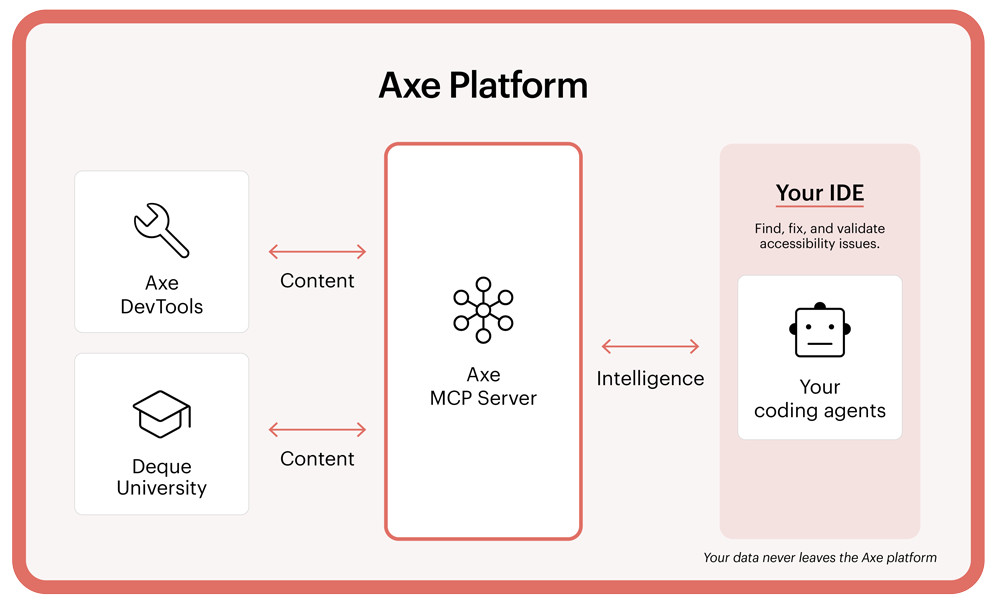
At Preety’s urging (“Come on, Dylan, developers want to see real stuff working, do it live!”), Dylan proceeded to demonstrate “accessibility at the speed of AI” in four steps:

Step 1
Give your AI agent (e.g., Copilot or Cursor) a digital accessibility task (e.g., make this code accessible).

Step 2
It will call the axe Platform through MCP to understand the accessibility task and prompt (using axe Assistant) on how to best resolve the issue.

Step 3
The AI agent will use that information to suggest a code change in your IDE.

Step 4
The developer can decide to accept, edit, or reject the suggested change in just one click.

Jump to 1:08:41 to watch this portion in the video demo.

AI agents and accessibility

Anytime we’re talking about AI and accessibility, we have to think about the role that human expertise plays in the process, and our presenters from Salesforce were excellent on the subject of how AI agents—specifically, Agentforce Vibes from Salesforce—can be “accessibility buddies.” Here’s Karen Herr, explaining more about this concept:

“As accessibility practitioners, we don’t want to cause harm. I don’t want the tool to go in and make a component worse for someone with a disability. And we don’t want to replace humans and human judgment.  We know that humans have to be the ones who decide to accept or reject changes.  We have an ethical responsibility to make sure that we are using our powers of discernment now more than ever. The LLMs are a ‘sidekick’ to work beside us—not to replace  us and our level of discernment.”

“We have an ethical responsibility to make sure that we are using our powers of discernment now more than ever.” —Karen Herr, Director, Product Accessibility, Salesforce

Accessibility in the role of automation

After a short break, we returned for the closing portion of the event, a presentation from Deque’s own Wilco Fiers on “Accessibility in the role of automation.” Wilco’s premise was straightforward: “AI-written code is often inaccessible. These things are trained on the web, and the web is largely inaccessible. So, there are problems there.”

To address these problems, Wilco focused on two key topics: 1) Advances in automated rules, and 2) Automated Intelligent Guided Tests (IGTs).

Regarding automated rules, Wilco described a new rule set developed to run alongside Axe-core. These fully automated rules address some of the most common accessibility issues that currently require manual review:

  • Headings lacking semantics
  • Presence of focus indicator
  • Multi-color text contrast
  • Incorrect decorative images
  • Incorrect informative images

Wilco noted that, with these rules, automated coverage has increased from about 57% to around 65%, with further measurement underway.

Wilco then moved on to Intelligent Guided Tests (IGTs):

“An IGT takes you through a question-and-answer process; it asks you questions about different things on the page. Based on the answers you give, it will figure out what the accessibility problems are. If you’re not an accessibility expert, you’re still able to test that page for accessibility issues.”

Specifically, he detailed how Deque is working to automate this process:

“Instead of having those questions posed to you, what will happen now is you start this IGT, it  analyzes the page using AI, it attempts to come up with the answers for these questions, it fills those out, and then presents the results to you, so you can  review them.”

Central to this process is human involvement:

“We’re trying to make it easy to override and leave the final judgment to you, because, ultimately, you, as humans, you, as developers or as testers, are the people who know these components best and can best make these judgments.”

“You are the people who know these components best and can best make these judgments.” —Wilco Fiers, Senior Accessibility Engineer, Deque

Wilco highlighted four “minimal requirements” for getting AI in accessibility right:

  1. Explicit uncertainty reporting (confidence or other)
  2. Transparency of AI decisions
  3. Direct human verification
  4. Easy to correct when wrong

And four risks of getting it wrong:

  1. Wrong violations waste developer time
  2. Missed violations ship to production
  3. Confusion about accessibility requirements
  4. Erosion of trust in accessibility testing

What’s next for Axe-con Minis?

As our first Axe-con Mini event made very clear, even a three-hour session can spark the same illuminating exchange of ideas that has always defined the Axe-con experience.

The good news about Axe-con Minis is that you won’t have to wait an entire year before the next one! Make sure to bookmark our Axe-con Mini page, as we’ll post updates about the next event soon. If you’re interested in hosting your own Axe-con Mini event, contact us today!

Thank you to our wonderful presenters, and thank you to everyone who joined us from around the world. You are why we do what we do, and you are why the mission is possible. Let’s keep building an accessible world for all!

Deque Systems

Deque Systems

Deque is the global leader in digital accessibility, helping the world’s top enterprises build inclusive products, services, and experiences and achieve lasting compliance. Recognized by leading industry analysts for its AI-powered tools, comprehensive services, and developer-trusted solutions, Deque delivers the industry’s most complete accessibility offering. The Axe platform, anchored by Axe-core, has more than 3 billion downloads and 875,000 installed extensions, making it the global standard for accessibility testing. As a pioneer of people-first accessibility, Deque applies a human-in-the-loop approach that blends expert insight with AI innovation to advance its mission of digital equality for all.

For decades, accessibility in India was viewed as a thoughtful addition, not as something essential. That’s now changing.

The Government of India has introduced draft accessibility standards (PDF) that will reshape how people design, build, and experience the world.

These wide-ranging draft standards cover everything from commonplace physical items such as kitchen tools, shoes, and elevators to the websites, kiosks, and mobile apps we engage with every day.

When implemented, these standards will make accessibility a required part of daily consumer life—the norm, not the exception.

This is more than regulation. It’s a mindset shift, and India has the opportunity to demonstrate its commitment to innovation and inclusivity on the world stage. For business leaders, this is the moment to prepare, to adapt, and to lead. Those who act early will be the visionaries. The rest will just be trying to keep up with requirements.

What’s new

India’s draft accessibility standards represent a major step forward in how accessibility is defined and managed. The new approach focuses on three main ideas: making everyday items physically accessible, prioritizing digital accessibility, and adopting a holistic approach that treats physical and digital experiences as interconnected.

Extending physical accessibility to everyday life

For the first time, accessibility rules will apply to more than 20 types of everyday products used by millions, such as kitchenware, clothing, furniture, medical supplies, childcare products, packaging, and more. The aim is to make these items easy, safe, and inclusive for everyone, regardless of ability. Accessible examples include utensils that are easy to grip, packaging with tactile and Braille labels, adjustable furniture, and shoes with accessible fasteners.

Prioritizing digital accessibility

The new standards acknowledge that digital products and services, such as payment terminals, kiosks, mobile apps, and websites, are now as commonplace as physical products. The draft standards require all digital interfaces to work with assistive technologies like screen readers and voice commands, use high-contrast visuals and tactile feedback, and offer audio instructions.

A holistic, unified accessibility framework

Implicit in India’s new draft standards for accessibility is a key premise: everyday life doesn’t distinguish between physical and digital experiences, so accessibility shouldn’t either. For example, the new standards introduce a rating system that will be applied to both physical and digital products. Based on the POUR principles (Perceivable, Operable, Understandable, and Robust), products will be tested and rated from Level A to AAA based on how accessible they are. Regular audits and penalties will help ensure that companies follow the rules. The standards require that people with disabilities be involved at every stage, from design to testing, to ensure products are truly usable.

Why this matters for businesses

Together, these changes extend and expand how accessibility is understood and achieved in India, and establish a new set of rules for how accessibility is required throughout everyday life.

These changes will have a direct impact on organizations that produce physical and digital products, services, and experiences.

Your offerings will be tested and rated, and failure to comply will introduce potentially serious financial, legal, and reputational risk for your organization.

To successfully meet these standards and mitigate these risks, you’ll need to be proactive and focus on early planning, design, development, and ongoing testing.

What can your business do today?

While we don’t know the exact timeline for when these new standards will be implemented, momentum for digital accessibility in India is rapidly increasing. It seems prudent to assume more changes are coming.

We’ve already seen significant moves from the Securities and Exchange Board of India (SEBI) on accessibility, as well as from the Supreme Court, who, in April 2025, delivered a landmark ruling that affirmed that digital access is a fundamental right under Article 21 of the Indian Constitution (Right to Life), and the Bureau of Indian Standards (BIS), who introduced IS 17802 in 2023, which strengthens existing provisions regarding ICT products and services.

In light of this momentum, your organization has a choice: start planning now and be ready when the changes come, or wait and then try to react fast enough to avoid any negative consequences.

Given that non-compliance involves serious risk—including fines, recalls, and public disclosure—the choice should be clear. Consider your team’s current velocity as well. How long will it take your organization to get educated on digital accessibility, equip teams with the right tools and processes, and start delivering results? You don’t want to still be figuring these issues out when the new standards are already being implemented.

Proactivity is going to be especially important because the new standards will involve rigorous testing by accredited bodies and a rating system that will clearly label products from Level A to Level AAA.

Let’s look at some basic steps your organization can start taking today to ensure you’re prepared when the new standards are implemented.

  1. Integrate accessibility checks into existing processes

Automate accessibility scans through tools in your development pipeline to catch problems with code before release. Combine these with manual testing using assistive technology such as screen readers and keyboard navigation to cover gaps that automation misses. These steps help you find and fix accessibility problems continuously—not just at the finish line.

  1. Embrace a shift-left approach

Shift accessibility testing and remediation to the earliest design and development phases—in other words, shift left. By catching issues early and fixing them before they hit production (or worse, your customers!), you save time on costly remediation. You’ll also have fewer issues overall, which means less risk.

  1. Conduct audits and prioritize fixes

Use audits or gap analysis  to determine where you have accessibility issues, and then prioritize them based on impact and effort. For example, prioritizing easier fixes can help you quickly make significant progress, generating momentum. Prioritizing fixes on high-traffic pages, on the other hand, may be more complex, but the improvements will have a larger impact.

  1. Provide role-specific training

Provide role-based training for all roles, including designers, developers, and QA testers, as well as your marketing, customer support, and product teams. Individuals and teams can sign up for modern accessibility courses (like those at Deque University), attend webinars, or work with invited expert trainers. Accessibility is a company-wide concern, and having cross-functional alignment and knowledge increases efficiency and efficacy.

The above are some foundational best practices for accessibility.

Something else you’ll want to get ahead of is having people with disabilities involved in your processes. The new standards require collaboration with people with disabilities throughout the entire product lifecycle.

Finally, it’s important to assess accessibility through the lens of risk, and understand that risk comes in many forms, including:

  • Legal: Failure to make products and services accessible can expose your organization to lawsuits, as well as the fines, recalls, and exposure mentioned above.
  • Financial: Financial risk goes beyond fines. If your organization embeds accessibility throughout your processes, and does not shift left, your likelihood of releasing inaccessible products goes up, which means your remediation costs go up. Market share is another factor. If your organization is exposed for not being accessible, that opens the door to accessible competitors to step into the breach and claim greater share, hitting your bottom line.
  • Reputational: Reputational risk goes beyond public disclosure and potential loss of market share. Increasingly, people shop with their values, choosing organizations whose business values they believe align with their personal values. Businesses that prioritize inclusivity see increased brand loyalty. Businesses with poor reputations suffer.

Be a part of the bigger story

India is moving to expand accessibility into our everyday physical and digital lives. These new draft standards aim to make sure everyone, regardless of ability, can easily and safely use the products and services that are essential in our modern world.

These standards are not suggestions—they’re mandatory, enforceable requirements spanning 20 major product categories. They include features like Braille, tactile labels, audio instructions, and digital screen compatibility with assistive technologies.

For businesses in India, this is a bigger story than just a new layer of compliance boxes to tick off. This is a revolution in thinking about how our physical and digital lives interact, and what accessibility and inclusivity really means. The new standards make accessibility a mandatory component of our everyday lives. This is a radical process.

As a business leader, this is your chance to take your place at the vanguard. Yes, it’s about adopting processes and tools to streamline accessibility and save time and money at the product lifecycle level. Yes, it’s about proactively engaging and collaborating with people with disabilities. Yes, it’s about rigorous testing and continuous improvement.

But more than all that, it’s about being a leader in the new era of accessibility. India is taking its place on the global stage as a leader. Your business needs to be a part of that story.

Next steps with Deque

Deque has a proven track record of supporting organizations with interpreting new standards, strategizing compliance roadmaps, and implementing seamless accessibility workflows.

As a government-empanelled web accessibility auditor, Deque is uniquely positioned to help organizations interpret the draft requirements and develop practical compliance strategies.

Taking early action will not only reduce legal, financial, and reputational risk but also position your organization at the forefront of this new era of accessibility.

To learn more about these standards and how you can position your organization for success, contact Deque today.