 This week, we’re highlighting more great courses at Deque University – our comprehensive online curriculum in web accessibility. Choose from a variety of self-paced and instructor led-courses to help you build a knowledge base of digital accessibility techniques for practical use in your work. (Be sure to check out more resources below!)
Lately we’ve been interested in how certain programs, software and operating systems can be made accessible. This is especially relevant now, with the Section 508 refresh underway. We’ve decided to focus on MS PowerPoint Accessibility Techniques for our “course in the spotlight” this week. One of the great things about this course is you don’t need to have advanced technical knowledge of accessibility in order to harness the accessibility capabilities of Powerpoint.
Making PowerPoint Accessible
In short, the MS PowerPoint Accessibility Techniques course examines the issues related to creating accessible PowerPoint files. Regardless of whether you intend to use the files in their native format, or you want to export them into HTML or PDF, Deque University’s PowerPoint Accessibility Techniques has you covered.
Some topics presented in the course include:
- Accessible fonts and text
- Using Templates
- Closed Captions – we’ll walk you through the process, including downloading the necessary add-ons
- Formatting Images
- Visibility for Colorblindness
- Floating elements and the drawing layer
- Embedded Media
- A11y Hacks using features like Outline View and Speaker Notes
- Alternatives to PowerPoint
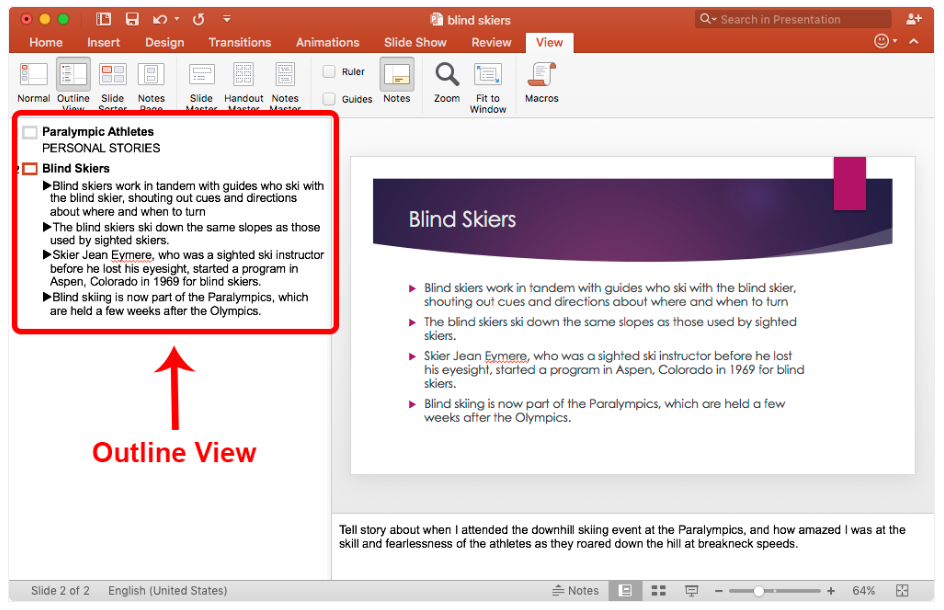
The MS PowerPoint Accessibility Techniques course is suitable for those at any technical level (or lack thereof). Even if you’re well-versed in PowerPoint, you may be surprised to learn of all the tips and tricks for making the files accessible. For example, we highly recommend using a template in your presentation. Using them properly will ensure that your headings and lists are structured the right way, in the correct reading order. Best of all, using the slide layouts correctly is probably the easiest thing you can do to make sure that your content is accessible. And speaking of accessibility, there’s even a PowerPoint accessibility checker built into the program. It’s pretty basic as far as accessibility checkers go, but it is useful in pointing out potential errors in your PowerPoint file. To learn more on PowerPoint accessibility, be sure to check out this very valuable course available at Deque University. Remember, implementing accessible features ultimately means better usability (and clarity) for everyone.
Additional Resources – Deque University & Beyond
We’ve written extensively about our popular Deque University courses in the past. Start with out Web Accessibility Fundamentals course to learn the building block basics of digital accessibility. Then you can move on to our more specialized courses to suit your individual needs, including:
- HTML and CSS Accessibility
- ARIA and JavaScript Accessibility
- Web Accessibility Testing Techniques
- Mobile Web Accessibility
Plus, you can discover how Deque University is changing lives with our scholarship program. And if you’re interested in learning more, be sure to find out if you qualify for a free scholarship to Deque University.