Thank you for joining me to learn about the second part of my journey overseas. In this post, I’ll cover my experiences on the plane as we flew to Germany from Texas and how it went with landing, deplaning, and getting through customs. If you want a refresher before diving in, you can read Part One here.

And with that, let’s catch up with Patrick (me) in the air!

Noise levels in the cabin

In general, the flight over was very enjoyable. As you may recall from Part One, I was traveling with a new carrier, and I’m happy to say that my first excursion with this German airline was a positive one, especially in the noise-level department, as the airplane was the quietest I have ever experienced—and I was sitting just forward of the wing! I know that in-cabin noise can vary and is often louder in older planes. I also know that where you sit can make a difference, so I was especially happy about the noise levels, given my seat location.

People with certain disabilities can have sensory processing differences, be sensitive to loud noise, or experience difficulty concentrating or understanding information when there is too much background or environmental noise. Items like noise-canceling headphones can help, but a quiet plane is great, too!

My helpful seat companion

For this trip, I was in premium economy, which meant I got additional legroom, a pillow, and a blanket. I was seated on the aisle in a grouping of two seats, with the other seat being on the window side. I was fortunate to share my experience with a seat companion who was a very lovely lady flying home to Germany to visit her ninety-plus-year-old mother. She was quite a conversationalist and very eager to read things to me, describe things, and flag down flight attendants when I needed something.

I mention this because, on this flight, I encountered a certain digital accessibility concern that I didn’t expect. We were flying on a European-built wide-body airliner that—per the airline—was almost new. The interior was very crisp, clean, and modern in many respects. However, I was surprised to find that the plane had a touchscreen-based tablet affixed to the back of each seat—commonly known as an In-Flight Entertainment (IFE) unit.

Challenges with the in-flight entertainment system

I had been under the impression that most aircraft manufacturers were moving to a “bring your own device” model, but perhaps that’s not yet the case everywhere. I know that when I flew to Germany six years ago, I was also confronted with an IFE unit in front of me, and as a blind traveler, it was as useless to me then as was this newer example.

Fortunately, the IFE unit was mostly not an issue, at least not initially. Expecting not to have access to music or videos on any sort of in-flight system, I had come prepared with my own wealth of books and music on my iPhone to keep me entertained for the ten-hour flight.

What I did not realize until my seatmate pointed it out was that the call button for assistance was not a physical button on the seat arm or overhead but a control on the touchscreen. How was I supposed to find it? I was fortunate enough to have a seatmate who had no problems touching the panel for me if I needed assistance. But what would I have done if she was sleeping? What if the seat hadn’t even been filled at all, or if the person who filled it wasn’t willing or able to help me?

Since I couldn’t access anything on the touchscreen unit on my own, I mostly just ignored it. Instead, I relied on my newfound friend for assistance when I needed something that was touchscreen-based, like determining where we were on our route or how long it was until we arrived. Most importantly, I had a friendly seatmate nearby to assist in getting the attention of the flight staff. But that’s not always going to be the case for myself or anyone else with a disability who is flying, so this is an issue that needs to be addressed.

There is probably some disagreement out there as to whether things like flight information and entertainment are essential to a successful flight. That’s understandable. However, the ability to call for assistance is a crucial feature that one should not be denied equal access to just because of having a disability.

For myself, I know I could also just get out of my seat and wander up front to ask the crew in person. However, based on some past experiences, I’ve learned this can make some flight personnel nervous. If I stand up and start moving around, they get concerned that I will get lost in the plane—why, I cannot comprehend. But it’s all the more reason to have another means to call for assistance.

Other than the issue with the IFE, the flight was a pleasant one. Ten hours later, we were ready to touch down.

My helpful escort at the German airport

Landing, deplaning, and getting through customs all went smoothly thanks to the expert assistance of my German escort, provided by the Frankfurt airport.

I mentioned in my previous post that in the US, individuals dedicated to assisting people with disabilities are not airport staff. They are contracted by the airlines. I don’t know whether this fact contributes to the varying levels of support and service you receive, but if my Frankfurt experience is any indication, shifting responsibility to the airports could be a great idea! My escort was very professional and knowledgeable, spoke six languages, knew everything about the Frankfurt airport, and successfully delivered me to my waiting relatives.

Conclusion

That’s the end of Part Two! Thank you for “flying” with me (sorry, I couldn’t resist) as I share my experience of traveling internationally as a person with a disability.

In my third and final post, I’ll share about my time in Germany and what it was like flying back to Texas. Given how long the flight was, I had a lot of time to think. I’ll also relay some of the big questions I was pondering about travel, accessibility, and the local and global regulations that impact these experiences for people with disabilities.

Until then, stay safe out there, and if you find yourself sitting next to someone on a plane who is unable to use the touchscreen, help them out. They’ll appreciate it more than you know.

Patrick Sturdivant

Patrick Sturdivant

Patrick Sturdivant is Vice President and Principal Strategy Consultant at Deque Systems. Patrick has worked in information technology for over 30 years. An experienced software engineer who is blind, Patrick deeply understands the technical challenges our customers and the disabled community face when it comes to accessibility. Coupled with his testing, team building, training and DE&I strengths, Patrick is a consulting force to be reckoned with. For the last eleven years, Patrick has been dedicated to promoting digital inclusion for all through awareness and the benefits digital equality brings to all users by sharing his own personal story of leading a digital lifestyle using multiple screen readers on both desktop and tablet platforms. Patrick’s accomplishments include accessibility lab and disability employee resource group establishment experience, US Patent holder for several bank products designed for the blind and his ability to influence at all levels of an organization’s business and technical teams.

Creating an inclusive and accessible hiring process is more than just meeting legal requirements—it’s about fostering a workplace that truly values diversity. By prioritizing accessibility from the start, you’re opening the door to a wider talent pool while building a culture that values equity, innovation, and respect for everyone.

In this post, we’ll explore how to build accessibility into your hiring process in a way that’s a win for both your company and your future employees. We’ll cover everything from dispelling disability myths and implementing inclusive recruiting practices to creating accessible application forms and optimizing for accessibility during interviews. We’ll draw on established best practices as well as our own experiences at Deque, where we’ve witnessed firsthand how bringing together different perspectives and experiences makes our team stronger.

In addressing this topic, we’re grateful to Jennifer Stark, Managing Attorney, Disability Rights California (DRC) for collaborating with us to help bring you these actionable strategies and pro tips for recruiting and hiring accessibly.

Replacing myths with facts

To build a truly inclusive workplace, employers must first confront and dismantle common myths about employees with disabilities. These misconceptions, often rooted in outdated stereotypes, create unnecessary barriers and prevent companies from benefiting from the full value of diverse talent.

Myth: We’d have to lower our standards
Fact: People with disabilities are often rated above average for performance and even outperform their peers without disabilities in productivity. Not only is it simply the right thing to do, but disability-inclusive hiring drives gains for your bottom line. Companies that hire and cultivate inclusive cultures for people with disabilities generate 28% higher annual revenue on average, driven by increased innovation enabling teams to capture new markets with inclusive products.

Myth: People with disabilities will miss work too much
Fact: Employees with disabilities often have equal, if not better, attendance rates than their peers without disabilities. In workplaces that offer accommodations, employees with disabilities are less likely to turn over.

Myth: We can’t afford accommodations
Fact: Over 50% of accommodations cost absolutely nothing. The median one-time cost for accommodations that incur a cost is $300. Those with ongoing accommodation costs had a median annual cost of $1,925. Factor in the increased revenue, productivity, and profitability of disability-inclusive hiring, and your organization can actually gain from building an organizational culture that champions individuals with disabilities.

Strategies for recruiting

Now that we’ve dispelled some myths about hiring individuals with disabilities, let’s explore practical strategies that create a more accessible and inclusive recruiting process.

Evaluate your current culture and systems

Equitable and inclusive hiring is not just about making more offers to people with disabilities. It’s about valuing the expertise and experience of employees with disabilities and supporting their professional growth through their entire journey at your organization.

To understand where your organization is currently, here are some questions you can ask of everyone from yourself and your colleagues to hiring managers and talent leadership:

  • How would we describe our organization’s current culture for people with disabilities?
  • How prepared are we to provide accommodations and support the retention and growth of employees with disabilities?
  • How does building a more equitable hiring process for people with disabilities align with our organizational goals?

Use this dialogue to set clear, actionable goals for improving your hiring process. For example, at the Disability Rights Center (DRC), the goal is to have 50% of their staff be individuals with disabilities. This focus on inclusion is embedded in every step of their process, from hiring panels that always include a person with a disability to ensuring that final candidates for any role represent diverse abilities. This intentional approach creates a structure that aligns talent acquisition with the company’s commitment to diversity and accessibility.

Pro tip: Set clear targets and accountability measures for hiring individuals with disabilities, and embed those goals into your everyday hiring practices. It’s more than a numbers game—it’s about creating a sustainable, inclusive culture where everyone can succeed.

Offer comprehensive benefits packages and remote work options

Benefits and perks are always factors when deciding whether to accept a new job offer. For employees with disabilities, however, they are especially crucial. A comprehensive benefits package is likely to be essential for maintaining their physical and mental health care plans, and the flexibility to work remotely will enable greater control over their environment and increased access to the assistive technology and space modifications they are already using at home.

Pro tip: Offering flexible work options and comprehensive benefits isn’t just a perk—it’s a commitment to inclusivity. When employees feel supported both in and outside work, they’re more engaged, productive, and loyal.

Build partnerships

There are thousands of organizations dedicated to helping employers and employees with disabilities find great talent matches. They include everything from the Workforce Recruitment Program and state vocational rehabilitation agencies to disability services offices at universities and colleges. “There is a Disability Rights Bar Association where we frequently post our jobs. This has been a great way to get in touch with advocates with lived experience from across the entire country,” says Jennifer Stark. By partnering with community organizations that serve individuals with disabilities, you can tap into a diverse, highly skilled talent pool that might not come through traditional recruiting methods.

Pro tip: Establish ongoing relationships with disability organizations to keep your talent pipeline full and diverse. Engage with them regularly to stay connected to a network of strong candidates who are ready to contribute to your company’s mission.

Revise your job descriptions and application questions

When drafting job descriptions, consider what’s absolutely necessary for the job and describe what needs to be accomplished, rather than how it should be done. Do your employees need to be strong oral communicators, or do they just need to communicate effectively with others?  Reframing can open the door for new talent. Make it explicit that you value the lived experience of people with disabilities. In your application questions, provide an opportunity for individuals to voluntarily disclose a disability and make it clear that you welcome accommodations.

The Employee Assistance and Resource Network’s guide “Encouraging Applicants with Disabilities” provides many more great tips for drafting inclusive job descriptions and application questions. 

Pro tip: Use inclusive language in your job descriptions and ask for feedback from individuals with disabilities to ensure your listings reflect your commitment to creating an accessible and equitable workplace.

Ensure your applications are accessible

One of the biggest challenges for people with disabilities is equal access to job listings and online applications. If job search engines aren’t accessible, how does someone with a disability even get to the job posting? You could be missing out on the ideal employee just because your application isn’t accessible!

There are also legal risks to consider. Under the Americans with Disabilities Act (ADA), employers can be held accountable even if they are inadvertently discriminating due to their application materials being digitally inaccessible. Make sure any documents and job posting platforms you use are accessible.

Pro tip: Try scanning the website where you’re posting using Deque’s free axe DevTools browser extension and learning more about document accessibility through Deque University’s Document Accessibility courses.

Strategies for interviewing

You’ve recruited a diverse pool of applicants. How do you ensure your interviews enable you to secure top talent with disabilities?

Design your interviews with accessibility in mind

Rather than simply reacting to requests for accommodation, design your process proactively to be as accessible as possible. Interviewing in person? Consider if your location is accessible to a candidate using a wheelchair. Interviewing online? Consider if you’ve chosen a platform that’s digitally accessible. At Deque, we use the Zoom platform with human-generated captions or ASL as needed.

In designing your process, plan questions and activities aligned to the skills required for the job and think through areas where accommodations may be needed. Can you provide questions in advance? Can you vary the structure of interviews? Can you provide flexible timing or format for an assignment? Providing clear and flexible options allows candidates to feel respected and gives them the opportunity to fully showcase their skills.

Pro tip: Design flexible interviews that allow candidates to demonstrate their strengths in different ways.

Be proactive about accommodations for interviews

Think through areas where accommodations may be needed and create clear protocols for asking for and responding to requests for accommodation. Explain your interview process in advance and ensure all candidates are asked if they need anything to fully participate in the hiring process. This makes clear that you welcome accommodations and allows both you and the candidate time to meaningfully plan for accommodations. And remember, under the ADA, employers are legally required to provide reasonable accommodations for job interviews. Again, be proactive.

Pro tip:  Make requesting accommodations easy and stress-free. Include a line in your interview invitation email offering the option for accommodations, and be specific about how to make that request. Make sure your interviewers are trained on how to respond to and meet reasonable accommodation requests.

Train your hiring managers

Ensure your hiring managers receive training to build awareness of their potential biases and implement structures to mitigate them, like including people with disabilities on your hiring panels. This is essential because hiring manager bias is a core driver of lower rates of employment for people with disabilities. Have clear policies regarding ethical and ADA-compliant questioning in interviews and ensure this guidance is clear to anyone conducting interviews. Ensure everyone is versed in basic disability etiquette to create a welcoming environment for candidates with disabilities.

Pro tip: Build accessibility awareness into ongoing training programs, not just as a one-off. Make it part of your hiring team’s ongoing education to stay aligned with best practices.

Know the risks of using AI for screening resumes

Many organizations have turned to AI-based tools to help streamline the hiring process by automatically screening resumes. While these tools can be useful, they come with a risk: AI can inherit the biases that exist in the data it’s trained on. If not carefully monitored, these biases can result in unintentional discrimination against candidates with disabilities.

At Deque, we know the potential of AI to revolutionize processes, but we also know the importance of embedding accessibility and equity into these systems. Ensure that any AI tools used in your hiring process are regularly evaluated for bias and are transparent in how they score and filter candidates.

Pro tip: Human oversight is essential. Use AI to assist in the screening process, but always ensure that trained recruiters review results to mitigate any potential bias and ensure that all candidates are evaluated fairly, particularly those with diverse experiences and backgrounds.

Strategies for making meaningful job offers

Once you’ve selected a great candidate, it’s time to make an offer. That means thinking about not just salary and benefits but retention and mentorship. For employees with disabilities, you also need to factor in providing reasonable accommodation. These are all part of creating an equitable and supportive work community.

Ensure your offer is competitive

Pay equity is a crucial factor in creating an inclusive workplace, and people with disabilities must be compensated fairly. Historically, people with disabilities have faced wage gaps and, in some cases, have been paid less than minimum wage. Ensure pay equity by evaluating if the offer is competitive within the job market and on par with offers made to employees without disabilities entering similar roles.

Pro tip: Conduct a pay equity audit across your organization, ensuring that all employees—including people with disabilities—are compensated equitably for similar roles. This sends a clear message that your company values fairness and equal opportunity for all employees.

Provide reasonable accommodations

Accommodations are not just a legal requirement under the Americans with Disabilities Act (ADA); they are critical to ensuring employees can perform their jobs effectively and feel supported in their work. Providing reasonable accommodations is an ongoing, flexible process that requires open dialogue and a proactive approach.

Pro tip: The Job Accommodation Network (JAN) is a great free and confidential resource for guidance on effective accommodations. JAN provides valuable insight into low-cost solutions that can greatly impact employee satisfaction and productivity.

Focus on retention

Retaining employees with disabilities goes beyond the hiring process. It involves creating a long-term culture of inclusion, growth, and support that ensures employees feel empowered and valued and have access to resources that support their professional development and personal needs, including support from mentors who can help them thrive in their roles.

Consider establishing Employee Resource Groups (ERGs) or affinity groups specifically for employees with disabilities. These ERGs can offer a safe space for employees to share experiences, provide mutual support, and advocate for broader organizational changes. Disability:IN highlights companies doing just that, providing specialized mentoring, education, and networking opportunities to support the growth and leadership of employees with disabilities.

Giving employees an opportunity to self-identify their disability is another vital step your organization can take. At the Disability:IN 2024 global conference, there was a wonderful session on this topic titled Count Me In: Strategies to Support Global Self Identification. The focus of the session was on how “a disability-focused self ID campaign can help shape the narrative surrounding global self-identification and inspire employee participation.”

Pro tip: Provide employees with disabilities opportunities to take on leadership roles within mentoring and resource programs. When employees with disabilities are visible in leadership, it reinforces your company’s commitment to inclusivity and provides role models for others within your organization.

Inclusive hiring: A catalyst for innovation and growth

Accessible and inclusive hiring isn’t just a checkbox for compliance; it’s a transformative strategy that strengthens your workforce and drives innovation. It’s not just about expanding your talent pool—it’s about embedding accessibility into the DNA of your organization, where equity is a core value and diverse perspectives fuel creativity and problem-solving.

As we observe National Disability Employment Awareness Month, consider whether you’re seizing the full potential of inclusive hiring. The steps you take today to eliminate barriers and empower people with disabilities are an investment in the future of your workforce. This commitment sends a clear message that your organization values innovation, growth, and equality, and recognizes that accessibility isn’t an afterthought—it’s the foundation for success in a diverse, ever-evolving world.


Glenda Sims

Glenda Sims

Glenda Sims is the Chief Information Accessibility Officer at Deque, where she shares her expertise and passion for the open web with government organizations, educational institutions, and companies ranging in size from small businesses to large enterprise organizations. Glenda is an advisor and co-founder of AIR-University (Accessibility Internet Rally) and AccessU. She serves as an accessibility consultant, judge, and trainer for Knowbility, an organization whose mission is to support the independence of people with disabilities by promoting the availability of barrier-free IT. In 2010 Glenda co-authored the book InterACT with Web Standards: A holistic approach to Web Design.

Thank you for joining me for another episode of Accessibility Reads! We’re here to look at some of the most notable recent stories from the world of accessibility, and I’m excited to share what we’ve been reading about at Deque.

In my short video below, I highlight some specific stories to stay on top of. I explore their significance and explain why I recommend you check them out.

Do you have a story we should read? Please share it on social media and tag us! You can also leave a comment on this post.

Featured articles

Some good news for increased accessibility in the skies: Virgin Atlantic has launched British Sign Language (BSL) cabin crew support. Now, people flying with Virgin can request cabin crew who know British Sign Language.

Be My Eyes and Meta have announced an accessibility partnership. Their “Call a Volunteer” experience will be provided on Ray-Ban Meta Smart Glasses, unlocking hands-free accessibility for blind and low-vision people for the first time.

Ryan Rix, a clothing designer from Swansea, was born with one forearm. He says his disability has inspired his passion for accessible fashion. While growing up, the clothes available to Ryan made him feel like he had to hide himself. He decided to learn how to craft and adapt his own clothes and now designs pieces for others with physical disabilities. Ryan is competing in a new ITV show for a role with Marks & Spencer.

The World Wide Web Consortium (W3C) turned 30 years old and marked the occasion with a video highlighting the milestones for their organization and the internet. Meanwhile, after 15 years of working on developing a safer and more accessible internet, the World Wide Web Foundation (WF) is set to close, saying “mission accomplished.” Foundation co-founders Rosemary Leith and Sir Tim Berners-Lee, the inventor of the World Wide Web, confirmed the decision in a letter shared online by the organization.

In the world of sports, Brett Favre reveals Parkinson’s diagnosis during Congressional hearing on the misuse of welfare funds in Mississippi. He states that this was a recent diagnosis.

More stories

Below, I’ve gathered some additional links to compelling stories that I think are well worth exploring:

‘Wicked’ Director Jon M. Chu Talks Creating “Accessibility In Oz” For Disabled Character
While discussing the character of Nessarose, Wicked director Jon M. Chu opened up about creating an accessible set for actress Marissa Bode.

Neuralink Brain Implant Wins an FDA Nod to Tackle Blindness
The regulatory approval is just the first phase of a long project, but Neuralink owner Elon Musk is already touting his brain implant tech as a world-changing solution for people with vision loss.

Take a seat for a tactile treat: Exhibit explores accessibility in modern art
Sacramento State Library Gallery hosts the exhibit Don’t mind if I do, organized by artist Finnegan Shannon and curated by Lauren Levy to challenge preconceptions of modern art while expanding accessibility.

AI tool could help cities improve accessibility at intersections
Researchers at Utah State University are developing an AI tool to identify accessibility issues at intersections, which could make it easier for cities to find and fix those issues.

This week’s recommended read

If you read just one thing this week, I recommend:

United Nations: Pact for the Future

Global leaders have made powerful commitments to a more inclusive and accessible world, especially for people with disabilities. The report’s message is clear: inclusion and accessibility are not optional—they are essential for a sustainable, equitable future.

Bonus content!

This Instagram post replays an ASL conversation between some first-grade deaf students as retold by their teacher. (Fair warning: it’s fart humor!)

Conclusion

Thank you for joining me for Accessibility Reads, and please stay tuned for our next edition.

In the meantime, please visit deque.com to learn more about how we’re advancing digital accessibility and inclusion across the globe.

Is your business ready to expand your digital accessibility efforts? Schedule a free strategic consulting session today!

Matthew Luken

Matthew Luken

Matthew Luken is a Senior Vice President and Chief Architect at Deque, consulting with companies of all sizes, markets, and industries to grow their digital accessibility programs. Matthew also provides thought leadership to advance the profession and practice of digital accessibility and mature and maximize operations, processes, and outcomes. Prior to Deque, Matthew built and ran U.S. Bank’s digital accessibility program, providing accessibility design reviews, compliance testing services, defect remediation consulting, and more. The program leveraged over 1,500 implementations of Deque’s Axe Auditor and nearly 4,000 implementations of Axe DevTools and Deque University. Matthew also served as Head of UXDesign’s Accessibility Center of Practice, where he was responsible for supporting the digital accessibility team’s mission. As a digital accessibility, user experience, and service design expert, Matthew has worked with over 500 brands, covering every vertical and market. He also actively mentors digital designers and accessibility professionals.

Tags:  news

Think about all the places you’ve been to during the past few weeks, and try to remember how many different self-service kiosks you have used along the way. It’s probably more than you thought!

You might have paid for parking at a smart meter or charged your car at an EV charging station. Maybe you used an ATM to get cash or deposit a check. Perhaps you snagged tickets to a show or used the grocery store’s self-checkout. If you were at an airport, you probably checked in and printed your boarding pass at an airline kiosk.

Interactive kiosks have become familiar fixtures in our lives. They’re convenient, helping us to live independently. They often act as extensions of our personal devices in public places, making it easy to complete all sorts of transactions.

Everyone who uses a kiosk wants a fast, easy, and intuitive experience—including people with disabilities, who represent one-fourth of U.S. adults (2022 data) and 16 percent of the global population. Unfortunately, despite these numbers, kiosks are too often not built to be accessible.

This has to change. Companies that use kiosks to interact with their customers must understand that accessibility is not only ethical and inclusive—it’s a business and a legal issue. Excluding the world’s largest minority can make your organization vulnerable to lawsuits and complaints, and you’re potentially blocking a large percentage of your customers from using your service.

The global interactive kiosk market is projected to grow significantly, with estimates ranging from $32.5 billion in 2023 to $63.3 billion by 2032, according to Zion Market Research. ATM kiosks are expected to dominate the US market with $16 billion in revenue, followed by retail use cases that include quick-service restaurants, ticketing, bill-pay, gaming, hospitality, and photos.

Ensuring that kiosks are accessible is essential for businesses and customers alike. In this post, I’ll examine what makes kiosks unique, clarify existing regulations, and share best practices for meeting the needs of all users.

What makes kiosks unique?

Kiosks require a simple user interface that can be used without training or documentation. They are designed for customers to conduct unattended transactions.

Kiosk interfaces can be coded using familiar operating systems such as Windows, macOS, Android, iOS, and Linux. Because the industry has many specialty vendors supplying custom tech stacks, there is no one self-service solution that can simplify achieving accessibility.

Another critical aspect of free-standing kiosks is that they prohibit users from attaching assistive technologies. Their public location mandates that users cannot install a preferred screen reader or screen enlargement software nor bring a keyboard or pointing device. This is known as “self-contained” or closed functionality. This limitation changes how accessibility is managed.

Why kiosks must be physically and digitally accessible

When considering kiosk accessibility, most people think of wheelchair access. Is the kiosk located at the top of the stairs with no ramp? Are the controls within reach? Can the screen be seen?

While meeting physical standards for clearance and maneuvering is essential, digital content must also be accessible. Otherwise, people who cannot see or interact with touchscreen displays are blocked from using the service.

A kiosk or ATM owner is responsible for providing accessibility for both the hardware and software.

Here are two foundational accessibility solutions that can help people with no or low vision use kiosks:

  • Offer the option to insert a cabled earphone or earbuds into the mini jack to activate a speech engine. Some providers call this accessibility mode.
  • Include a tactile physical keypad that allows people with no or low vision to navigate and activate controls. A common product uses a four-way directional control with a center action button.

Determining which standards apply to kiosks

Evaluating kiosk and ATM accessibility is a specialized process, and it’s important to understand that, unlike with web accessibility, there are no universal kiosk accessibility guidelines that provide the path to conformance. For example:

Because of this, you’ll need to create a blended set of guidelines.

Let’s look at several crucial standards and explore how each can contribute to a recipe of combined checkpoints.

For specific industries, we have these regulations as starting points:

  • Americans With Disabilities Act (ADA) Section 707 for Automatic Teller Machines and Fare Machines
  • Air Carrier Access Act (ACAA) for airport terminal machines

For retail, informational, point-of-sale (POS) machines, or other non-ATM, non-airline kiosks, we can consult:

  • Americans With Disabilities Act (ADA) Title II
  • Revised Section 508 of the Rehabilitation Act
  • European Standard EN 301 549
  • Web Content Accessibility Guidelines (WCAG)

ADA Section 707 for ATMs

As of March 2012, bank ATMs in the US are required to comply with the 2010 ADA Standards for Accessible Design from the US Department of Justice, specifically Section 707, Automatic Teller Machines and Fare Machines, which do not apply to other types of self-service machines.

Section 707 defines requirements from operable parts and privacy to speech output and tactile input keys. It also covers braille instructions and issues such as the physical spacing that allows people with wheelchairs to approach and access the content.

ACAA for airport terminals

The 2013 U.S. Air Carrier Access Act (ACAA) outlines accessibility requirements for automated airport kiosks. Checkpoints for content specify character size, color contrast, masking characters for security, and speech output, among others.

The regulations require that 25% of kiosks installed on or after December 12, 2016, be accessible to people with disabilities and that 25% of all kiosks be accessible after December 12, 2022.

Americans With Disabilities Act (ADA) Title II

On April 24, 2024, the Department of Justice (DOJ)  passed a rule under ADA Title II mandating that state and local governments and their third-party contractors and software vendors must comply with WCAG 2.1 A/AA standards. Depending on the size of the population served, organizations have two or three years to comply.

This law ensures that public services provided through digital platforms are usable by everyone, including individuals with visual, auditory, motor, speech, and cognitive disabilities. Compliance with these standards is crucial for providing equitable access to essential services such as paying taxes, accessing public records, and participating in community events.

The regulation has specific implications for third-party vendors of digitally delivered platforms, including parking payment apps, payment processors, event ticketing, and other digital public service tools.

Revised Section 508

In 1998, Congress amended the Rehabilitation Act of 1973 to require federal agencies to make their electronic and information technology (EIT) accessible to people with disabilities. Section 508 says all public-facing electronic content must be accessible. It cites self-service machines and information kiosks as examples of information and communication technology (ICT) with closed functionality.

If the content is not web-based, Section 508 says it must conform to all WCAG 2.0 A & AA success criteria, with a few exceptions. Chapter 2: Scoping Requirements lays out where non-web content is exempt. Section 508 gets more precise on kiosks than WCAG does, including technical criteria for the hardware. As a procurement law, Section 508 is enforced through consumers filing formal complaints.

European Standard EN 301 549

The European Accessibility Act, which will take effect in June 2025, requires that kiosks such as ticketing and check-in machines, information terminals, and ATMs be accessible to people with disabilities across the EU. This will unify accessibility across EU member states, reducing compliance barriers for businesses while fostering a more inclusive digital landscape.

The essential international standard to become familiar with is EN 301 549, a procurement guideline similar to 508 called “Accessibility requirements for ICT products and services in Europe.” To survive in a competitive global market, kiosk manufacturers and owners/operators must address European markets and these standards, which align with WCAG 2.1

WCAG

The Web Content Accessibility Guidelines (WCAG) provide guidance for building web pages, with the expectation that the device allows the user to bring assistive technologies on board. A kiosk deployment may use a web browser and HTML, but it will be pared back to essential transactional content only and probably relies on a touchscreen and keypad combination. Certain WCAG guidelines are not written for closed functionality, but others can inform and aid the development of built-in accessible alternatives.

One example of a WCAG success criterion that can be leveraged for kiosk interfaces is 3.3.4 Error Prevention (Legal, Financial, Data): If the user can change or delete legal, financial, student exam responses, or unrecoverable/unintentionally modified or deleted data, the changes/deletions must be reversible, verified, or confirmed. It’s a critical reality check: If the user is getting ready to submit a form or initiate an action that has real consequences for them (such as financial or legal commitments), then they are given a chance to review and change or cancel the transaction.

Your kiosk or ATM accessibility journey

As an interactive kiosk owner, if your software is already built, you may need to conduct an accessibility audit to determine its accessibility. If you are in the design phase or just now building your software and need guidance, Deque has specialized kiosk accessibility coaches that can help you incorporate accessibility at every step.

Deque’s methodology relies on a phased and pragmatic approach that enables testing to occur as accessibility measures are implemented, making the path to accessibility manageable:

  • The first phase is a visual test of screens using a remote emulator.
  • The second phase examines the physical keypad or keyboard to ensure navigation order, visible focus states, and, most importantly, that all functionality can be performed without using the touchscreen interface.
  • The third phase tests the speech output that takes the place of traditional screen reader software and may include scriptwriting.
  • The final phase involves functional usability testing with people with disabilities, to validate that everything works in the real world as you designed it to.

If a kiosk assessment is driven by a complaint or a lawsuit, the standard to which you must test may be referenced in the legal brief. Be sure to review this document with your accessibility consultant before landing on your specific checkpoints to avoid wasting time, effort, and money.

Rulemaking for self-service machines is coming

A proposed legal update for interactive kiosks in the US appears to be on the horizon. On May 24, 2024, the US Access Board published a proposed rule that could provide supplemental ADA guidelines for self-service equipment to be used in public accommodations. The DOJ will be solely responsible for determining when the requirements will become effective.

When the results are eventually codified, it may lead to less ambiguity in achieving accessibility with kiosks. This is good news for customers and reinforces the need to build accessible kiosks and remediate existing ones now.

Postponing accessibility debt will only increase exposure to legal risk and take more away from your bottom line. You can follow Seyfarth’s ADA Title III coverage and articles from attorney Lainey Feingold for more information about kiosk legal cases and regulatory developments.

Good news: All kiosks can be made accessible

As we always say in the accessibility industry, avoiding problems in the first place is always better than trying to fix them later.

When it comes to kiosks and ATMS, commit to assessing the needs of all users early and throughout the design, development, and testing lifecycle. Kiosks and ATMs can be made fully accessible and meet regulatory requirements, which is good for humans and good for business.

Contact us today to learn how we can partner to create self-service success stories.

Karen Rawson

Karen Rawson

Karen Rawson has been committed to digital accessibility since 2007, when her stepdad lost his vision, fueling her dedication to creating inclusive digital experiences. With experience as an auditor, lead accessibility developer, coach, and consultant, Karen helps organizations embed accessibility into their digital workflows, reducing risk and enhancing usability. A Certified Professional in Web Accessibility (CPWA), Karen currently serves as the kiosk lead for the standards and methodology team at Deque Systems, where she coaches teams and leads large-scale accessibility initiatives.

October is National Disability Employment Awareness Month (NDEAM), a wonderful and important opportunity to “celebrate the value and talent workers with disabilities add to America’s workplaces and economy.” NDEAM is part of an initiative from the U.S. Department of Labor’s Office of Disability Employment Policy, whose purpose is to “confirm our commitment to ensuring disabled workers have access to good jobs, every month of every year.”

With that purpose in mind, this year’s official theme is “Access to Good Jobs for All.”

The theme is timely, especially given how debates around work-from-home (WFH) policies increasingly fail to recognize that WFH represents a literal lifeline for millions of employees who have a disability.

Productivity vs. privilege, or accessibility and inclusion?

The WFH conversation has degenerated into a simplified binary pitting corporate productivity on one side against perks for privileged professionals on the other. We must redirect this conversation to emphasize how WFH can and should be a powerful tool for accessibility, inclusion … AND productivity!

Amazon made headlines recently when the company announced it would require employees to return to the office five days a week. In his announcement, CEO Andy Jassy stated his belief that having everyone physically in the office would create “the right culture.” He also said the company would be “better set up to invent, collaborate, and be connected enough to each other and our culture to deliver the absolute best for customers and the business.”

In 2023, when Starbucks CEO Howard Schultz mandated a physical return to the office, he repeatedly referred to remote work as a “privilege.”

Unfortunately, too many companies overlook how flexible work arrangements improve accessibility. WFH provides those with disabilities the opportunity to work in environments they can control, reducing stressors and distractions that are typical in physical office spaces. It also resolves challenges related to commuting, sensory overload, and inaccessible office layouts.

If companies view WFH purely through the lens of productivity, outmoded understandings of workplace culture, or the comfort of high-status employees, they risk ignoring the very real benefits it provides to a broader, more diverse workforce.

Why accessibility matters

Accessibility isn’t just about making buildings, websites, or apps usable. It’s about empowering people to fully participate in work and society. While many organizations have taken steps to improve digital accessibility, ensuring that physical work environments, at home or in the office, are inclusive is critical.

In a hybrid or WFH model, digital accessibility becomes the great equalizer.

Making sure that collaboration tools, company software, and even digital training materials are accessible to employees with disabilities must be a priority. At Deque, we’ve seen firsthand how digital accessibility leads to stronger, more inclusive, and more productive workplaces.

It’s no longer about “allowing” employees to work from home; it’s about building inclusive environments where all employees can thrive—wherever they are.

Moving beyond simple productivity metrics

Companies that focus only on a narrow interpretation of the productivity question miss a larger opportunity. When employees with disabilities have the opportunity and support to work remotely, they often experience increased engagement, reduced turnover, and higher job satisfaction. This, in turn, can fuel increases not just in productivity but ideation, innovation, and collaboration as well.

For NDEAM, let’s challenge businesses to broaden their view. Instead of just narrowly asking, “Is WFH making our workforce more productive?” the question should be: “Are we making work accessible for everyone?” In asking this question, our reasoning is clear: greater accessibility leads to a greater quality of work life, which results in greater work performance.

Accessibility as a strategic business advantage

By ensuring that remote work remains a viable option for those who need it, companies can better support their current employees, tap into a wider pool of future talent, and foster a truly inclusive and productive work culture.

At Deque, we believe that accessible work environments are a strategic advantage, not just a compliance checkbox. Businesses that take the lead on this are more likely to attract and retain diverse talent, build a positive reputation, and avoid legal risks associated with inaccessible work practices.

As more companies reassess their WFH policies, let’s make sure accessibility remains part of the conversation. Let’s remember that the future of work must be accessible, equitable, and inclusive for everyone—not just those whose voices dominate the headlines.

Glenda Sims

Glenda Sims

Glenda Sims is the Chief Information Accessibility Officer at Deque, where she shares her expertise and passion for the open web with government organizations, educational institutions, and companies ranging in size from small businesses to large enterprise organizations. Glenda is an advisor and co-founder of AIR-University (Accessibility Internet Rally) and AccessU. She serves as an accessibility consultant, judge, and trainer for Knowbility, an organization whose mission is to support the independence of people with disabilities by promoting the availability of barrier-free IT. In 2010 Glenda co-authored the book InterACT with Web Standards: A holistic approach to Web Design.

Welcome back to Accessibility Reads! It’s time for another roundup of the most interesting and important stories that have recently emerged in the accessibility space.

In my short video, I highlight some of the topics we’ve been reading about at Deque, and I also share links below to many more recommended articles.


Do you have a story you think we should read? Please share it on social and make sure to tag us! You can also leave a comment on this post.

Featured articles

The US Election Assistance Commission (EAC) (PDF) found that one in seven voters with disabilities reported difficulties voting in the 2022 midterm elections. The likelihood of encountering difficulties voting was 14% higher for a disabled voter than for a nondisabled voter.

As the November general election approaches, Arizona recently took a significant step toward ensuring that voters with disabilities are fully prepared to participate in the democratic process. A new article, Spark the Spectrum empowers Arizona voters with disabilities after court ruling expands accessibility, covers all the great work that the Spark the Spectrum event brought to voters with disabilities.

Monroe County in New York is discussing challenges for their voters and what they are doing to ensure greater accessibility to the polls in the How to make voting more accessible for people with disabilities podcast.

There can be many barriers to voting for people with disabilities, from transportation to filling out a paper ballot. The Maine Department of the Secretary of State wants to ensure all eligible voters can participate in elections. “Our elections are best when everyone has a chance to make their voice heard at the ballot box,” says Secretary of State Shenna Bellows. The Maine Morning Star shares How Maine is making it easier for voters with disabilities to participate in elections.

More stories

Apple says AirPods Pro 2 can be used as ‘clinical-grade’ hearing aids | TechCrunch
Apple says that AirPods Pro 2, its latest flagship wireless earbuds, can be used as “clinical-grade hearing aids”—pending FDA approval.

New design and accessibility improvements for embedded Google Calendars
Google Calendar has received a refreshed look with enhanced accessibility features.

Nestlé moves to assist consumers with sight loss in forging accessible QR codes
A notable move to assist consumers with sight loss has been made by Nestlé Confectionery, which is trialing Accessible QR codes for its flagship KitKat and Quality Street, which will enable greater ease of access for customers.

This week’s recommended read

If you read just one thing this week, I recommend this article, as it covers a critical and timely topic: additional regulation to the European Accessibility Act (EAA) that will affect many, many companies:

Disability Inclusion in the EU: A Legal Analysis to Guide Corporate Responsibilities Under New EU Disability Inclusive Legislation
There are three new government directives that apply to companies doing business in the European Union (EU). All three of them impact people with disabilities and their involvement in the economy in important ways. For the first time, disability is now officially recognized as a sustainability matter for companies.

Bonus content!

Learn about a free game that can be used to assist with raising disability awareness:

Do you see blue or green? This viral test plays with color perception.
A visual neuroscientist realized he saw green and blue differently from his wife; he designed an interactive site about their argument over the color of a blanket.

Conclusion

Thank you for joining me for Accessibility Reads, and please stay tuned for our next edition. In the meantime, please visit deque.com to learn more about how we’re advancing digital accessibility and inclusion across the globe.

Is your business ready to take your digital accessibility efforts to the next level? Schedule a free strategic consulting session today!

Matthew Luken

Matthew Luken

Matthew Luken is a Senior Vice President and Chief Architect at Deque, consulting with companies of all sizes, markets, and industries to grow their digital accessibility programs. Matthew also provides thought leadership to advance the profession and practice of digital accessibility and mature and maximize operations, processes, and outcomes. Prior to Deque, Matthew built and ran U.S. Bank’s digital accessibility program, providing accessibility design reviews, compliance testing services, defect remediation consulting, and more. The program leveraged over 1,500 implementations of Deque’s Axe Auditor and nearly 4,000 implementations of Axe DevTools and Deque University. Matthew also served as Head of UXDesign’s Accessibility Center of Practice, where he was responsible for supporting the digital accessibility team’s mission. As a digital accessibility, user experience, and service design expert, Matthew has worked with over 500 brands, covering every vertical and market. He also actively mentors digital designers and accessibility professionals.

Tags:  news

International travel poses many fascinating challenges for travelers and the companies transporting them. When you take off in one country and land in another, the regulations, policies, and procedures literally change mid-flight.

For travelers with disabilities, these unusual circumstances have a real-world impact, as accessibility regulations also change from country to country.

If you haven’t read one of my posts before, I am blind, and in this three-part article, I describe my recent round-trip flight from my home airport in San Antonio, Texas, to Frankfurt, Germany, and back, with a particular focus on how differing levels of accessibility affected my experience.

I hope that travelers of all abilities will enjoy this, but I think it should be particularly relevant for travelers with a disability, as well as everyone from designers, developers, and executives in the airline industry to the government agencies that regulate the transportation industry and the operators of large US and European airports.

So, here’s my story!

Part One

I’ll begin by saying that I travel a fair bit for my job at Deque, attending conferences and visiting with clients. This time, however, the trip was a personal one, as I was going to visit family in Germany.

Purchasing tickets

Excited to try out a new direct flight between San Antonio and Frankfurt, I booked my tickets early and got a great deal on a premium economy seat for the trip over and a business class seat for the journey back. I was happy, because this would give me the ability to evaluate both experiences for accessibility.

Locating the flight and purchasing the tickets was as straightforward as can be expected, given the reality of having to get comfortable with a new air carrier website. There were small problems along the way, but no major blockers in my pursuit of buying tickets.

I should note that seat selection presented the usual confusing experience of trying to work through all the data required to display the options. This is a problem with almost all air carriers. Here are some recommendations for how to improve this:

  • Create a filtering system that allows users to hide all taken seats.
  • Provide filters that show all available window seats and aisle seats, creating an easy-to-understand quick list of options to review and choose from.
  • Present all options in a table that allows users to quickly move around the seating options. This would make navigation and understanding of seat relationships much more intuitive.

Documenting my disability

Documenting my disability is always a part of the travel experience. In this case, it was a good one. I am very used to documenting my special needs for an escort on an airline’s website, and this process normally goes smoothly at the time of an online booking. To set up assistance at my destination required a call to the carrier. When I called, I was helped to document my blindness, and I was assisted in making my final seat assignments (since the seat selector had given me some problems). With everything taken care of, all that was left was to wait for my travel date to arrive!

Getting to the airport

My flight was due to depart at 8:30 pm, which was a treat for me. I could work almost the entire day, and still get to the airport during daylight. That meant no worrying about finding an Uber driver!

I am a huge fan of the curbside check-in at my local airport. Most of the time, my Uber driver can get me very close (20-50 feet) to curbside staff, and once I can make a human connection, I can communicate my needs and get the ball rolling for the accommodations I need to get me to the gate. For this trip, however, curbside check-in was not an option, as the airline I selected was a German airline with a new and exceedingly small footprint in San Antonio, which meant that airport staff possessed only general knowledge, and there was minimal signage for the ticket counter. One of my biggest friction points with traveling is making that first contact with either airline ticket staff or, ideally, airport staff assigned to assist people with disabilities.

Entering the airport

For this particular flight, a kiosk was not available. This didn’t bother me, as I normally avoid kiosks even if they are accessible, since, to my knowledge, a kiosk cannot be used to summon airport staff to assist me in navigating the airport. I completely agree that kiosks should be made accessible for those who have other disabilities than mine, but until they can fix the problem of a totally blind person easily finding the unit (usually located out in the middle of a very large room with lots of moving objects), I am probably not going to use it.

Finding the right ticket counter

Given that I only have two hands, navigating with a white cane and two roller bags (one full-size to be checked, one smaller for on-board) is quite an experience. But I figured it out and was able to make it indoors, where I found myself among a lot of people all moving in different directions. I stood there, hoping to be noticed by airport staff or a good Samaritan.

After about ten minutes of waiting for someone to volunteer to assist me, I decided to rely on technology to help me locate the right counter. For the record, I love apps that can connect a low or no-vision person with a live attendant to assist me in situations like this. So that’s what I did. I started off by panning around for the virtual assistant to get the lay of the land over a live video stream, and then they started giving me directions, and we were off.

Anytime I’m being guided virtually, it almost always happens that a good Samaritan will come up and ask if I need help. This means I’ll have a virtual assistant and an in-person version, both wanting to take me in different directions! The situation normally ends with me thanking the virtual assistant and letting them know that someone has come to help me, which is what happened on this trip. It was a good thing they did, because the counter for the airline was wedged in between two major carriers, and the sign, while prominent, was not easy to find without some hunting around.

Getting to the gate

After getting hard-copy boarding passes printed and checking my luggage, I was asked to wait for an escort to come and assist me. In less than ten minutes, airport staff arrived to help me through to the gate.

This moment can be a tricky one, as it often involves the question: “Would you like to be seated in a wheelchair?” I always decline, but that decision isn’t always respected. Fortunately, this time, it was. They offered their elbow, and we were on our way to TSA.

To be clear, I greatly appreciate the efforts of airport staff to get me successfully from point A to point B. However, my experiences do vary because the level of staff training and understanding of disabilities at each airport varies. Many assistants are either not trained on how best to assist someone who is blind, or they are uncomfortable guiding, which is why they try to insist that I sit in a wheelchair. I normally stand my ground and have even had to be insistent enough that management gets involved, at which point a new assistant willing to provide sighted guide service is located.

It’s important to know that individuals dedicated to assisting people with disabilities are not actually airport staff. They are contracted by the airlines. If you have an issue with training or service provided by escorts assisting people with disabilities, that’s the responsibility of the airlines and not the airport—at least, that’s the case in the US market.

In this case, everything went smoothly, and with my luggage checked and my airport assistant at my side to guide me, I headed off to the gate.

Getting through security

Post-Covid, my experiences with TSA have been fairly good—especially since most major airports have newer equipment that allows you to leave laptops in your carry-on.

One thing I have learned and now insist upon is that it’s important to pull out my refreshable Braille display from my bag and place it in the bin where the TSA agents can pick it up and hold it. When they scan a bag with a Braille display in it (which is technically a portable computer), they will often raise a red flag and stop everything to figure out what that foreign object is. I have been delayed as much as 30 minutes in the process of trying to offer an explanation.

I didn’t take it on this particular trip, but I wanted to mention this issue because people with disabilities often fly with gear that is essential for our independence but which is unfamiliar to most TSA agents. Education on common “disability tech” feels warranted.

Arriving at the gate

Continuing on, my assistant and I were at the gate in just minutes, and the age-old problem of finding the ideal seat arose. When you are blind, and your connection to the airline is the gate agent, you want to be as close to them as possible. This is often not an easy task. Everyone seems to want to sit as close as possible to the door, and telling an airport assistant that I need to be close to the agent doesn’t always help. Often, the gate agent isn’t there yet, so checking in with them directly isn’t even possible. So, I have to do my best to get the assistant to clearly explain to me the orientation of my chair to the gate agent and the door to the jetway. I usually get pretty mixed results.

I finally got seated, and at that point, I was about two hours early. I settled in for a long wait. I could actually hear some German conversation happening near me, which helped reassure me that I was, indeed, in the right place for my flight!

Boarding

When it was time to board, things got a little tense. I admit that I am a creature of habit, and I am accustomed to being pre-boarded. But no pre-board was called. So, I decided to take matters into my own hands. I got up and started trying to head in the direction of the jetway. Unfortunately, things didn’t work out the way Patrick wanted them to. Suffice it to say, ropes are my worst enemy! I got pretty turned around. Luckily, a good Samaritan once again came to my rescue and gave me a hand getting to the beginning of the line, where I was able to ask about pre-boarding. I was quickly given an apology and told that the escort had not yet arrived. Lucky for all involved, they were there within a matter of minutes, and they took over the management of getting Patrick where he needed to be. I was successfully taken down the jetway for a short wait and then turned over to onboard airline staff, who showed me to my seat.

Conclusion

That’s the end of Part One!

I hope I’ve begun to give you a meaningful sense of what international air travel can be like for someone with a disability, and how much of a difference it can make to have support available. Accessibility requires a lot of forethought and planning, but once it’s embedded, it’s literally life-changing. I am blind, but thanks to several factors—ranging from accessible websites and virtual assistants to well-trained airport staff—I was able to safely make it to my gate on time, ready for my international flight to Germany.

Please stay tuned for Part Two, where I’ll talk about the flight, the varying degrees of accessibility I experienced with everything from in-flight entertainment to reclinable seats, and how well my German escort was able to help me navigate deplaning and immigration.

Until then, travel safely. And if you see someone in need of assistance, consider being a good Samaritan and offering to help. We continue to work toward a world that is fully accessible to all, regardless of their abilities, but a little human connection still goes a long way.

~

Want to learn more about digital accessibility? Visit deque.com today!

Patrick Sturdivant

Patrick Sturdivant

Patrick Sturdivant is Vice President and Principal Strategy Consultant at Deque Systems. Patrick has worked in information technology for over 30 years. An experienced software engineer who is blind, Patrick deeply understands the technical challenges our customers and the disabled community face when it comes to accessibility. Coupled with his testing, team building, training and DE&I strengths, Patrick is a consulting force to be reckoned with. For the last eleven years, Patrick has been dedicated to promoting digital inclusion for all through awareness and the benefits digital equality brings to all users by sharing his own personal story of leading a digital lifestyle using multiple screen readers on both desktop and tablet platforms. Patrick’s accomplishments include accessibility lab and disability employee resource group establishment experience, US Patent holder for several bank products designed for the blind and his ability to influence at all levels of an organization’s business and technical teams.

Interactive charts can transform data into compelling stories, offering valuable insights at a glance. But what happens when these visual tools are inaccessible to those with visual impairments? In this post, we’ll show you how to ensure your interactive charts are accessible to all users, regardless of their abilities.

Before digging deeper, let’s establish what we mean by an “interactive” chart. With interactive charts, users can change the chart’s appearance via different controls. For example, a page used for tracking site traffic—where changing the date range alters the view—is an interactive chart. However, a page that displays student grades that a user cannot manipulate is a static chart.

Below are some best practices for making your interactive charts accessible and ensuring all users, including those with disabilities, can interact with and understand the information.

Choose chart libraries with built-in accessibility features

Accessible chart libraries are typically designed to support the needs of people with disabilities by default, and they approach accessibility with an emphasis on customization and keyboard operability. For example, Highcharts, Recharts, and Google Charts all allow for customization and accessibility support.

Ensure seamless keyboard navigation of interactive elements

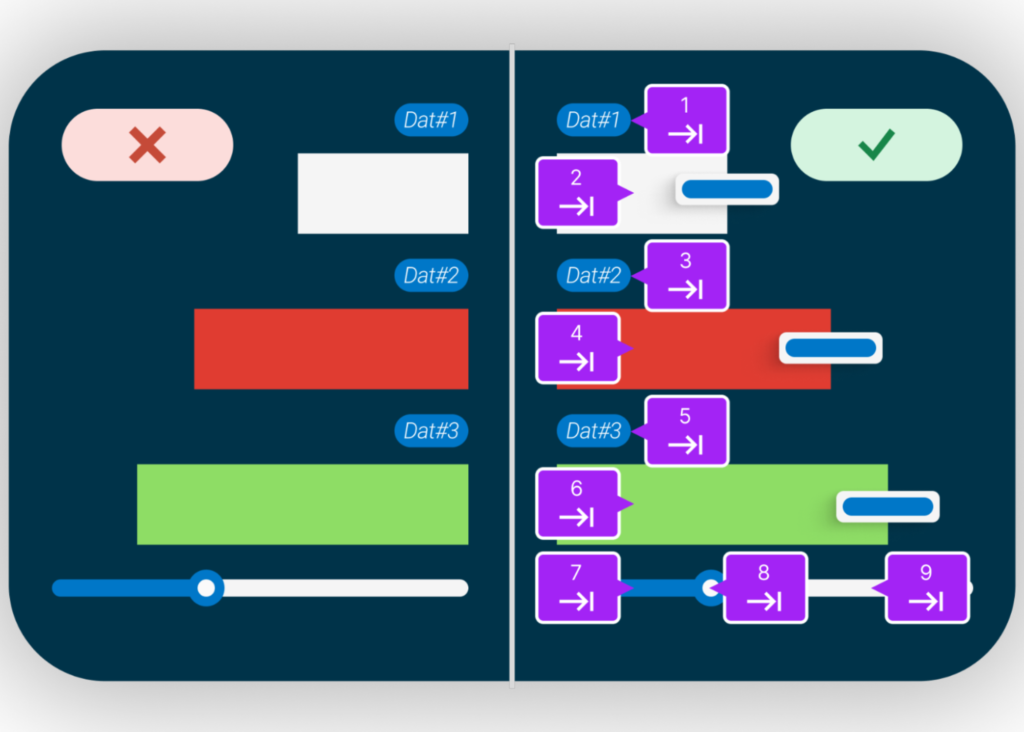
An example of various data points in a chart with each tab stop identified
Tab order helps users move through interactive elements in a logical and intuitive order.

To customize data visualization, interactive charts rely on interactive elements such as buttons, sliders, and data points that describe data at a given point using tooltips. These interactive elements must be operable and focusable using the keyboard alone. It is also essential to have a clear, visible focus indicator for these interactive elements so that keyboard-only users know where their focus is placed and can follow the tab order.

Tab order refers to the sequence in which elements on a webpage, form, or software interface are selected when navigating using the tab key. Tab order helps users, especially those using keyboards or assistive technologies, move through interactive elements in a logical and intuitive order. For example, in the image above, we can see the numbering elements that depict how the focus should move for keyboard-only users.

Enhance screen reader compatibility

Any information that a visually sighted user can get from a chart must include text alternatives that describe the relationships between different data points and any other information that a sighted user receives. All the interactive elements need names to let screen reader users know what the elements are and what they do. You should always prioritize using native HTML elements. However, if you use custom elements, you can use ARIA (Accessible Rich Internet Applications) to provide roles, properties, and states to describe the chart structure, interactive elements, and data to screen readers.

You should also make sure each interactive element and image includes the following to allow screen readers to understand the presented data:

  • Descriptive titles and labels for all chart elements
  • Summaries or descriptions of the chart’s purpose and main insights
  • Accessible tooltips and data values that are navigable via keyboard and readable by screen readers
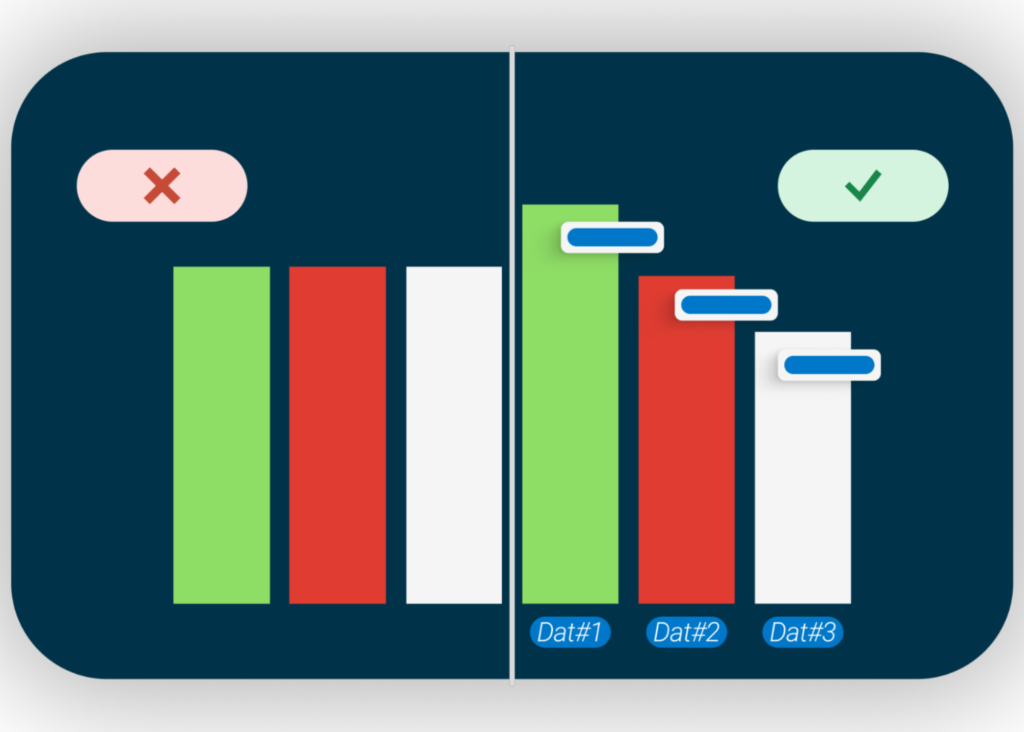
One bar chart using only bar length to communicate information vs. another that has each data point properly labelled with detail information
Use colors along with data labels to help all users get equal information from a chart.

Address color contrast and use of color alone to convey information

Colorblind users may not be able to understand the intent of the data in your chart if the patterns only use colors. So, you need to be aware of contrast ratios between foreground and background colors. 3:1 is the minimum contrast ratio, but 4.5:1 will provide even greater usability. When presenting text against a background, WCAG guidelines require 4.5:1.

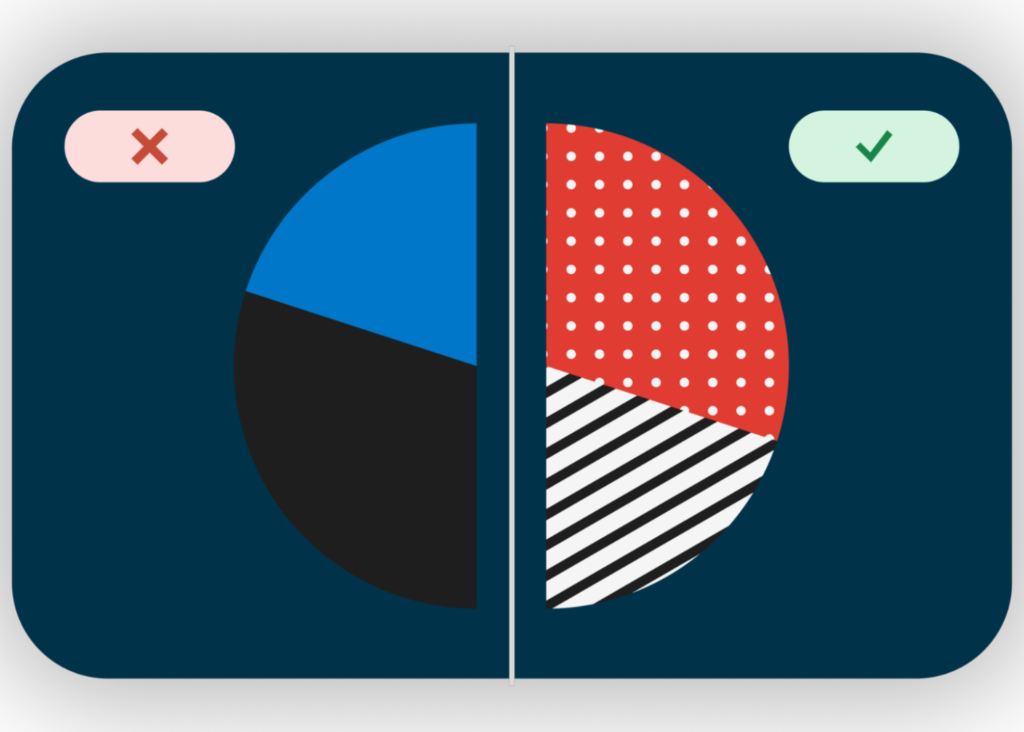
You can also use different patterns to show data instead of relying on colors as the sole method. For example, interactive charts with data labels can deliver a clear understanding to all users about what each bar in a graph represents. If that’s not possible, you should at least provide a text alternative for each part of the graph so that colorblind or low-vision users can still have the same “aha” moment as other users.

One version of a pie chart using only colors to convey information vs. another which uses color and patterns.
Use patterns rather than just colors to ensure all users get equal information.

Conclusion

By following these best practices, you can ensure that your interactive charts are accessible to all users, including those with disabilities. Start evaluating your charts for accessibility today, and remember that inclusivity is essential for effective data communication.

If you’d like support for remediating charts and making them accessible to all your users, please contact Deque today!

Aparna Pasi

Aparna Pasi

Aparna Pasi is Vice President of Professional Services, APAC at Deque Systems, with nearly 20 years of experience in software engineering and accessibility consulting. She drives Deque’s mission by empowering organizations to build inclusive digital experiences, offering executive-level advisory and accessibility risk strategies to growth-stage companies. Aparna also contributes to the broader accessibility profession as an active WCAG Working Group Member at W3C. Throughout her career, she has led cross-cultural teams delivering accessible, compliant solutions across mobile and web technologies in industries such as banking, e-commerce, gaming, and e-learning. Aparna holds a Master of Science in Information Systems and is IAAP certified as CPWA, WAS, and CPACC.

As you wrap up your week, today is a great day to catch up on some of the most interesting and important stories that have recently emerged in the accessibility space. These are some of the things that we are reading about at Deque.

In my short video below, I talk about some of these stories, highlighting those that particularly struck me, exploring their significance, and explaining why I recommend that you check them out.


Do you have a story you think we should read? Please share it on social and make sure to tag us! You can also leave a comment on this post.

Featured articles

With the presidential election cycle in full swing here in the US, it was recently revealed that the US Department of Transportation has been investing billions of dollars into accessibility-related efforts. As reported in USA Today by Zach Wichter, the efforts are paying off.

Also on the political theme, a recent article from The 19th showcases How the DNC is prioritizing accessibility for all at this year’s convention.

Those are just two of the election-related stories you can delve into this week. I will talk about more of them in the video, and you can find links below as well.

On the global stage, the 2024 Olympics and Paralympics are now complete, but the messages of empowerment and achievement are still very much with us all. This is due in part to the success of Apple’s “The Relay” video, which has already notched more than 20 millions views on YouTube alone. Combining stirring music, powerful imagery, and a hypnotically repeating “all you children gather ‘round” mantra, it’s an inspiring reminder that athletes everywhere “train the same way, practice the same way, sweat the same way.”

Below, I’ve gathered some additional links to compelling stories that I think are well worth exploring:

“Calm on set”: How Venice title ‘My Everything’ has helped to pioneer accessibility practices on set.
“I couldn’t believe the job I was doing didn’t exist already,” says Margault Algudo-Brzostek, France’s first ‘accessibility coordination manager’, on Venice premiere My Everything and French summer hit A Little Something Extra, which both star several actors with disabilities.

Big Ocean breaks barriers as the first K-pop group whose members are hard of hearing
The three South Korean musicians use hearing aids and cochlear implants and mix sign language with dance moves, reaching out to deaf and hard of hearing K-pop fans around the world.

A visionary approach: How a team developed accessible maps for colorblind scientists
Researchers from the U.S. Department of Energy’s (DOE) Argonne National Laboratory recently published a paper in the Bulletin of the American Meteorological Society detailing their work to create CVD-friendly colormaps that highlight important characteristics of clouds and precipitation.

More Than 1 in 4 Americans Over 50 Are Now Caregivers
More than 1 in 4 Americans 50 or older are now caregivers, looking after at least one family member or friend who has a health problem or disability, a new poll has found.

CBC research finds that kids like all kinds of captions
Canada’s public broadcaster and McMaster University’s CanChild research center recently teamed up to study optimizing captions for kids with disabilities. And they have found that while comprehension doesn’t change much depending on the style, children do have their favorites.

This week’s recommended read

If you read just one article this week, I recommend this one, as the findings are pretty remarkable:

The Cost of Inaccessibility: Businesses Lose More Than $6.9 Billion Annually
If you think it is costly to design accessible and inclusive websites, just think about how much inaccessibility will cost your business. Web accessibility is not only an ethical choice. It is a smart business move that doesn’t require excessive time or resources.

Statista reveals that about 13.5% of the U.S. population has a disability. This represents a huge untapped market if your digital properties are not accessible. Pure play ecommerce retailers are estimated to lose over $6.9 billion in annual revenue for non-compliance to accessibility standards.

Bonus content!

And here’s a bonus for you! Go check out Simon Eyles’ new inclusive stock photography library Disinfluencer. It’s a brilliant and brand-new inclusive stock photography library of wonderful images of people with disabilities. As a social enterprise, it’s genuinely supporting true, authentic inclusivity.

Conclusion

Thank you for joining me for Accessibility Reads, and please stay tuned for our next edition. In the meantime, please visit deque.com to learn more about how we’re advancing digital accessibility and inclusion across the globe.

Is your business ready to take your digital accessibility efforts to the next level? Schedule a free strategic consulting session today!

Matthew Luken

Matthew Luken

Matthew Luken is a Senior Vice President and Chief Architect at Deque, consulting with companies of all sizes, markets, and industries to grow their digital accessibility programs. Matthew also provides thought leadership to advance the profession and practice of digital accessibility and mature and maximize operations, processes, and outcomes. Prior to Deque, Matthew built and ran U.S. Bank’s digital accessibility program, providing accessibility design reviews, compliance testing services, defect remediation consulting, and more. The program leveraged over 1,500 implementations of Deque’s Axe Auditor and nearly 4,000 implementations of Axe DevTools and Deque University. Matthew also served as Head of UXDesign’s Accessibility Center of Practice, where he was responsible for supporting the digital accessibility team’s mission. As a digital accessibility, user experience, and service design expert, Matthew has worked with over 500 brands, covering every vertical and market. He also actively mentors digital designers and accessibility professionals.

Tags:  news

We’re excited to introduce three new features for the axe DevTools Extension that help you quickly track issues, boost testing speed, and cover even more accessibility scenarios—making it easier and faster than ever to build accessible digital experiences.

Sign up for a 14-day free trial to try out the new features now, or watch our webinar to learn more.

Jira integration: Track accessibility issues where your team already works

With this new Jira integration, you can send accessibility issues straight from the axe DevTools Extension to Jira in just a few clicks. No more manually transferring accessibility issues and no more manual data exports—just seamless tracking alongside your other development tasks. With everything in one place, it’s easier to monitor progress, resolve issues, and keep things organized.

And this is just the start—we’ve got more integrations on the way that will make collaboration between your development and accessibility teams even smoother.

Request Early Access to the new Jira integration

Auto replay: Turn your Intelligent Guided Tests into automated workflows

Testing your web applications against the W3C’s Web Content Accessibility Guidelines (WCAG) standards takes time and expertise. Not having the right tools can slow down releases or result in accessibility issues slipping through the cracks.

That’s where the axe DevTools Extension comes in—it’s designed to catch 80% or more of the accessibility issues, as proven in real-world testing with hundreds of clients. It achieves this by combining fully automated testing with Intelligent Guided Tests (IGTs). IGTs are semi-automated tests that ask your team simple questions about your app and run complex accessibility checks in the background.

Now, with auto replay, we remember your answers and learn about your app, so when you re-test it again, it’s automatic. If your user interface changes, it adapts by asking only the new questions that matter and provides updated results.

Watch a video of auto replay in action:

Keyboard trap detection: Automatically find and fix navigation blockers

Keyboard traps can block users who rely on keyboards from fully navigating your site, preventing them from moving forward or backward through your content. In the past, spotting these issues has required time-consuming manual testing by an accessibility expert. If they slipped through to production, the cost to fix them was even higher—not to mention the frustration for your users.

Now, with our keyboard trap detection in the keyboard IGT, your dev teams can quickly find and fix blockers, like when users get stuck in a search form or accidentally indenting text instead of moving to the next field. This new, semi-automated workflow reduces the need for expert intervention, lowers costs, and keeps your team focused on building great user experiences that don’t block users.

Deque is always finding new ways to make web accessibility easier for your development teams. With the launch of our Jira integration, auto replay, and automated keyboard trap detection, your teams can work more efficiently and spend less time on manual testing—helping you build more inclusive digital experiences faster.

Try these new features today with a 14-day free trial and take a step toward making the web more accessible for everyone.

Harris Schneiderman

Harris Schneiderman

Harris Schneiderman is a web developer with a strong passion for digital equality. He works at Deque Systems as the Senior Product Manager of axe DevTools building awesome web applications. He wrote Cauldron (Deque's pattern library), Dragon Drop, and is the lead developer on axe DevTools Pro. When he is not at work, he still finds time to contribute to numerous open source projects.