
Most users probably use infinite scrolling widgets every day. The most common examples of this widget are social networking websites feeds. Stories or articles within the feed are continually added or removed as the user navigates. Let’s review and compare how a sighted user navigates this feature versus a person with a disability.
A sighted user can usually scroll by using the mouse. For example:

In the gif above, when the user scrolls it displays the first set of articles and when the user scrolls again, it displays another set of articles.
However, when a screen reader user navigates through this widget in the reading mode, such as browse mode in the NVDA, they only encounter those first five articles or stories. After navigating to the 5th article, the screen reader then navigates to the footer region or navigates to whichever content is present after this widget. The user cannot navigate to the 6th article by using the arrow key navigation. In short, the infinite scrolling widget is not accessible in the reading mode or browse mode for screen reader users.
In order to address this problem, ARIA 1.1 introduced the feed role. When feed role is applied, assistive technology and the browser interact with each other to provide an accessible experience to the screen reader users who are navigating the infinite scrolling widget in reading mode.
Implementation example (screenshot leading to an example page)
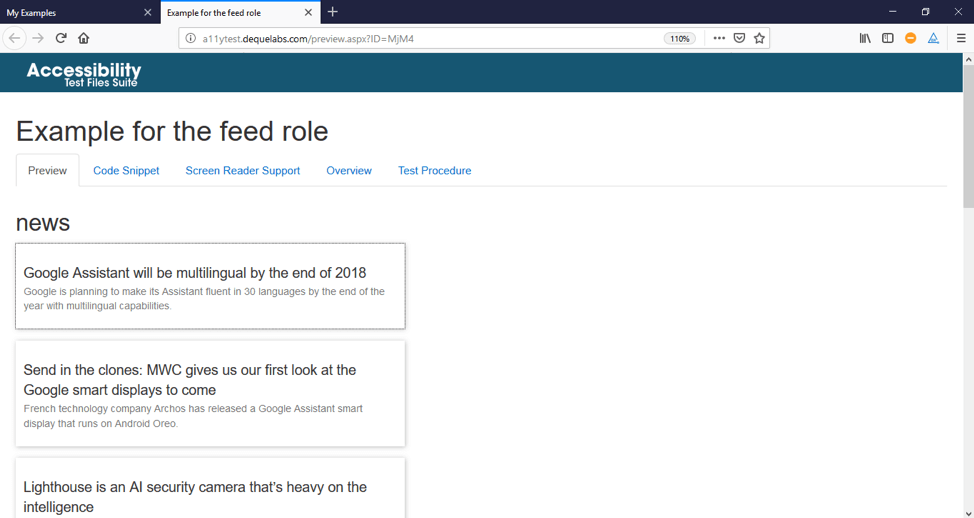
The screenshot above contains an example of a newsfeed. This newsfeed contains an ARIA feed role. When this feed is navigated with screen reader browser mode, the articles will be continually added or removed. Note that this feature may not work as expected in all the screen reader and browser combinations. It is an accessibility best practice to test all possible screen reader and browser combinations.
Partial code snippets (for link to example page) news
<main>

<h2>news</h2>

<section id="main-content">

<div id="news-feed" role="feed">

</div>

</section>

</main>
Author’s Notes
- Authors must use article role as children in feed
- Authors SHOULD make each article in a feed focusable
- Authors should provide a brief label to each article in the feed
- Authors may provide more description to the articles in feed by using aria-describedby
- Authors should set aria-busy while adding or removing the articles at either end of the list
- Authors MAY specify aria-setsize on article elements if article supply is static
- Authors MAY set aria-setsize to -1 if the total number of articles is extremely large, indefinite, or changes often
Assistive technology support matrix for the attribute (most common browser/AT combinations)
| Assistive Technology | Internet Explorer | FireFox | Google Chrome | Mobile Chrome | Mobile Safari |
|---|---|---|---|---|---|
| JAWS | Supports | Supports | Supports | Not Available | Not Available |
| NVDA | Supports | Supports | Supports | Not Available | Not Available |
| Talkback | Not Available | Supports | Not Available | Supports | Not Available |
| Voice Over | Not Available | Not Available | Not Available | Supports | Supports |
Note:
- NVDA, Voiceover, and Talkback do not announce to screen readers that role feed is active, rather articles are automatically added or removed in the reading cursor.
- The articles do not get added/removed in Jaws with Firefox and Google Chrome when shortcut keys are used, however, articles would get added or removed when arrow keys are used in the browse mode.
En résumé
If authors do not follow the ARIA feed role pattern while constructing the infinite scrolling widget, then screen readers may not work as expected in the reading mode. Without the ARIA feed role, it is difficult for the users to perceive, navigate, and understand the content within the widget. Therefore, in order to provide an accessible experience, I strongly suggest authors follow the ARIA feed role pattern while constructing an infinite scrolling widget.