Software development is undergoing a radical transformation with the rise of artificial intelligence (AI) software factories. An AI software factory is a continuous, autonomous engineering pipeline in which networks of coordinated agents design, build, test, and ship software, governed by deterministic checks and human oversight. In an AI software factory, coding is one station on the line. The line is set up, work is approved at key points, and the line improves over time. Every step runs inside guardrails the team defines, quality is enforced on every change, and lessons learned become tests the factory runs from then on. The line is creative in the middle and strict at the edges. Agents have freedom in how they write code, but none in what the code must satisfy.
As your organization moves development into AI software factories, you must fully embed digital accessibility, just as you must integrate privacy and security. Get it right, and your products, services, and experiences become and stay accessible. Get it wrong, and you increase risk, cost, and technical debt.
Whether accessibility becomes a strength or a weakness of your software factory depends on how, when, and where you embed it in your AI workflows. Embed it early and throughout, and you maintain compliance, mitigate risk, and expand your business with software that works for more customers, including the estimated 1.3 billion people worldwide with disabilities. Bolt it on late, or leave it out, and you’re left with costly risk and rework.
In this piece, I lay out a vision for an accessibility-first AI software factory. In this approach, accessibility is part of every stage, from the requirements that agents work from and the checks every change must pass to the evidence that the work was done and the monitoring that follows release.
I’ll start with why now is the moment to build accessibility in. Then I’ll walk through where along the line accessibility is won or lost and how to know it’s working. I’ll also explore what to build versus buy, and highlight where and how humans make the difference.
Why now is the moment to build accessibility in
Organizations are designing their AI software factories now, and large organizations are likely to run several factories, with shared infrastructure for governance and cost, lines set up for each team’s work, and people approving work at set points.
The systems you design today will apply to every change that follows. Integrating accessibility now makes it part of the line, ensuring everything that follows benefits. Now is the moment to build it in, while the line is still taking shape.
Agents already do some accessibility work on their own. Ask an agent to build a web page, and it will often run Axe-core without being asked. Axe-core is the most widely used accessibility testing engine, with over five billion downloads to date, so it’s no surprise agents reach for it. That’s a useful start, but a scan of finished code has limits. It can tell you a button has no label. What it can’t tell you, however, is whether the label it has is the right one, because that depends on context the agent needed when it wrote the code.
The real opportunity is to build accessibility into the line itself. For years, accessibility teams have worked to shift accessibility left, catching issues in design and development instead of after release. Doing that consistently has depended on each designer and developer applying what they know to every change they make. In a factory, the line can do that for every change. Catching issues early becomes standard practice.
Our research clearly reveals the cost of missing that opportunity. In our report, From debt to dividend: How engineering leaders can advance accessibility in the AI era, we found that 88 percent of engineering leaders said they had high or very high trust that their AI-generated code is accessible. Yet 64 percent named accessibility as a top driver of post-production rework. In other words, engineering leaders are using AI for accessibility and believe it’s working, even though missed accessibility issues are creating more work for their teams. This is a gap between presumed and actual accessibility: between what engineering leaders believe is accessible and what actually is. That gap is expensive. The same report notes that fixing an issue in production costs 30 times more than fixing it in design. A similar gap shows up with agents. An agent may tell you its work is accessible, or that it ran the necessary tests, when it didn’t actually do so. That’s the gap between what an agent says it did and what it actually did. It’s another example of the accessibility gap: what’s claimed to be accessible versus what’s actually accessible.
Closing those gaps is mission-critical for your AI software factory to succeed at what it’s built to deliver: quality and speed.
Fundamentally, accessibility issues are quality issues. Found late, they send work back through the line and cost more time and tokens. And an accessibility review added at the end of the line slows the factory down. When accessibility slows the factory down, it gets cut. When accessibility checks are built into the line, however, they run as the work is done, and deterministic checks keep that process both fast and affordable.
Where accessibility is won or lost along the line
In an AI software factory, the tests and the gates that every change must pass are fixed before generation starts and checked by machines that don’t guess. Generation is creative; verification is not. In an accessibility-first AI software factory, accessibility is part of what the code must satisfy, and it has a role at every stage of the line.
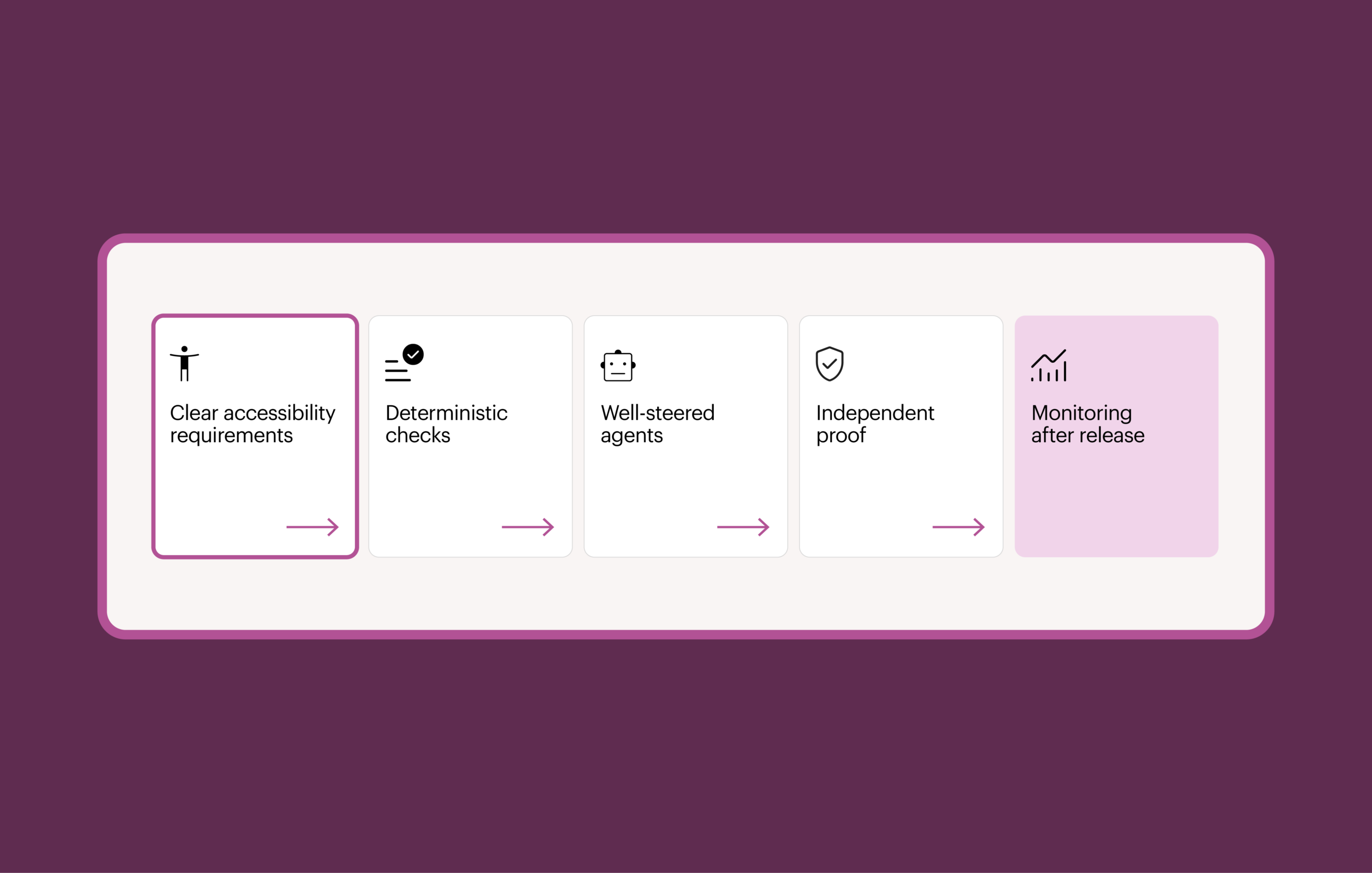
There are five things in particular the factory has to get right, as these are the areas where accessibility is won or lost:
- Clear accessibility requirements
- Deterministic checks
- Well-steered agents
- Independent proof that the work was done
- Monitoring after release
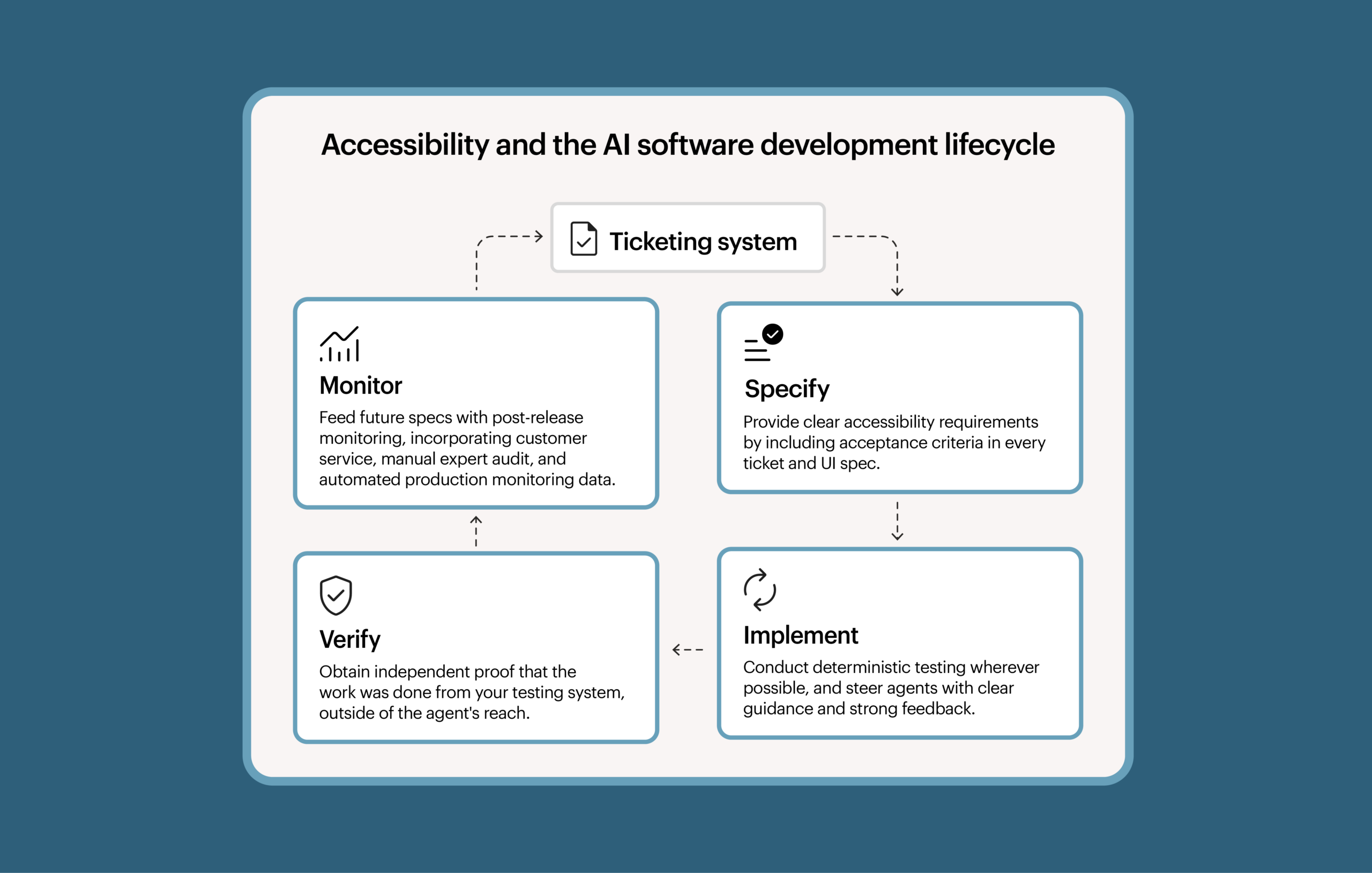
1. Start with the requirements
An agent can only build what it’s asked to build, and it can only check its work against what it was told matters. So accessibility starts in the ticket.
Accessibility acceptance criteria are the AI version of design annotations. They tell the agent how a screen needs to work for people with disabilities. Any ticket that touches the user interface should name the conformance target, such as WCAG (Web Content Accessibility Guidelines) 2.2 AA, and the criteria that apply to that screen: keyboard operation, focus order, accessible names and roles, and color contrast.
When a spec says nothing about accessibility, the factory should ask about it, the same way it would about any other gap it identifies.
Good criteria also carry context. Accessibility informs your user research, brand, design system, and tone of voice, and an agent needs that context to get details like labels right. However, because the full body of accessibility guidance won’t fit in an agent’s context window (the amount of information it can work with at once), each ticket should carry only the guidance that applies to the work at hand.
When you get the requirements right, questions get asked at the cheapest moment, not discovered in code review or production.
2. Check deterministically wherever you can
Anything that can be deterministic should be: Axe-core, lint rules, fixed tests, and more. Deterministic testing addresses both reliability and speed.
AI models often give different answers to the same question. A recent VPAT (Voluntary Product Accessibility Template) example demonstrates this. A prompt couldn’t reliably count failures. A short script could.
AI also doesn’t reliably follow instructions. Even when told to do something, agents will sometimes make wrong assumptions, lose focus through context bloat, or simply vary in their results due to the inherent non-deterministic nature of their foundation.
Cost matters, too. When I measured token spend in my own agent pipeline, 66 percent went to reviews and to fixing what reviews found. Deterministic checks help keep that cost down. I’ve written about the economics of AI use in more detail in a piece for Forbes.
To be clear, I’m not recommending leaving AI out. What I recommend is using AI for questions that need judgment, such as whether a label makes sense, and deterministic tools for everything else. Paired with narrowly scoped AI, deterministic checks can take on work that used to be manual. In our own testing tools, that pairing turned a keyboard test that took a specialist 30 to 45 minutes into one that can be done in seconds, with a human reviewer confirming the result before the check counts. My colleague Harris Schneiderman has described this in an article on intelligent automation and guided testing. This approach gives you the reliability and predictability of rules-based testing and the speed of AI-powered automation.
3. Steer the agents
Beyond running scans, agents will write their own keyboard and browser tests without being asked. They’ll also duplicate effort. In one of my projects, an agent built its own color contrast checks, recreating what existing tools already do well. A short instruction pointing agents to accessibility—and to the tools you already use—is enough to change what they do.
Agents also tend to be somewhat myopic. Because they can’t keep the full context of an application in their context window, they often miss implications that are outside the scope of what they’re working on. This can result in fantastic keyboard accessibility within a component, or a single PR’s code with keyboard traps in the transitions between changes made in different pull requests. Agents also have trouble mapping the appropriate accessibility technique to real-world use cases. This can lead to things like overuse of aria-live—perfect in isolation but really problematic when applied holistically to a complex application.
This is where contextually accurate accessibility acceptance criteria are essential inputs to the process.
Then, an open question is how to check whether the tests an agent writes are the right ones, and whether they’re correct.
Agents need strong feedback. They need tests that check how pieces work together, not just unit tests. Strong pipelines run loops within loops, from planning through testing, building, and integration, with humans approving the work between stages. Reviewer agents belong at the spec and design stages as well, not just in code review.
4. Require proof, not claims
An agent’s summary of its own work is a claim, not proof. Agents sometimes report that tests passed when they never even ran the tests in the first place, as I described in a recent article on AI alignment. The solution is to have a record of the accessibility work created by a separate testing system, kept outside the agent’s reach, and tied to the exact code being merged.
Those records add up to evidence you can use during approval, which is also available to your compliance team for conformance reports or process audits. When a customer, regulator, or procurement team asks how you know your software is accessible, you can answer with records rather than assurances. In regulated industries, where people review the evidence before anything goes live, those records are critical.
5. Keep monitoring after release
Testing in the pipeline is necessary but not enough. Real content, real data, and changes from other teams can still break accessibility after release, so the factory needs to keep checking once code is live.
Production monitoring catches regressions as they appear. Regular audits cover what automation can’t judge. Customer feedback, including help desk reports about accessibility, shows where real people run into problems.
The resources freed up from reviews of pull requests and design annotations can be spent on acceptance testing and making sure the user experience works well.
Issues that emerge should flow back in two ways. Each issue goes into the backlog as a ticket, with accessibility criteria already set. And the patterns behind those issues go back into the factory as better context, tests, and rules. Fixing the pattern, not just the issue, keeps the factory from producing the same defect again.
How to know what’s working, and what to build versus buy
Once accessibility is in the line, leadership will want to know whether it’s working and what next steps will optimize efficiency.
Measure what your factories produce
A factory you can’t measure is a factory you can’t manage. Rerun your evaluations on every model, prompt, or tool upgrade, so a change that makes the factory worse is caught before it reaches your teams. Track how many accessibility issues production monitoring and audits find that the line missed, and what share of user interface changes ship with a signed accessibility evidence record. Those numbers give you a baseline and a clear answer to whether the investment is paying off.
What to build and what to buy
Some of the accessibility work in a factory you can build yourself, such as writing accessibility into requirements and capturing customer complaints. For other aspects, however, it’s best to use purpose-built tools that consistently produce predictable, trustworthy results.
We’ve recently conducted testing to assess the performance of different approaches:
- Prompting
- Basic
- Detailed
- Open-source tooling
- Claude running Axe-core with Playwright
- Open-source MCP server using Axe-core
- Paid tooling
- Deque’s Axe MCP Server
We assessed predictability across three critical performance dimensions: coverage, precision, and consistency. Our testing revealed that prompting was the least predictable. Open-source tooling was more predictable, but only up to a limited ceiling. Only the paid tooling approach met all three dimensions, finding the most defects identified in a baseline audit and producing consistent output in every run. We’ll be releasing our full report soon. In the meantime, preliminary testing indicates the following:
- Coverage: Open-source tooling caught 50 percent of the defects identified in a baseline audit, while paid tooling caught 69 percent.
- Precision: Basic prompting generated 5 to 19 false positives per run and detailed prompting generated 4 to 17 false positives per run. Paid tooling generated 0 to 2 false positives per run.
- Consistency: Basic prompting found a range of 9 to 29 total issues and detailed prompting found 9 to 28 total issues. Open-source tooling described the same issue in 16 to 20 different ways across runs, while paid tooling described each issue the same way every time.
There are other challenges specifically associated with open-source approaches as well. Homegrown skill files and MCP servers have to be maintained and governed. Teams without accessibility expertise may miss nuance, and AI-written interpretations of the standards can produce tools that test the wrong things.
Where people make the difference
Just because something passes an automated test doesn’t mean it’s accessible. Automation should state what it didn’t cover, so the manual handoff doesn’t repeat work. End-to-end journey testing and real assistive technology users remain essential because tools struggle with multi-page flows and how people actually use assistive technology.
The role of accessibility professionals evolves in an AI software factory model. Accessibility professionals shouldn’t try to test everything coming through the factory. Instead of manual testing on pull requests, they can spend more time on comprehensive audits and run compliance reporting on the finished product more often. They look for patterns in what slips through, then feed those patterns back into the factory as context, judges (AI evaluators), and lint rules. Each organization’s factories also need tuning to its design system, compliance needs, and domain.
It’s the same high-value work accessibility professionals do today, done in different amounts and in different ways, with the aim of improving the factory so it produces more accessible software. There will be work in two places: making each product accessible, and improving how the factory handles accessibility. The most important human job in the factory is making sure it gets better over time.
Where accessibility is won in the AI software factory
Now is the time to build accessibility in, while factories are still taking shape. Along the line, accessibility is won with clear requirements, deterministic checks, well-steered agents, independent proof, and a feedback loop from production.
You’ll know it’s working when you measure it. You’ll keep it working by building the parts you can build yourself and relying on purpose-built tools where you need predictable, trustworthy results and don’t want to maintain and govern your own. And people make the difference by making sure your factories get better over time.
The next step is to make accessibility part of how your organization designs its factories: in the requirements, the checks, the evidence, and the feedback from production, with accessibility experts involved from the start. Done this way, accessibility stops being a one-time project or an annual scramble. The product is checked continuously, and every miss is an opportunity to make the factory itself better.