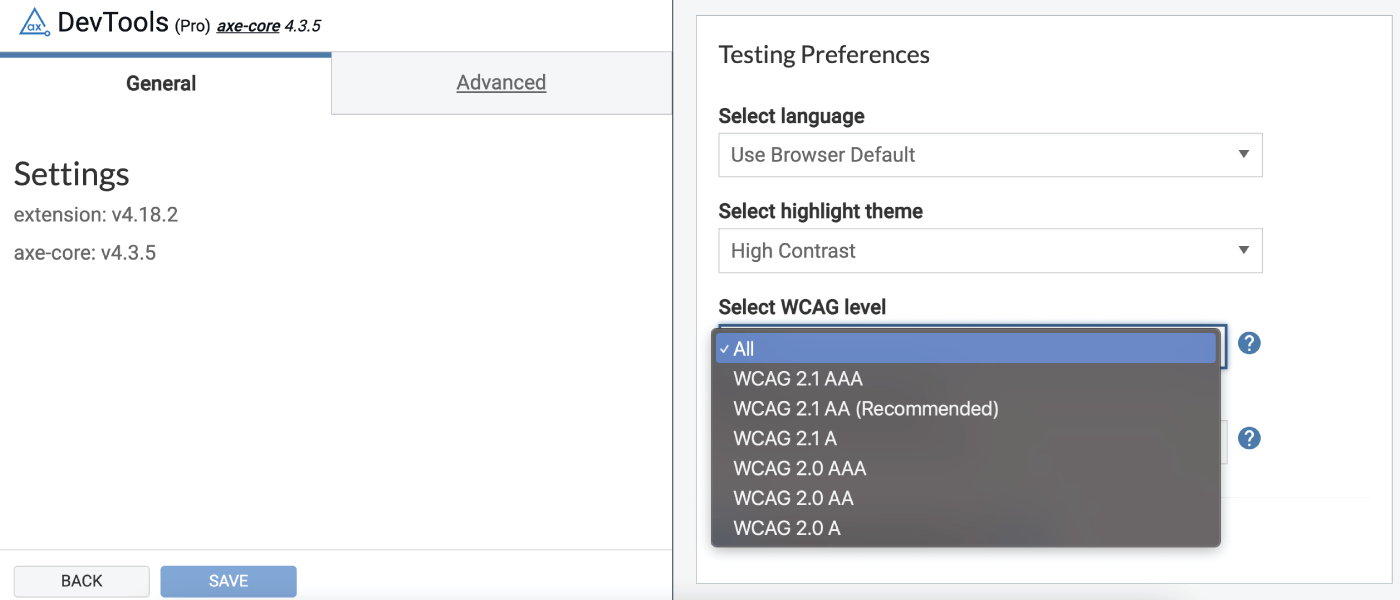
In der Version 4.18.2 der Browser-Erweiterung „axe DevTools“ haben Pro-Nutzer nun die volle Kontrolle darüber, was sie im Hinblick auf die WCAG-Standards und die Regeln der „ axe-core “ testen, können sich direkt aus der Erweiterung heraus anmelden bzw. registrieren und vieles mehr.
Entdecken Sie alle neuen und bestehenden Funktionen der Browser-Erweiterung, indem Sie sich für eine kostenlose Testversion von axe DevTools Pro anmelden.
Einstellungen – Sie haben die Kontrolle! „ axe-core “ regelt die Versionskontrolle und die Filterung der Ergebnisse nach dem ausgewählten WCAG-Standard
Viele von Ihnen haben uns mitgeteilt, dass Sie die Umsetzung neuer Barrierefreiheitsanforderungen selbst steuern möchten. Manchmal haben Sie eine feste Frist für die Umsetzung der Anforderungen gemäß WCAG 2.1, Stufe A. In anderen Fällen möchten Sie die zusätzlichen automatisierten Regeln, die zu „ axe-core “ hinzugefügt wurden, sorgfältig verwalten, um Verwirrung innerhalb des Entwicklerteams durch unterschiedliche Ergebnisse zu vermeiden.
Aufgrund Ihres Feedbacks können Sie nun im Einstellungsfenster festlegen, was Sie testen möchten. Auf der Registerkarte „Allgemein“ des Einstellungsfensters können Sie nun die WCAG-Stufe und die Version von „ axe-core “ auswählen. Auf diese Weise können Sie neue Regeln so lange „unter Sperre“ halten, bis Sie und Ihre Teams bereit sind.
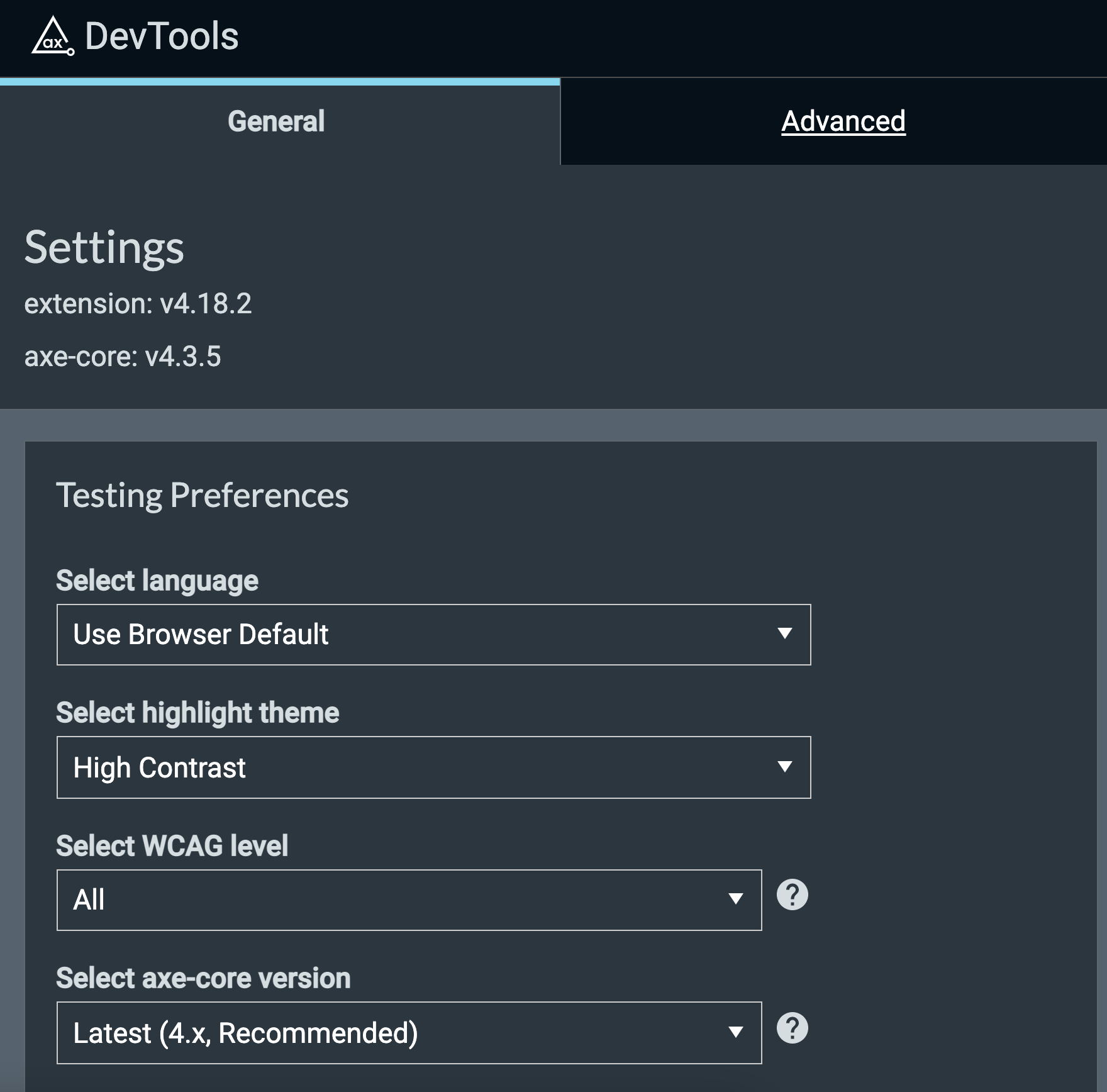
Auswahl der WCAG-Standards
Die Auswahl der WCAG-Konformitätsstufe könnte jetzt nicht einfacher sein. Sie können zwischen WCAG 2.1 Stufe A oder AA sowie WCAG 2.0 Stufe A, AA oder AAA wählen. Wenn Sie eine WCAG-Stufe auswählen, werden alle Testergebnisse gefiltert, sodass Ihnen nur die Ergebnisse für die ausgewählte WCAG-Stufe angezeigt werden. Haben Sie Ihre Meinung geändert? Ändern Sie den Filter und sehen Sie sich die Ergebnisse basierend auf Ihrer neuen WCAG-Stufenauswahl an, ohne die Tests erneut ausführen zu müssen.
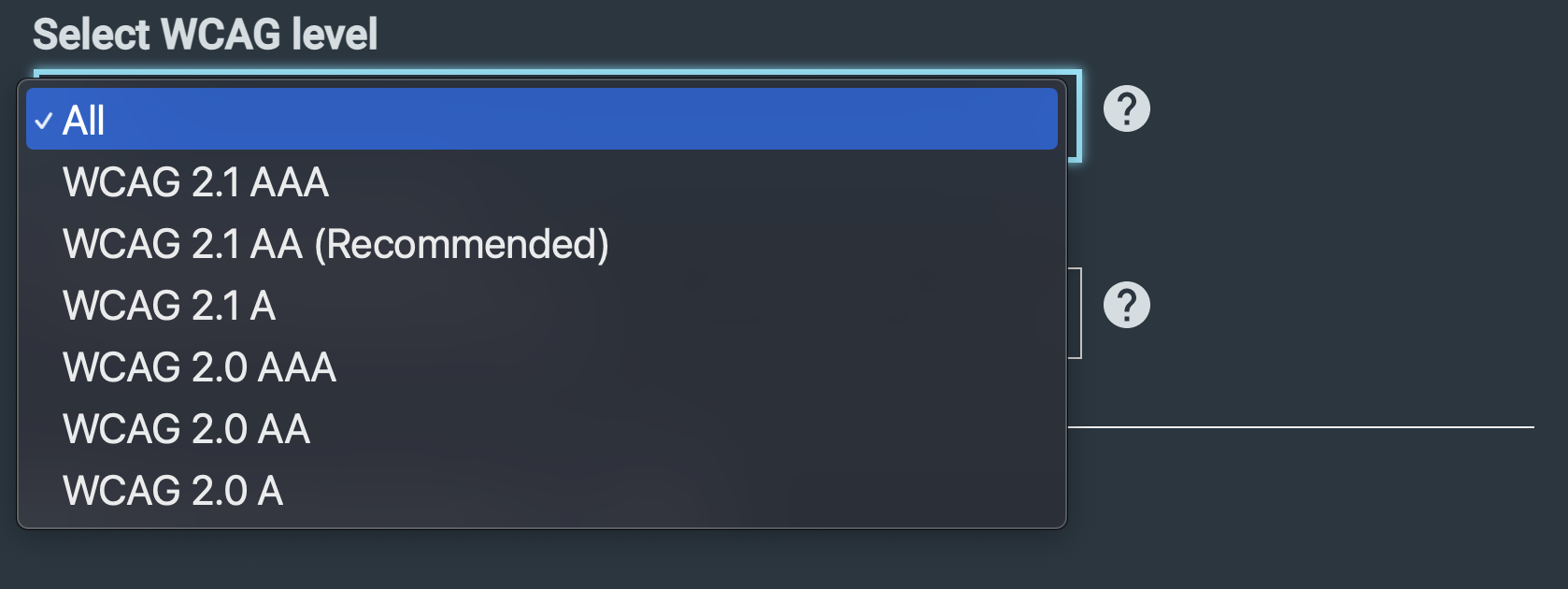
Axe-core Auswahl des Regelsatzes
Die DevTools-Browsererweiterung von axe bietet Ihnen nun eine Versionskontrolle für „ axe-core “, sodass Sie die Konsistenz zwischen den verschiedenen Teammitgliedern und den von ihnen verwendeten axe-Produkten gewährleisten können. Ohne diese Einstellung kann es zu Abweichungen bei den Barrierefreiheitsergebnissen zwischen den Testern kommen – eine potenzielle Ursache für Verwirrung und unnötigen Hin und Her, um sich abzustimmen. Um die Konsistenz zu gewährleisten, müssen Sie nun lediglich sicherstellen, dass Sie für das gesamte Team denselben Regelsatz „ axe-core “ auswählen. Die Auswahl bleibt über mehrere Sitzungen hinweg erhalten, sodass Sie sie einmal festlegen und dann nicht mehr daran denken müssen.
Ab der Version 4.18.12 können Sie die neuesten Nebenversionen von „ axe-core “ (4.0+ und 3.5.6) auswählen. Ihre aktuelle Auswahl wird im Kopfbereich der Browser-Erweiterung „axe DevTools“ angezeigt.

Einfache Registrierung/Anmeldung über die Browser-Erweiterung
Registrieren Sie sich und melden Sie sich an, ohne die Browser-Erweiterung jemals verlassen zu müssen. Es ist schneller und einfacher, sich bei der „axe DevTools“-Browser-Erweiterung zu registrieren bzw. anzumelden, um Zugriff auf die Pro-Funktionen zu erhalten.
Klicken Sie einfach auf den Link „Registrieren“ oder „Anmelden“ in der Kopfzeile.

In einem Modalfenster wird Ihnen die Möglichkeit angeboten, sich mit Ihrem Google- oder GitHub-Konto anzumelden oder sich mit Ihrer E-Mail-Adresse zu registrieren bzw. anzumelden.


Wichtige Fehlerbehebungen
In dieser Version sind einige nennenswerte Fehlerbehebungen enthalten. Zu den schwerwiegendsten Problemen, die behoben wurden, gehören die folgenden:
- Stellen Sie bei den „Intelligent Guided Tests“ sicher, dass alle Nebenwirkungen von Antwortschritten korrekt rückgängig gemacht werden, wenn man innerhalb einer Anleitung zurückgeht.
- Behebung eines Problems, bei dem „analyze“ nicht auf Antworten von inneren Frames gewartet hat
- Bei Aktivierung die Best-Practice-Angabe im Datensatz anzeigen
- Warten Sie, bis die Frames die Axt-Version eingefügt haben, bevor Sie die Analyse starten.
- Problem beheben, bei dem der Textmarker in Firefox nicht korrekt angezeigt wird
- Stellen Sie bei den „Intelligent Guided Tests“ sicher, dass die in den Geltungsbereich einbezogenen Baumstrukturen einen Selektor relativ zur Dokumentwurzel enthalten.
- In den „Intelligent Guided Tests“ wurde ein Problem behoben, bei dem Tabulator-Stoppstellen übersehen wurden, wenn DevTools abgekoppelt war.
- Ignoriere bei den Intelligent Guided Tests den Geltungsbereich für modale IGTs
- Machen Sie bei den intelligenten geführten Tests Screenshots, wenn Sie einen geführten Test fortsetzen.
- Auswahl von Elementen löschen
- Tippfehler im Sprunglink korrigieren
Bekannte Probleme
- In domänenübergreifende Iframes kann weder Axe eingefügt noch können sie hervorgehoben werden.
- Die Filterung nach Issues gilt nicht für die Ansicht „Gespeicherte Tests“, sodass die Anzahl der Issues nicht korrekt angezeigt wird.
Wir arbeiten derzeit an Lösungen für beide bekannten Probleme. Bleiben Sie auf dem Laufenden.
Denken Sie daran: Wenn Sie axe DevTools Pro derzeit noch nicht nutzen, können Sie barrierefreiere Nutzererlebnisse erstellen und das Tool kostenlos testen (keine Zahlung erforderlich). Sollten Ihnen die großartigen erweiterten Tests und all die anderen Funktionen nicht gefallen, werden Sie automatisch auf die kostenlose Browser-Erweiterung zurückgestuft. Es sind keine weiteren Schritte erforderlich. Einfacher geht es nicht.