
La première mise à jour d'Axe de 2019 est sur le point d'arriver ! Nous introduisons de nouvelles règles, des fonctionnalités de reporting améliorées et toute une série de corrections de bugs. Nous sommes ravis de pouvoir partager toutes ces nouvelles fonctionnalités avec nos utilisateurs. Nous avons de grands projets pour axe-core cette année, et la version 3.2 d’ axe-core nous place en position de force pour une nouvelle année placée sous le signe de l’accessibilité. Nous mettrons à jour tous les outils HTML axe et Attest au cours du mois de mars afin d’y intégrer la version 3.2 d’ axe-core . Pour savoir comment cette version affecte les autres outils d’ Deque , veuillez contacter votre chargé de compte pour plus d’informations.
Nouvelles règles
Règle n° 1 :<aria-label>; les valeurs correspondent au contenu des widgets
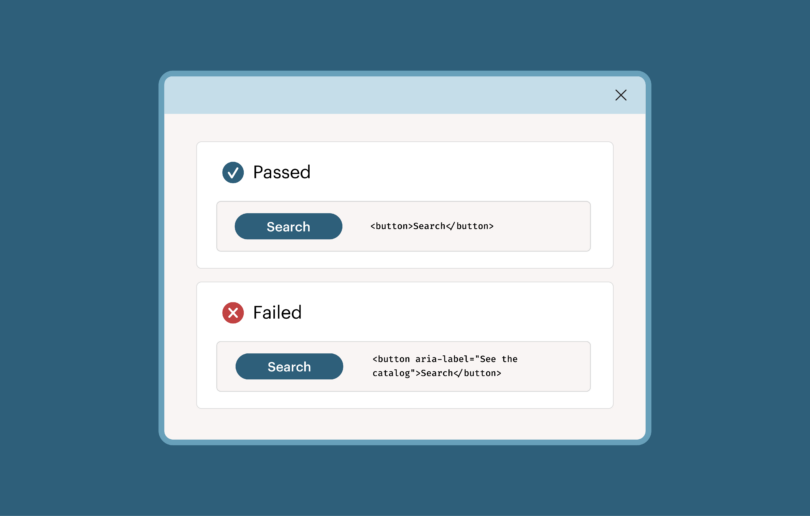
Cette nouvelle règle, fondée sur les WCAG 2.1, est spécialement conçue pour aider les utilisateurs de logiciels de dictée. En garantissant que le texte affiché à l'écran correspond au nom accessible, les logiciels de dictée savent quels boutons, liens et autres éléments d'interface dotés d'un « nom issu du contenu » ils doivent activer.
Exemple d'échec :
<a href=”page2.html” aria-label=”Page 2”>Next ?</a>
Exemple de passage :
<a href=”page2.html” aria-label=”Next page”>Next ?</a>
| Remarque : pour activer cette règle, les utilisateurs doivent activer le tag « expérimental ». Les utilisateurs de l'extension de navigateur axe peuvent utiliser axe-coconut, qui intègre des règles expérimentales. |
Règle n° 2 : les champs d'un formulaire ne doivent pas comporter de libellés en double
Cette règle a été extraite de la règle relative aux libellés des champs de formulaire et transformée en une règle distincte de bonnes pratiques. Une erreur courante lors du balisage des formulaires consiste, pour les auteurs, à attribuer par inadvertance deux libellés à un même champ de formulaire. L'attribution intentionnelle de plusieurs libellés n'est pas une pratique courante ; elle génère un code difficile à maintenir.
Exemple d'échec :
<label class="sr-only" for="nmr">Number of products</label>

<label><input type="text" id="nmr" /> pizza’s</label>
Exemple de passage :
<input type="text" id="nmr" aria-label="number of pizza's" /> pizza's
Règle n° 3 : les repères complémentaires se trouvent au niveau supérieur
Cette règle de bonne pratique garantit que aside éléments ou éléments comportant role=complementary ne font pas partie intégrante d'un autre repère ARIA. L'imbrication des repères rend la structure du document confuse. Cette règle est similaire aux règles existantes qui vérifient cette même exigence ARIA pour l'élément banner, contentinfo, et main rôles.
Exemple d'échec :
<main>

<p>Some text</p>

<aside><p>An aside</p></aside>

</main>
Exemple de passage :
<main><p>Some text</p></main>

<aside>An aside</aside>
Autres nouvelles fonctionnalités
Fonctionnalité n° 1 : détails de l'environnement de test inclus dans les résultats d'analyse
Une question qui revient souvent lors de l'utilisation d'axe-core, et d'ailleurs de la plupart des outils de test d'accessibilité, est qu'il peut s'avérer difficile de reproduire certains problèmes spécifiques. Pourquoi n'y avait-il aucun problème hier, alors qu'aujourd'hui, lorsque je lance Axe, j'obtiens 5 problèmes ? La réponse est presque toujours l'une des suivantes :
- La page a changé.
- Axe-core a été mise à jour, ou sa configuration est différente.
- La configuration du navigateur est différente.
Même si axe ne peut pas vous indiquer si la page a changé, depuis la version 3.2, l'analyse « axe-core » inclut dans ses résultats des informations qui vous permettent de déterminer toutes les autres variables. « Axe-core » fournit désormais les propriétés suivantes :
- Moteur de test:
- nom: axe-core
- version: 3.2.0
- Exécuteur de tests:
- nom: l'outil d'exécution de tests utilisé dans l'analyse (par exemple : Axe Devtools Chrome, Axe CLI)
- Environnement de test:
- Largeur et hauteur de la fenêtre: permettent d'indiquer quelles requêtes de média ont été appliquées
- Agent utilisateur: le navigateur, la version du navigateur et le système d'exploitation utilisés dans l'analyse
- Angle et type d'orientation: si cette information est disponible, la méthode ` axe-core ` indique l'orientation de l'écran
Une fois que ces propriétés sont disponibles sur axe-core, nous les intégrons dans les différents outils d'exécution de tests et de génération de rapports de axe-core .
Fonctionnalité n° 2 : des commentaires plus détaillés sur la prise en charge de l'accessibilité
Dans la version 3.1 d’ axe-core , nous avons commencé à avertir individuellement les utilisateurs lorsqu’ils utilisaient des rôles qui n’étaient pas largement pris en charge par les technologies d’assistance. Cela permet aux utilisateurs de distinguer les rôles mal saisis ou inexistants des rôles moins largement pris en charge. La version 3.2 d’ Axe-core signale désormais également ces problèmes pour les propriétés et états ARIA moins pris en charge. Les propriétés ARIA moins prises en charge comprennent les attributs suivants :
- aria-details
- aria-roledescription
- aria-describedat (non standard)
Fonctionnalité n° 3 : nouveau calcul des noms accessibles
L'algorithme de calcul des noms accessibles constitue un élément clé de la norme « axe-core ». Il sert à déterminer comment les lecteurs d'écran et autres technologies d'assistance nomment les différents titres, liens et autres éléments d'une page. À la fin de l'année dernière, le W3C a publié la version 1.1 de l’algorithme de calcul des noms accessibles. Nous avons saisi cette occasion pour refondre notre implémentation, non seulement afin de fournir une indication raisonnable quant à la présence ou non d’un nom accessible pour un élément, mais aussi pour le calculer avec précision.
Grâce à cette nouvelle méthode de calcul du nom d'accessibilité, les outils s'appuyant sur axe-core peuvent désormais représenter avec précision le nom d'accessibilité le plus probable attribué à un composant par les différents navigateurs. Elle est conçue pour trouver le plus petit dénominateur commun entre Chrome, Firefox et Safari. De plus, elle peut être configurée pour indiquer avec précision le nom d'accessibilité d'un navigateur spécifique.
Corrections de bogues notables
- Autoriser les libellés hors écran pour les champs de formulaire (#1187)
- Allow <div> groups in definition lists (#1284)
- Empêcher « th-has-data-cells » de planter en présence de lignes vides (#1285)
- Éviter les erreurs de type lors des vérifications du contraste des couleurs (#1320)
- Déprécier l'espace de noms « axe.commons.utils » (#1330)
Problèmes connus
- Axe-core ne fonctionne pas avec une politique de sécurité de contenu stricte (#1175)
- L'utilisation de l'attribut « maximum-scale » dans l'élément méta « viewport » ne devrait pas être signalée comme un problème (#694)
- Ne pas vérifier le contraste des couleurs des caractères non imprimables (#315)
- La règle d'ordre des en-têtes peut générer des faux positifs lors de l'utilisation de context.exclude (#278)
- … consulter la liste complète des bogues.