Digitale Barrierefreiheit ist für den Softwareentwicklungszyklus (SDLC) von entscheidender Bedeutung. Ohne sie lassen sich keine Produkte entwickeln, die den Compliance-Anforderungen entsprechen. Wenn Ihr Produkt die Barrierefreiheitsstandards nicht erfüllt, müssen Sie mit Umsatzrückgängen, Marktanteilsverlusten, rechtlichen und finanziellen Risiken und weiteren Folgen rechnen.
Leider wird die digitale Barrierefreiheit jedoch oft erst im Nachhinein berücksichtigt – wenn überhaupt. Und das ist ein Problem. Ein reaktiver Ansatz bei der digitalen Barrierefreiheit (bei dem Probleme erst entdeckt werden, wenn sie bereits in das Produkt eingeflossen sind) erhöht die Kosten, bremst Ihre Teams aus, frustriert Ihre Nutzer und kann Barrieren für Menschen mit Behinderungen schaffen.
Die gute Nachricht? Das muss nicht so sein.
Indem Sie die Überprüfung der digitalen Barrierefreiheit früher in Ihren Entwicklungsworkflow verlagern – also bereits während der Entwicklung und nicht erst im Nachhinein –, erkennen Sie Probleme zu einem Zeitpunkt, an dem sie am einfachsten und kostengünstigsten zu beheben sind. Genau das bedeutet „Shift Left“: die Verlagerung Ihrer Test- und Qualitätssicherungsmaßnahmen in eine frühere Phase des Softwareentwicklungszyklus (SDLC), damit Sie Probleme beheben können, bevor sie sich ausbreiten.
Mit den richtigen Tools ist digitale Barrierefreiheit nicht nur einfach, sondern kann sogar schneller umgesetzt werden als Ihre derzeitige Vorgehensweise.
In diesem Artikel zeige ich Ihnen drei schnelle Möglichkeiten, wie Sie Barrierefreiheit bereits in frühen Entwicklungsphasen integrieren können, ohne Ihre Prozesse zu ändern oder zusätzlichen Aufwand zu verursachen – und zwar mithilfe von Tools, die sich direkt in die Umgebungen einbinden lassen, die Ihre Entwickler ohnehin schon täglich nutzen:
- Der axe DevTools Linter läuft in Ihrer IDE (integrierte Entwicklungsumgebung) oder über die CLI (Befehlszeilenschnittstelle) und weist Sie bereits während des Schreibens auf Probleme hin, noch bevor der Code überhaupt committet wird.
- Die „axe DevTools“-Erweiterung scannt Ihre Benutzeroberfläche im Browser und gibt Ihnen in Echtzeit Feedback dazu, was korrigiert werden muss.
- Der axe Developer Hub erweitert Ihre End-to-End-Tests und Ihre Continuous-Integration-Pipeline (CI) um Barrierefreiheitsprüfungen, sodass Sie Regressionen erkennen können, bevor sie in die Produktion gelangen.
Mit diesen Tools können Sie von einem reaktiven zu einem proaktiven Ansatz übergehen, Probleme früher erkennen und beheben, Nacharbeiten reduzieren und vom ersten Tag an barrierefreie Nutzererlebnisse bieten.
Schnelltipp Nr. 1: Fehler schon beim Programmieren erkennen
Während Sie programmieren, nutzen Sie wahrscheinlich bereits Linting-Software, um Ihren Code sauber, einheitlich und standardkonform zu halten. Barrierefreiheit sollte Teil dieses Standards sein.
Der „axe DevTools Linter“ integriert Barrierefreiheit in denselben Arbeitsablauf. Er weist Sie bereits während des Programmierens direkt in Ihrer IDE auf Probleme hin. Dadurch lassen sich häufige Probleme wie die folgenden leichter erkennen und beheben:
- fehlender oder falscher Alt-Text
- Falsche Überschriftenstruktur
- Ungültige Verwendung von ARIA
- Komponenten ohne zugängliche Namen
- und mehr
Wenn Sie ein Designsystem verwenden, können Sie den Linter so konfigurieren, dass er Ihre benutzerdefinierten Komponenten erkennt und die Barrierefreiheitsregeln automatisch anwendet.
Indem Sie Barrierefreiheit genauso behandeln wie Codestil und Syntax, reduzieren Sie das Hin und Her bei QA-Fehlern, verhindern, dass Probleme in die Live-Umgebung gelangen, und entwickeln von Anfang an bessere Lösungen.
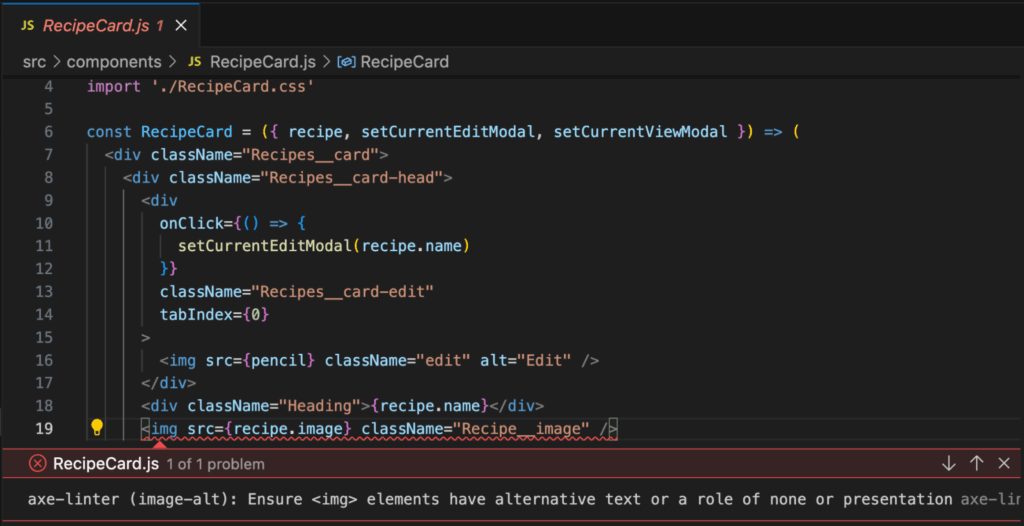
Falls Sie weitere Unterstützung benötigen, finden Sie hier Links zur „ Deque University“, wo Sie zuverlässige Ressourcen finden, die Ihnen bei der Lösung dieser Probleme helfen. Dort erfahren Sie mehr über das Problem, wie Sie es beheben können und sogar, welche Behinderungen typischerweise betroffen sind, falls das Problem weiterhin besteht.
Sie können den Axe DevTools Linter sogar so erweitern, dass er an die von Ihrem Team bevorzugte Komponentenbibliothek oder an benutzerdefinierte Komponenten angepasst wird.
Wenn Sie noch einen Schritt weiter gehen möchten, können Sie den axe DevTools Linter in den Entwicklungs-Workflow Ihres Teams integrieren. So können Sie beispielsweise:
- Pull-Anfragen mithilfe von GitHub Actions prüfen.
- Verwenden Sie Pre-Commit-Hooks, um Probleme noch früher zu erkennen.
- Wenden Sie teamweite Standards für die Barrierefreiheitsprüfung an.
Der axe DevTools Linter bietet außerdem eine Befehlszeilenschnittstelle (CLI), mit der sich Barrierefreiheitsprüfungen in Ihrer CI/CD-Pipeline ganz einfach automatisieren lassen. Sie können ihn für Skripte nutzen und Barrierefreiheitsprüfungen als Teil Ihres Build-Prozesses durchführen, um sicherzustellen, dass Sie „axe-clean“-Code committen und keine neuen Barrierefreiheitsprobleme verursachen. Und wenn Sie Ihren Code lieber lokal behalten möchten, können Sie das Flag „–local“ aktivieren, um Dateien vollständig in Ihrer Umgebung zu prüfen, ohne den Quellcode an einen Server zu senden.
Für größere Teams oder komplexere Arbeitsabläufe lässt sich der axe DevTools Linter in jedes CI-Tool wie GitHub Actions, Azure DevOps oder Jenkins integrieren und zeigt die Ergebnisse in Code-Qualitäts-Tools wie SonarQube an, sodass Sie Probleme bei der Barrierefreiheit in Ihren Repositorys über einen längeren Zeitraum hinweg nachverfolgen können. Sie können die Unterstützung auch auf Bibliotheken wie MUI, React Native oder Cauldron (unsere Bibliothek für barrierefreie Komponenten) ausweiten und die Regeln in Ihrem gesamten Designsystem durchsetzen.
Erfahren Sie mehr in der Dokumentation zum axe DevTools Linter
Diese fortschrittlichen Arbeitsabläufe erleichtern die teamweite Umsetzung von Barrierefreiheit, da sie sich direkt in die Tools integrieren lassen, die Entwickler ohnehin täglich nutzen. Barrierefreiheit wird so zu einem weiteren Bestandteil der Entwicklung hochwertiger Software – gleichberechtigt mit Sicherheit, Leistung und Datenschutz. Es geht nicht darum, Ihre Arbeitsweise grundlegend zu ändern, sondern darum, Barrierefreiheit nahtlos in die Prozesse zu integrieren, die Sie ohnehin bereits befolgen.
Schnellmethode Nr. 2: Testen im Browser mit der „axe DevTools“-Erweiterung
Die Code-Analyse in der IDE eignet sich hervorragend, um solche Probleme auf Code-Ebene frühzeitig zu erkennen. Sobald Ihre Komponente jedoch im Browser dargestellt wird, müssen Sie sicherstellen, dass sie sich so verhält, wie es die Nutzer erwarten – und genau hier kommen browserbasierte Tests ins Spiel.
Viele Entwickler lassen während des Programmierens einen Browser geöffnet, sei es, um eine lokale Version anzusehen oder in einer Staging-Umgebung zu arbeiten. Die „axe DevTools“-Erweiterung läuft direkt in Ihrem Webbrowser und bietet Ihnen eine schnelle, entwicklerfreundliche Möglichkeit, Probleme bei der Barrierefreiheit in der gerenderten Darstellung zu finden und zu beheben. Ganz gleich, ob Sie eine ganze Seite, ein Modal oder nur eine einzelne Komponente testen – mit einem Klick können Sie einen Scan durchführen und sofort erkennen, was Ihrer Aufmerksamkeit bedarf.
Jedes Problem wird direkt auf der Seite hervorgehoben und dem entsprechenden DOM-Element zugeordnet. Sie erhalten Angaben zum Schweregrad, zu Selektoren und den entsprechenden Codeausschnitt, sodass Sie das Problem schnell lokalisieren und beheben können, solange es noch frisch im Gedächtnis ist. Und die Behebung wird niemals dem Rätselraten überlassen. Zu jedem Problem gibt es klare, kontextbezogene Schritte zur Behebung sowie direkte Links zu weiterer Dokumentation. Ganz gleich, ob Sie eine Korrektur überprüfen oder dabei lernen – die Anleitung ist bereits integriert.
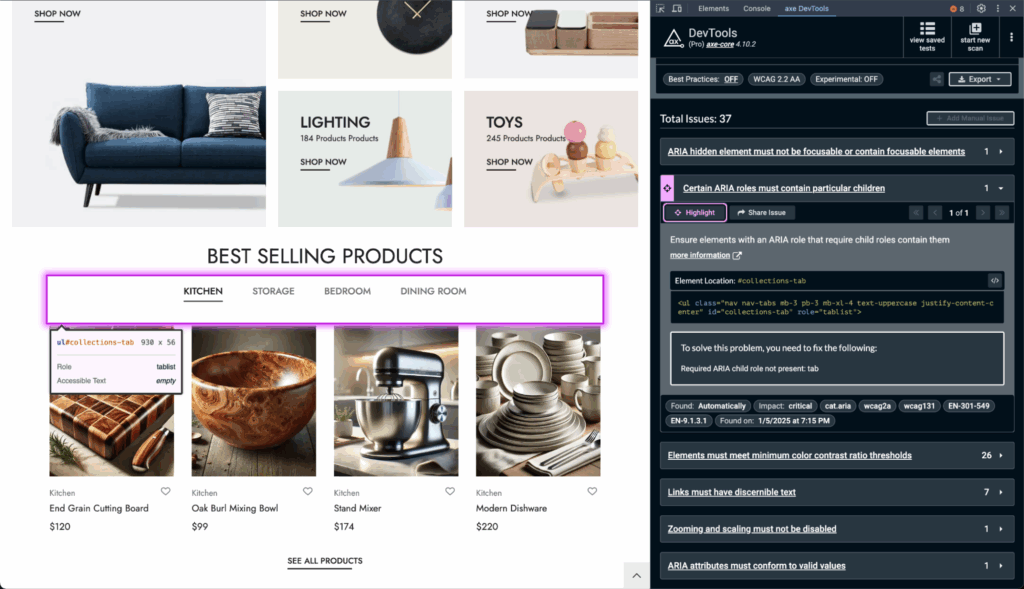
Tipp: Führen Sie Teil-Scans für den konkreten UI-Bereich durch, an dem Sie gerade arbeiten. So bleibt das Feedback zielgerichtet und umsetzbar, ohne dass Sie mit irrelevanten Ergebnissen überhäuft werden.
Die „axe DevTools“-Erweiterung kann kostenlos im Chrome Web Store, bei den Firefox-Add-ons oder auf der Edge-Add-ons-Website installiert werden. Nach der Einrichtung wird sie zu einem unverzichtbaren Bestandteil Ihres Arbeitsablaufs und hilft Ihnen dabei, früher zu testen, effizienter zu entwickeln und mehr Probleme zu erkennen, bevor sie live gehen.
Wenn Sie noch einen Schritt weiter gehen möchten, stehen Ihnen im Rahmen der kostenpflichtigen Funktionen „Intelligent Guided Tests“ (IGTs) zur Verfügung. IGTs sind kurze, strukturierte Anleitungen, mit denen Sie die Barrierefreiheit in Bereichen überprüfen können, die automatisierte Tools allein nicht abdecken können, wie beispielsweise das Tastaturverhalten oder barrierefreie Namen.
IGTs sind besonders hilfreich, wenn Sie Formulare, Modal-Fenster oder andere interaktive Elemente erstellen und sich erst einmal sicher sein möchten, bevor Sie einen Pull-Request öffnen oder Ihre Arbeit teilen. Da sie schnell und wiederholbar sind, ermöglichen es IGTs, über automatisierte Scans hinauszugehen, ohne Ihren Prozess zu verlangsamen.
Die „axe DevTools“-Erweiterung basiert auf axe-core, der branchenüblichen Open-Source-Engine für Barrierefreiheit. Mit Milliarden von Downloads durch Endnutzer genießt „ axe-core “ das Vertrauen großer Frameworks und Tools im gesamten Web und ist für die Entwicklungsprozesse von Unternehmen wie Google und Microsoft von entscheidender Bedeutung.
Wenn Sie die kostenpflichtigen Funktionen nutzen, können Sie außerdem Ergebnisse exportieren, Berichte zum Teilen erstellen und Probleme direkt in Jira nachverfolgen, wodurch Ihr Team während des gesamten Entwicklungszyklus aufeinander abgestimmt bleibt und seine Verantwortlichkeiten wahrnehmen kann.
Schnelllösung Nr. 3: Barrierefreiheit in End-to-End-Tests mit dem axe Developer Hub integrieren
Wenn Sie bereits End-to-End-Tests (E2E) mit Tools wie Cypress, Playwright oder WebDriverIO erstellen, sind Sie in einer hervorragenden Ausgangsposition, um die Barrierefreiheit in Ihre Tests zu integrieren, ohne Ihre Testsuite neu entwickeln zu müssen. Der Axe Developer Hub lässt sich direkt in Ihre bestehenden Tests und CI-Workflows einbinden, sodass Sie Barrierefreiheitsprüfungen im Hintergrund durchführen können. Sie müssen nichts umschreiben oder komplexe Logik einbauen – fügen Sie einfach ein paar Zeilen Code in die Konfigurationsdatei Ihres Tests ein.
Da Ihre Tests reale Benutzerabläufe simulieren (wie das Öffnen eines Modals, das Absenden eines Formulars oder das Navigieren zwischen Seiten), überprüft der axe Developer Hub diese Zustände automatisch auf Probleme mit der Barrierefreiheit. Dies gilt für die gesamte App-Erfahrung – einschließlich dynamischer Inhalte und Übergänge –, sodass Sie Probleme genau dort erkennen, wo sie auch bei den Benutzern auftreten.
Sie können:
- Führen Sie während der E2E-Tests Scans durch, ohne einzelne Testdateien zu ändern.
- Surface-Probleme in echten UI-Zuständen, nicht nur auf statischen Seiten.
- Vermeiden Sie doppelte Rauschanteile dank intelligenter Deduplizierung über mehrere Testläufe hinweg.
- Stellen Sie die Barrierefreiheit in der CI sicher – mithilfe von GitHub Actions, Jenkins oder Ihrer bestehenden Pipeline.
- Verfolgen Sie Regressionen und vergleichen Sie dabei die Scan-Ergebnisse der einzelnen Commits miteinander.
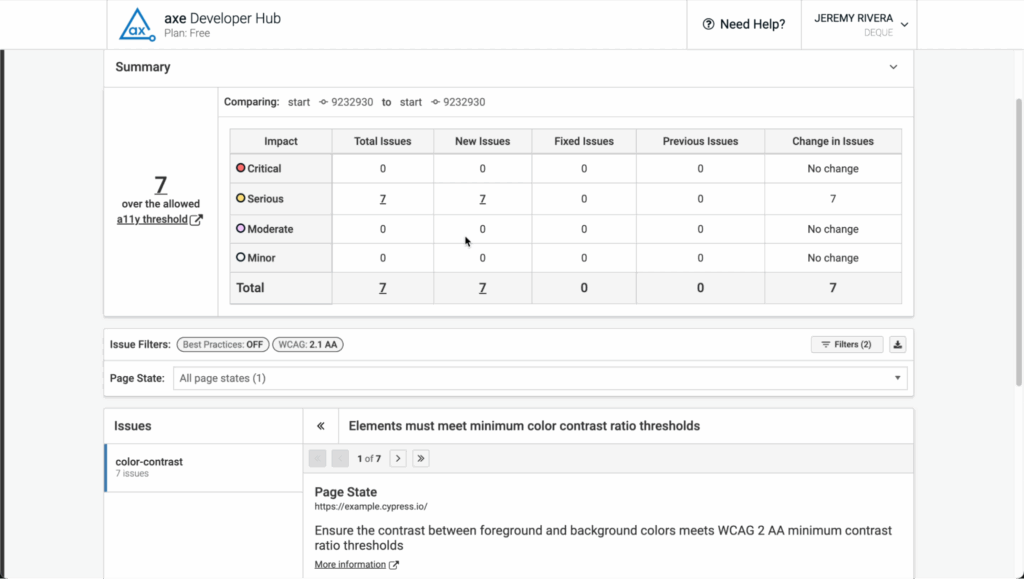
Sie erhalten übersichtliche, zielgerichtete Berichte, die aufzeigen, was sich geändert hat, wo die Änderung stattgefunden hat und wie sie behoben werden kann. Und dank Anmerkungen in Pull-Requests und GitHub-Kommentaren sind die Ergebnisse zur Barrierefreiheit für Ihr gesamtes Team sichtbar – genau dort, wo die Code-Reviews stattfinden.
Probieren Sie es aus, und Sie erhalten alles, was Sie benötigen, um Ihre App während E2E-Testläufen zu scannen.
Der Vorteil: Ein effizienterer, integrativerer Arbeitsablauf
Eine frühzeitige Einbindung der Barrierefreiheit führt zu schnelleren Entwicklungszyklen insgesamt und zu inklusiveren Produkten, ohne dabei unnötige Hindernisse zu schaffen.
Und so fügt sich das Ganze zusammen:
- axe DevTools Linter
Läuft in Ihrer IDE und markiert Barrierefreiheitsprobleme bereits während des Programmierens, noch bevor etwas festgeschrieben wird. So können Sie fehlende Alt-Texte, falsche Überschriften und vieles mehr direkt im Quellcode erkennen. - axe DevTools-Erweiterung
Testet Ihre gerenderte Benutzeroberfläche im Browser. Ganz gleich, ob Sie ein Modal-Fenster debuggen oder eine ganze Seite durchsehen – Sie erhalten sofortiges visuelles Feedback, das auf den Code verweist, der Ihrer Aufmerksamkeit bedarf. - axe Developer Hub
Erweitert Ihre End-to-End-Tests und Ihre CI-Pipeline um Barrierefreiheitsprüfungen. Das Tool erkennt Regressionen, identifiziert doppelte Probleme über verschiedene Abläufe hinweg und zeigt die Ergebnisse direkt in Pull-Anfragen an, ohne den Wartungsaufwand für Ihre Testsuite zu erhöhen.
Jedes dieser Tools lässt sich nahtlos in die Umgebungen und Arbeitsabläufe integrieren, die Sie bereits nutzen. Zusammen decken diese Tools den gesamten Entwicklungszyklus ab – vom Schreiben und Ausführen des Codes bis hin zur Validierung und Bereitstellung in verschiedenen Umgebungen.
Fangen Sie noch heute an
Sie müssen nicht auf eine groß angelegte Einführung oder einen neuen Haushaltszyklus warten. Diese Tools können Sie ab sofort kostenlos nutzen, und sie lassen sich nahtlos in die Umgebungen integrieren, die Sie bereits verwenden:
- Installieren Sie den axe DevTools Linter in Ihrer IDE, um Fehler bereits während des Schreibens zu erkennen.
- Fügen Sie die „axe DevTools“-Erweiterung zu Ihrem Browser hinzu und probieren Sie unsere „Intelligent Guided Tests“ aus.
- Testen Sie den „Axe Developer Hub“, um die Abdeckung der Barrierefreiheit in Ihrer gesamten End-to-End-Testsuite und CI-Pipeline zu erweitern.
Ganz gleich, wo Sie gerade stehen – eine Verlagerung nach links ist immer möglich. Je früher Sie damit beginnen, desto leichter fällt es Ihnen, proaktiv zu handeln.