
Web designers have a vision and web developers bring it to life. They’re two sides of the same coin. Everyone agrees that a world-class user experience must address accessibility for everyone, so why are we still wrestling with communicating that intent clearly from design to development? Of course, there are many reasons, but it starts with an understandable lack of accessibility knowledge. Accessibility looks complicated – clearly too complicated to address without being an expert. Add to that a lack of tools to simplify the effort and…I can see the panic starting.
Just…step…away.
But 67% of accessibility issues originate in design
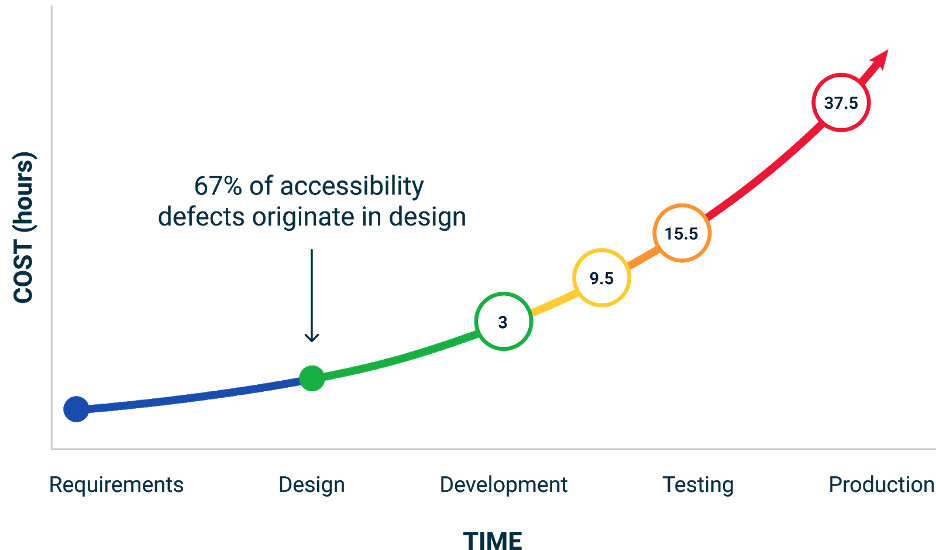
It’s true. My colleagues recorded a case study about it with a customer back in 2020 and well, things haven’t improved much since. Design systems are still woefully lacking in native accessibility features, still relying on Third-party plugins that are, for the most part, limited. Designers can now check things like color contrast, touch target size, and defined headings, so the percentage of issues that originate in design has gone down. That is progress. Deque even has a Figma plugin to help with these. But what about issues that arise between design and development? How do we cross that chasm?
Designers don’t create products by themselves. You need to collaborate with a lot of stakeholders—most closely with developers to resolve usability and technical issues early in the process. But miscommunication is common, creates a lot of friction and misunderstanding, and leads to rework, stress, and bad relationships.
It’s all about intent
First, let’s define intent. It’s not about how the designer intends the end user to experience the page. Of course, that’s critical, but that’s usually covered well in design systems. In this case, intent means how and why the designer intends the developer to manage the accessibility of page components, full page and overall website. The designers have a vision of how layers should be grouped, components labeled, actions defined, how the various elements of their design work individually and together to produce the desired results for users. It’s critical that developers understand this vision.
If they don’t, they can’t build a successful product.
For instance, it’s easy to see what may appear to be an obvious component and think, “It looks like a button, it acts like a button, therefore, it’s a button.” Label it <button> and move on. And that makes sense…if you can see and touch the button. But what if the user is blind or disabled and uses assistive technology to help them navigate your page?
Without getting into too much detail, if the button isn’t coded with visually hidden descriptive text, aria-label, appropriate attributes, etc., the user can’t understand what it is or what to do with it. That’s why clear, complete accessibility annotations matter. They are the bridge that help designers and developers share the same vision. That’s intent.
Bridging the chasm
But you and your dev teams actually speak different languages. And neither of you speak fluent accessibility. So, how do you, as a designer, clearly communicate this intent? You need to properly annotate and label components, elements, organisms, templates, etc. This may sound simple, but there are some roadblocks to overcome.
- Many design systems don’t include annotations
- Annotations are best provided in language developers understand (e.g.: code snippets)
- Accessibility annotations aren’t part of ANY design system (but accessibility violations can stop a digital product in its tracks)
Automating accessibility annotations with AI/ML
With the right tool, you don’t need to become a dev genius or an accessibility expert to start identifying accessibility requirements and communicating your intent clearly to your developers. Axe for Designers (Beta) provides auto-annotation capabilities with short code snippets so:
- You don’t need to pour over and memorize complex WCAG* or WAI-ARIA* requirements to get started addressing accessibility in your designs
- Developers don’t need to interpret your intent by writing their own code. It’s already there for them. Even if they need to modify it, they have a clear basis from which to start.
And, because it’s driven by AI/ML, it learns while you learn, getting smarter about your specific environment, requirements, and needs.
Of course, this doesn’t replace the need to foster an excellent relationship and effective communication between designers and developers overall. But, we think making it easier to close the understanding gap is a bridge worth building.
Learn more about axe for Designers (Beta).